
Three Android 17 changes land on the screens a banking app cares about most: the balance screen, the copy-account-number button and the OTP field. The short version, for an app moving to targetSdk 37: replace any ContentCaptureManager.setContentCaptureEnabled(false) call with FLAG_SECURE on the window that shows the data, mark copied account numbers as sensitive, and read OTPs only through SMS Retriever or SMS User Consent. Everything else in this post is the detail behind those three lines.
This is a review of Google’s Android 17 behaviour-change pages (targeting page updated 11 Nov 2026, all-apps page updated 9 Nov 2026) plus a source check of nine npm packages a React Native banking app typically ships: react-native 0.88.1, react-native-screens 4.30.1, @react-native-clipboard/clipboard 1.16.3, expo-clipboard 8.0.8 and 58.0.4, react-native-screenguard 2.0.2, react-native-capture-protection 2.4.3, react-native-otp-verify 1.1.8 and 1.2.0, and react-native-sms-retriever 1.1.1. We unpacked each with npm pack and searched the android/ sources.
Why we did this: our Beacon-type banking apps show balances, let customers copy account and UPI details, and auto-fill OTPs. React Native 0.88.1 still defaults to targetSdk 36 (its gradle/libs.versions.toml has targetSdk = "36" and compileSdk = "37"), so the move to 37 is the next upgrade on the list.
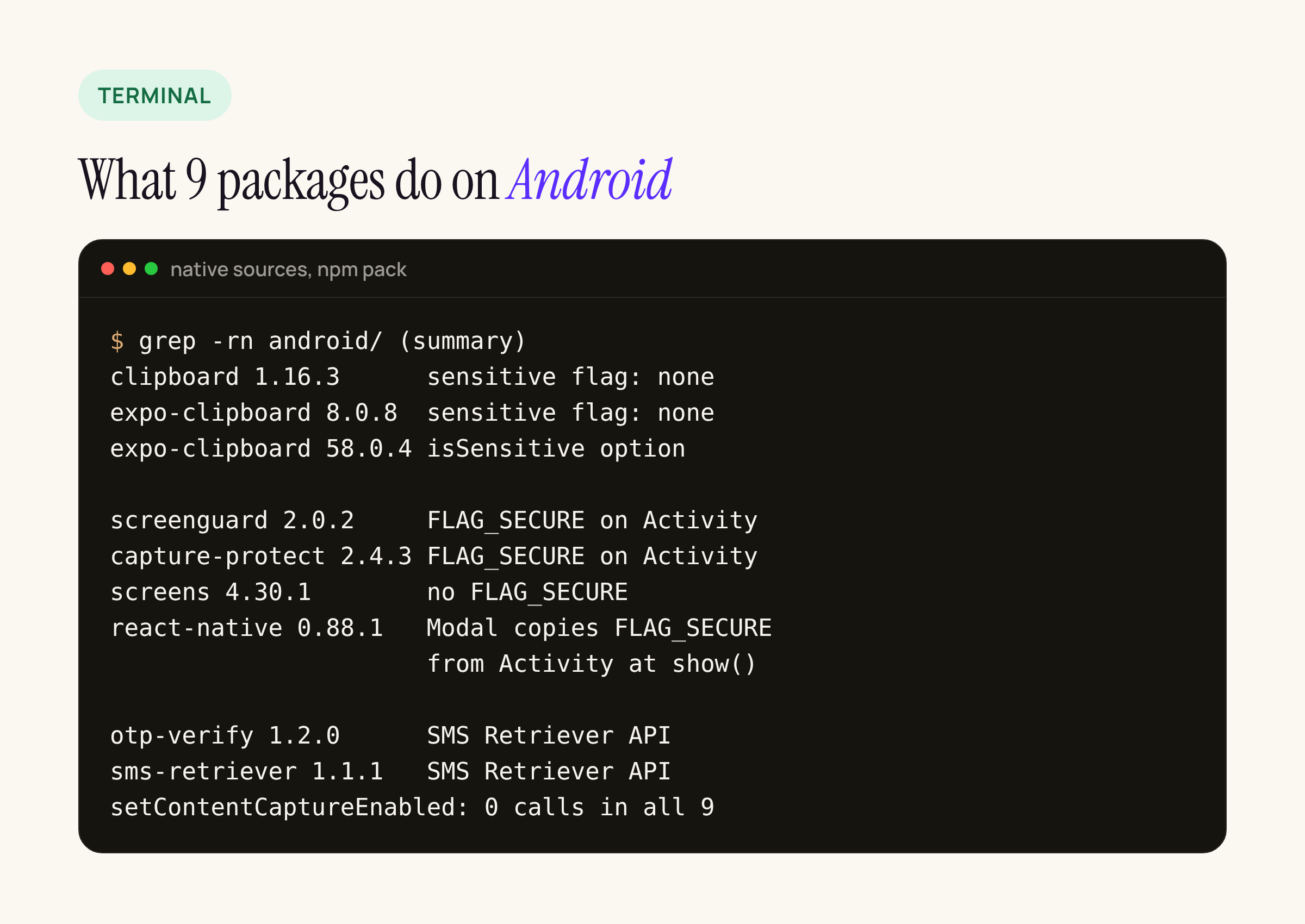
A summary of what we found in the native sources of each package.
1. The content capture opt-out stops working at targetSdk 37
Google’s Android 17 behaviour changes for apps targeting 17 list this under “Intelligence”: ContentCaptureManager.setContentCaptureEnabled(boolean) is deprecated, and for apps targeting API 37 or higher, calling it with false no longer disables content capture. The page says apps must move to the FLAG_SECURE window flag to keep disabling it.
Content capture is the channel the system uses to feed on-screen text to features such as smart suggestions. A banking app that turned it off for the balance screen, and left screenshots alone on purpose, now has to choose: keep the data out of content capture with FLAG_SECURE, which also blocks screenshots and screen recording of that window, or accept that the screen is captured.
What we found in the packages: none of the nine calls setContentCaptureEnabled. If your app uses it, the call lives in your own code, usually MainActivity or a native module you wrote. Search for it first:
grep -rn "setContentCaptureEnabled\|ContentCaptureManager" android/app/src
How FLAG_SECURE reaches a React Native screen
FLAG_SECURE is a window flag, not a view flag. React Native draws every screen in the same Activity window, so “secure this one screen” means adding the flag when the screen gains focus and clearing it when it loses focus:
- react-native-screenguard 2.0.2 and react-native-capture-protection 2.4.3 both call
getWindow().addFlags(FLAG_SECURE)andclearFlagson the current Activity. That is per Activity, so you switch it on and off from the screen’s focus effect. - react-native-screens 4.30.1 has no
FLAG_SECUREcode. A native-stack screen does not get its own window, so there is nothing to scope. - react-native 0.88.1:
ReactModalHostView.ktreads the Activity’s flags inisFlagSecureSet()and copiesFLAG_SECUREonto the Modal’s dialog window when the dialog is shown. The flag is copied once, at show time. If you set it after a<Modal>is already open, the modal window stays unprotected until it is shown again.
That last point matters for banking flows that open the card details or the “reveal account number” sheet as a <Modal>. Set the flag before you set visible to true.
A sketch of the screen-level pattern, to adapt to the library you use:
useFocusEffect(
  useCallback(() => {
    ScreenGuard.registerWithoutEffect(); // Android: FLAG_SECURE
    return () => ScreenGuard.unregister();
  }, [])
);
2. Copying an account number: mark the clip as sensitive
Neither Android 17 behaviour-change page mentions the clipboard, so nothing new breaks at targetSdk 37. The rules that matter are older, and a banking app should already follow them:
| Android version | What the platform does | Source |
|---|---|---|
| Android 10 (API 29) | Apps that are not in focus and are not the default keyboard cannot read the clipboard | Android 10 privacy changes |
| Android 12 (API 31) | A toast (“App pasted from your clipboard”) appears when an app reads another app’s clip | Copy and paste guide |
| Android 13 (API 33) | The system shows its own visual confirmation with a preview of the copied content | Copy and paste guide |
| Android 13 (API 33) | ClipDescription.EXTRA_IS_SENSITIVE hides the preview of sensitive content; on older SDKs use the android.content.extra.IS_SENSITIVE key |
Copy and paste guide |
The guide says apps must add the sensitive flag to the ClipDescription before calling setPrimaryClip(), whatever their target API level. Without it, the account number you just copied is shown in the system’s clipboard preview.
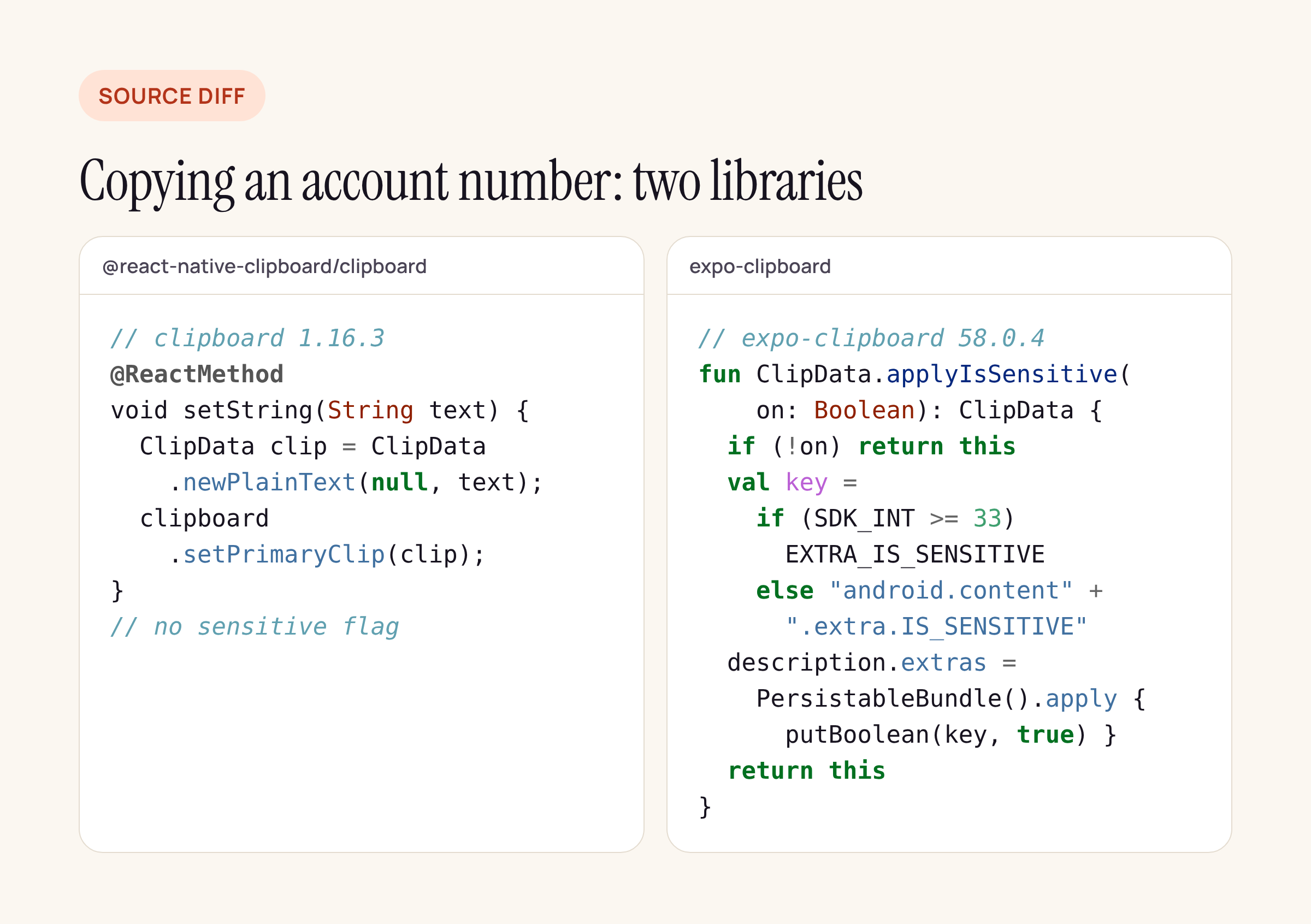
Condensed from the two packages’ Android sources.
What the libraries do:
- @react-native-clipboard/clipboard 1.16.3 (the current release, published June 2025):
setStringbuilds a plainClipDataand callssetPrimaryClip. There is no option to mark it sensitive, and 1.11.2 does the same. - expo-clipboard 8.0.8: no sensitive flag either.
- expo-clipboard 58.0.4:
setStringAsynctakesandroid: { isSensitive: true }, and the nativeapplyIsSensitive()setsEXTRA_IS_SENSITIVEon API 33 and above, and the string key below that.
If you stay on the community package, a small native module that copies with the flag is about ten lines of Kotlin; the expo-clipboard code above is the pattern. Two more habits from our checklist: do not offer copy on the PIN or OTP screen at all, and clear the clip yourself after a short time if the customer copied a full account number.
3. OTP SMS are withheld for three hours
From the targeting page, under “OTP protection for standard SMS messages”: for most apps targeting API 37 or higher, standard SMS messages that contain an OTP do not become available until three hours after receipt. During that delay the SMS_RECEIVED_ACTION broadcast is withheld and SMS provider queries are filtered. The default SMS app and companion apps are exempt, and Google tells everyone else to move to SMS Retriever or SMS User Consent.
The all-apps page adds that the existing protection now also covers WebOTP-format messages, for all apps regardless of target.
So the code that breaks is the old pattern: a BroadcastReceiver for android.provider.Telephony.SMS_RECEIVED plus the RECEIVE_SMS or READ_SMS permission. Search for it:
grep -rn "SMS_RECEIVED\|READ_SMS\|RECEIVE_SMS" android/ node_modules/*/android/src
What the two common OTP packages do:
- react-native-otp-verify 1.2.0 registers for
SmsRetriever.SMS_RETRIEVED_ACTIONand starts the retriever withSmsRetrieverClient.startSmsRetriever(). It does not useSMS_RECEIVED. The 1.1.8 to 1.2.0 diff only adds a SIM check to the phone number hint, more error rejections and a Gradlenamespace; the OTP path is unchanged. It pulls inplay-services-auth:21.2.0. - react-native-sms-retriever 1.1.1 also uses SMS Retriever, but it was last published in 2022 and defaults to
compileSdkVersion 28andplay-services-auth:17.0.0. It is the one we would replace before a targetSdk 37 upgrade.
SMS Retriever only works when the bank’s SMS template ends with the 11-character app hash, which depends on your signing certificate. If the SMS text is controlled by a core banking vendor and cannot carry the hash, SMS User Consent is the other sanctioned path: the system asks the customer once per message and needs no hash.
What to check in your own app
grepforsetContentCaptureEnabled; replace each call withFLAG_SECUREon the screens that show balances, card numbers or statements.- Set
FLAG_SECUREbefore opening any<Modal>that shows sensitive data, because React Native copies the flag only when the dialog is shown. - Find every “copy” button and make sure the clip carries
EXTRA_IS_SENSITIVE. grepforSMS_RECEIVEDandREAD_SMSin your code and innode_modules; move to SMS Retriever or SMS User Consent.- Confirm the OTP SMS template carries the app hash for the release signing key, not the debug one.
Runtime behaviour on an Android 17 device (the three-hour delay, what content capture still sees) is outside this post; the steps above are the code side of the upgrade.






