
Apps that target Android 16 (API 36) and run on Android 16 no longer get onBackPressed() calls or KEYCODE_BACK events, according to Google’s behaviour-change page. We diffed the Android sources of react-native 0.76.9 and 0.88.1 (plus 0.79.7 to 0.87 in between) and react-native-screens 4.0.0 and 4.30.1, all from npm on 14 Nov 2026. The takeaway: do not raise targetSdkVersion to 36 on React Native 0.79 or older, because JS BackHandler stops firing on Android 16. Go to 0.85 or later, not just 0.80. 0.80 added the callback that keeps back presses reaching JavaScript, and 0.85 fixed a case where that callback stayed switched off after the app came back from the background.
Why we did this: our Beacon-type banking apps block the back gesture on payment confirmation and OTP screens with BackHandler. If that handler silently stops running, a user can leave a half-finished payment with one swipe.
What Android 16 changes
From Google’s Android 16 behaviour-change page: for apps targeting API 36 on an Android 16 device, “the predictive back system animations (back-to-home, cross-task, and cross-activity) are enabled by default”, and “onBackPressed is not called and KeyEvent.KEYCODE_BACK is not dispatched anymore”. The page still documents a temporary opt-out: android:enableOnBackInvokedCallback="false" on <application> or <activity>.
Android 15 had already dropped the developer option and shown these animations for apps that opted in. Android 16 makes them the default for API 36 targets.
React Native’s own Android code used onBackPressed() as the single entry point for back presses until 0.79. That is the method Android 16 stops calling.
What we checked, and how
npm pack react-native@0.76.9and@0.88.1, unpack, grep and readReactAndroid/src/mainforOnBackPressedCallback,onBackPressed,OnBackInvokedCallback,BackEventCompatandhandleOnBackProgressed.- The same for 0.79.7, 0.80.2, 0.81.5, 0.82.1, 0.83.4, 0.85.3 and 0.86.3, reading only
ReactActivity.java, to find where the change landed. 0.84 and 0.87 did not download in our run, so we cannot say which side of the line they are on. npm pack react-native-screens@4.0.0and@4.30.1, the same grep overandroid/src.@react-native-community/template@0.88.1: the new-appbuild.gradleandAndroidManifest.xml.
Nothing was built or run on a device or emulator. Every claim below is about source code, not about what the gesture looks like on screen.
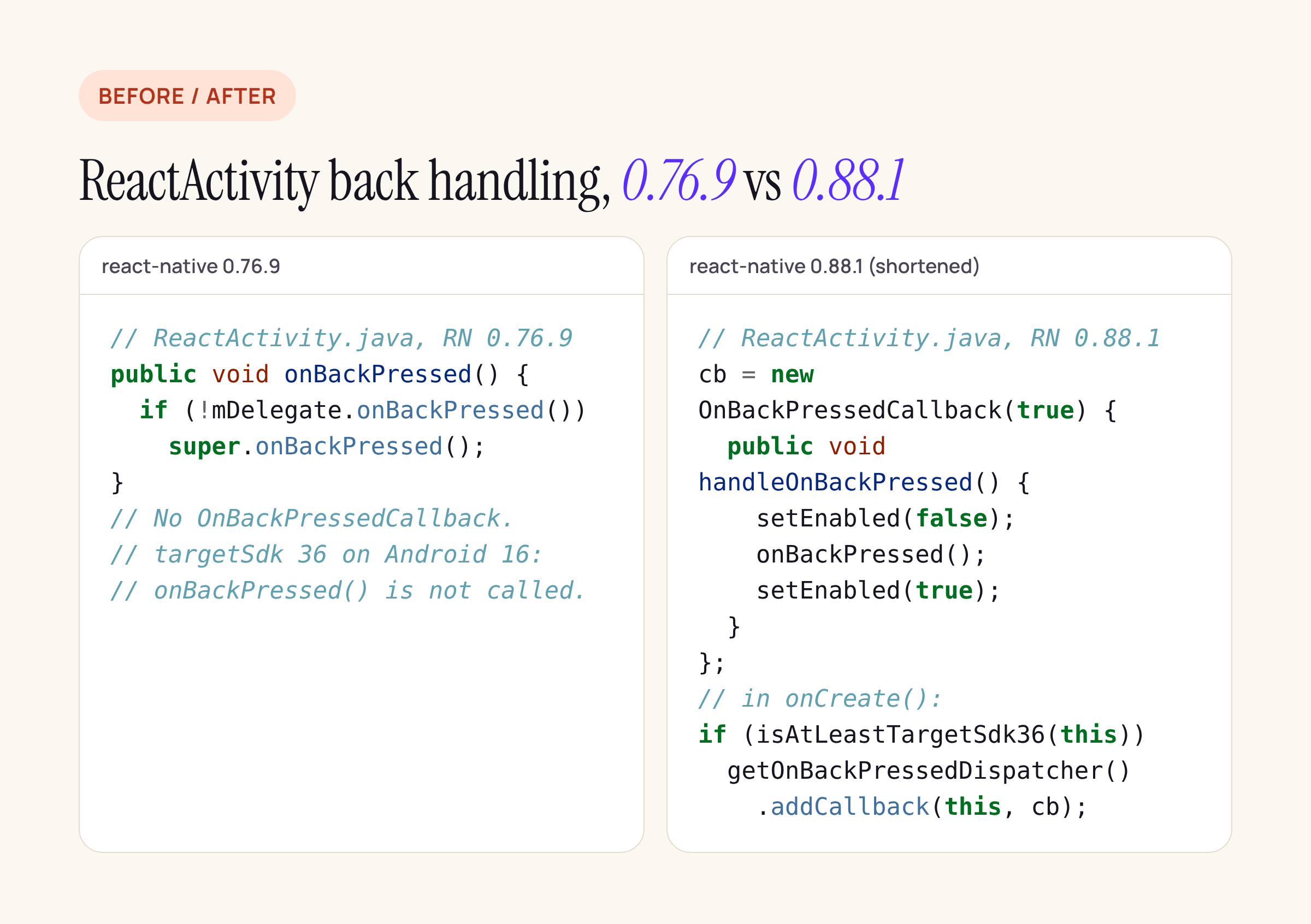
ReactActivity before and after. The 0.88.1 side is shortened; the logic is unchanged.
What React Native 0.80 to 0.88 does
From 0.80.2 onward, ReactActivity creates an OnBackPressedCallback that is enabled from the start. In onCreate() it registers that callback with the activity’s OnBackPressedDispatcher, but only when AndroidVersion.isAtLeastTargetSdk36(this) is true. That check needs both the device and your targetSdkVersion to be 36 or higher. The source comment says it plainly: “Due to enforced predictive back on targetSdk 36, ‘onBackPressed()’ is disabled by default. Using a workaround to trigger it manually.”
The callback calls onBackPressed() itself, so the old path still runs:
// react-native 0.88.1, ReactActivity.java
@Override
public void handleOnBackPressed() {
  setEnabled(false);
  onBackPressed();   // -> ReactActivityDelegate -> ReactHost -> JS hardwareBackPress
  setEnabled(true);
}
Three consequences for app code:
- JS
BackHandlerkeeps working at targetSdk 36 on 0.80+. AhardwareBackPresslistener that returnstruestill keeps the user on the screen. - An
onBackPressed()override in yourMainActivitystill runs, because the callback calls the virtual method. Android Studio flags it as deprecated, and on 0.79 and older it is the code that stops being called. - The callback is always enabled, so every back press goes through React Native rather than straight to the system. Google’s guide asks apps to enable a callback only while they actually intercept back. React Native cannot know that ahead of time, because the decision lives in JavaScript. What this means for the back-to-home preview animation is a runtime question this source review does not answer.
The 0.85 fix
When no JS handler returns true, React Native calls invokeDefaultOnBackPressed(). That method disables the callback so super.onBackPressed() can finish or background the activity. In 0.80.2 through 0.83.4 it never turned the callback back on. 0.85.3 adds one line:
// react-native 0.85.3 and 0.88.1, ReactActivity.invokeDefaultOnBackPressed()
mBackPressedCallback.setEnabled(false);
super.onBackPressed();
// Re-enable callback to ensure custom back handling works after activity resume
// Without this, the callback remains disabled when the app returns from background
mBackPressedCallback.setEnabled(true);
The comment is React Native’s own. In a banking app, “back from the home screen, reopen from recents, open the payment screen, swipe back” is a normal path, and on 0.80 to 0.83 the source suggests the payment screen’s BackHandler would not run after that. That is the reason for our “0.85 or later” advice.
Modal
0.88.1’s ReactModalHostView also registers an OnBackPressedCallback on the dialog’s own dispatcher, and it calls your onRequestClose. 0.76.9 relied only on a key listener for KEYCODE_BACK, which is the event Android 16 stops sending to API 36 apps.
What react-native-screens does
| screens 4.0.0 | screens 4.30.1 | |
|---|---|---|
FragmentBackPressOverrider (search bar back handling) |
present | identical after whitespace |
CustomSearchView callback |
present | present |
PreventNativeDismissCallback in the experimental “gamma” stack |
absent | new, driven by the preventNativeDismiss prop |
handleOnBackProgressed / BackEventCompat |
none | none |
The new callback in 4.30.1 starts disabled. It turns on only when the top screen of the experimental gamma stack sets preventNativeDismiss, and it turns off again in ON_STOP. That is the enable-only-when-needed pattern Google’s guide asks for. It lives in src/components/gamma/stack, though, not in the native stack most apps use through React Navigation.
Neither version, and neither React Native version, implements handleOnBackProgressed or reads BackEventCompat. So the in-app “screen slides as you swipe” predictive animation is not something React Native or screens draws for you today. What you get is the system’s own animations around your activity.
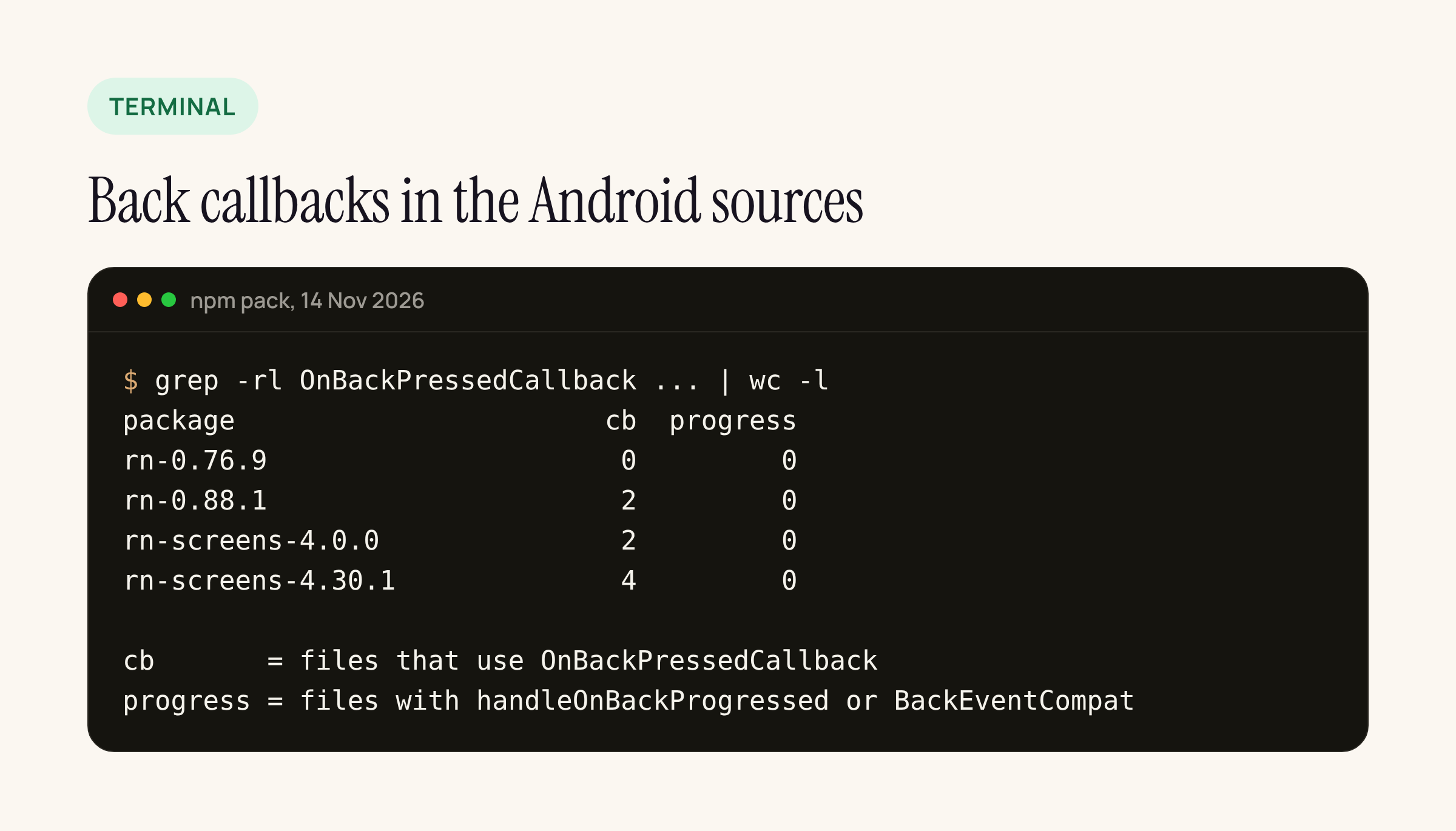
Counted with grep -rl over the Android sources of each package. “progress” is zero everywhere.
What to change before raising targetSdk to 36
- Check your React Native version. On 0.79 or older, upgrade before you raise
targetSdkVersionto 36. If you cannot, addandroid:enableOnBackInvokedCallback="false"to the<activity>for now and plan the upgrade, because Google calls the opt-out temporary. - On 0.80 to 0.83, plan the move to 0.85+, or copy the one-line re-enable into your own
ReactActivitysubclass by overridinginvokeDefaultOnBackPressed(). Test the background-and-return path described above. - Search your Android code for
onBackPressed,KEYCODE_BACKanddispatchKeyEvent. Anything that intercepts back outside React Native’s path needs to move to anOnBackPressedCallbackthat you enable only while it is needed. - Keep back-blocking logic in JS (
BackHandler, or React Navigation’sbeforeRemove), which on 0.85+ still runs at targetSdk 36. - Check
Modalscreens withonRequestClose. On 0.88.1 they go through the dialog’s dispatcher.
The 0.88.1 template already ships targetSdkVersion = 36 with no opt-out in its manifest, so a new app starts on this path.
Scope of this check
This is a source review of React Native and react-native-screens, not a device test. So this post does not say how the back-to-home animation looks with React Native’s always-enabled callback, and it does not confirm the 0.80 to 0.83 “callback stays disabled” path on a device. Both need a Pixel or an emulator on Android 16 with targetSdkVersion 36, and they are next on our list for the banking app’s payment screens.






