

We downloaded the latest npm releases of 32 libraries a React Native banking app typically ships (react-native 0.88.1, screens 4.30.1, React Native Firebase 27.1.1, react-native-fs 2.20.0 and 28 more) on 14 Nov 2026 and checked each one’s iOS sources. 7 of 32 ship a PrivacyInfo.xcprivacy. 3 call required-reason APIs with no manifest of their own. React Native’s pod install step merges the manifests it finds into your app’s manifest, so a library without one adds nothing. In most apps the core declarations cover the gap anyway. The exception is disk space: if you use react-native-fs and neither react-native-device-info nor react-native-blob-util, no pod declares DiskSpace, so add it to your app’s PrivacyInfo.xcprivacy yourself.
Why we did this: our Beacon-type banking apps are React Native CLI apps with a long native dependency list. When App Store Connect warns about missing required-reason declarations, we need to know which library caused it without guessing.
How we checked
Everything here comes from the published npm packages, checked on 14 Nov 2026: manifests parsed, iOS sources searched for the API symbols. It is a source audit, not an App Store submission test.
npm pack <package>@latestfor each of the 32 packages, then unpack.findeveryPrivacyInfo.xcprivacyand parse it with Python’splistlib.- Grep the iOS sources (
.m,.mm,.swift,.h,.c,.cppoutsideandroid/, tests and examples) for the symbols behind Apple’s required-reason categories:NSUserDefaults/UserDefaults,systemUptime/mach_absolute_time,NSFileSystemFreeSizeand friends,NSFileCreationDate/NSFileModificationDate/getattrlist/st_mtime, andactiveInputModes. - Check each podspec to see whether the manifest is actually put into a resource bundle, since that is what CocoaPods (and React Native’s merge step) reads.
- Read
scripts/cocoapods/privacy_manifest_utils.rbin react-native 0.88.1 to see whatpod installwrites into the app’s manifest.
A symbol grep catches the common calls, not every possible one. A library that reads a file date through C++ std::filesystem, for example, would not show up. Treat “no symbols found” as “nothing obvious”, not as a guarantee.
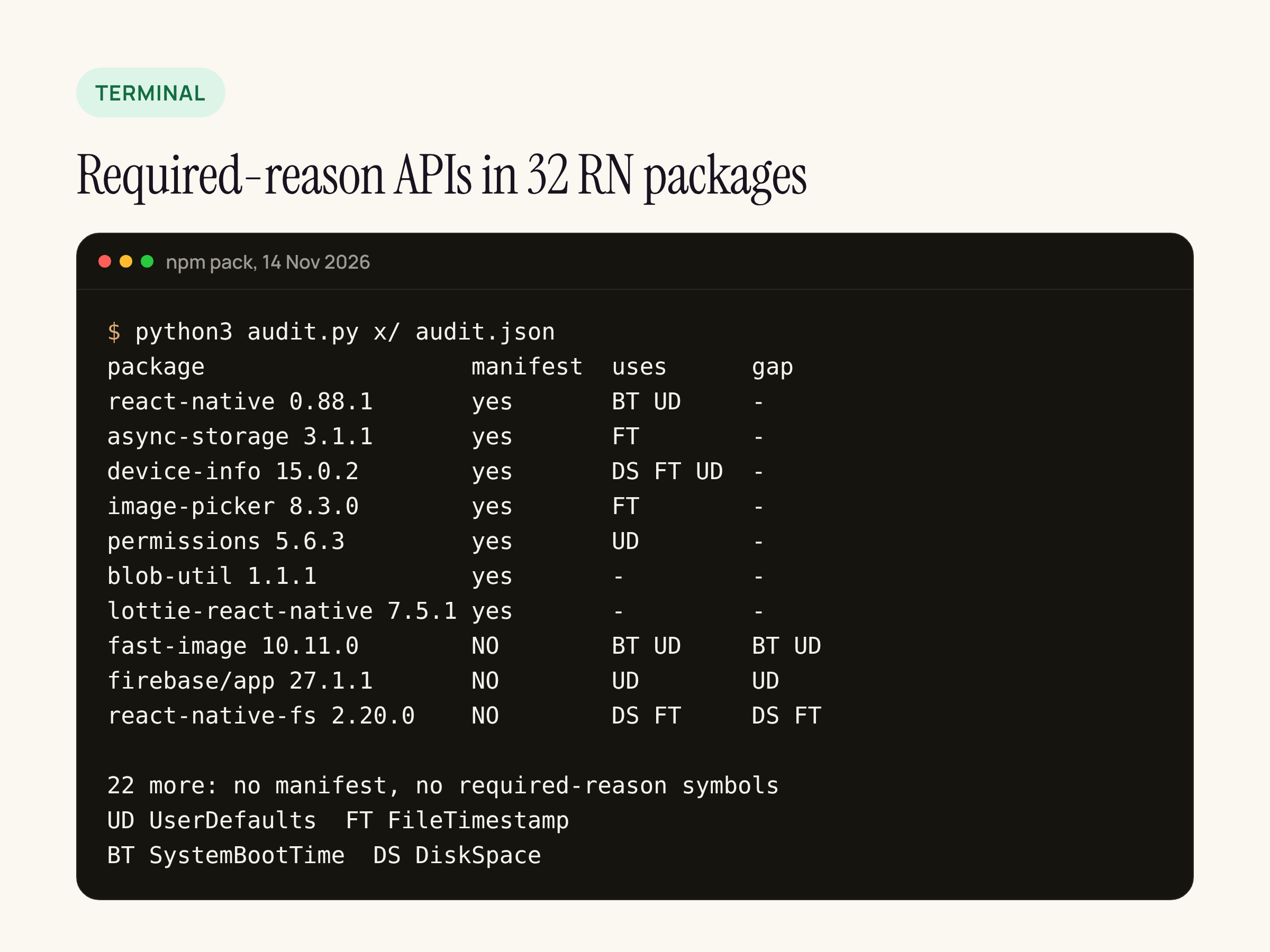
The audit output, shortened. “uses” is what we found in the iOS sources, “gap” is what the package uses but does not declare.
What ships a manifest
| Package | Version | Declares (category: reason) |
|---|---|---|
| react-native | 0.88.1 | UserDefaults: CA92.1, FileTimestamp: C617.1, SystemBootTime: 35F9.1 (three manifests: React-Core, React-cxxreact, React-timing) |
| @react-native-async-storage/async-storage | 3.1.1 | FileTimestamp: C617.1 |
| react-native-device-info | 15.0.2 | UserDefaults: CA92.1, FileTimestamp: C617.1, SystemBootTime: 35F9.1, DiskSpace: 85F4.1 |
| react-native-image-picker | 8.3.0 | FileTimestamp: 3B52.1 |
| react-native-permissions | 5.6.3 | UserDefaults: CA92.1 |
| react-native-blob-util | 1.1.1 | DiskSpace: 85F4.1, E174.1; FileTimestamp: 0A2A.1 |
| lottie-react-native | 7.5.1 | Empty list (no required-reason APIs, no tracking) |
All seven list the manifest in a resource_bundles entry in their podspec, so CocoaPods packages it.
One change in core since our older apps: react-native 0.76.9 shipped manifests for React-Core and React-cxxreact only. 0.88.1 adds a third, in ReactCommon/react/timing, declaring SystemBootTime with reason 35F9.1. The React-Core manifest itself is byte-for-byte the same in both versions.
The three gaps
react-native-fast-image 10.11.0 stores its cache limit in NSUserDefaults.standardUserDefaults (FFFastImageModule.mm) and reads NSProcessInfo.processInfo.systemUptime to time cache clears (FFFastImageSource.m). No manifest. Its image decoding comes from the SDWebImage pods it depends on, which are separate pods and not part of this check.
@react-native-firebase/app 27.1.1 keeps its preferences in a UserDefaults(suiteName:) store (RNFBPreferencesStorage.swift). No manifest in the npm package. The Firebase SDK pods it pulls in (FirebaseCore, FirebaseInstallations) are on Apple’s list of SDKs that must ship their own manifest, and that is the Firebase SDK’s job, not the React Native wrapper’s.
react-native-fs 2.20.0 reads NSFileCreationDate and NSFileModificationDate for stat() and readDir(), and NSFileSystemFreeSize for getFSInfo(), all in RNFSManager.m. No manifest.
22 of the 32 packages neither ship a manifest nor use any of the symbols we searched for, including screens, safe-area-context, reanimated, worklets, gesture-handler, keychain, mmkv, vision-camera, svg, webview and @sentry/react-native. For mmkv and Sentry, the native SDKs they wrap (MMKVCore, Sentry’s Cocoa SDK) are separate pods we did not unpack.
What pod install does with these
React Native’s Podfile helper has privacy_file_aggregation_enabled: true by default. After install, add_aggregated_privacy_manifest does three things:
- Reads every
PrivacyInfo.xcprivacythat a pod lists in its resource bundles. - Always adds React Native’s own three entries: FileTimestamp
C617.1, UserDefaultsCA92.1, SystemBootTime35F9.1. - Merges them with whatever is already in your app’s
PrivacyInfo.xcprivacyand writes the file back.
# react-native 0.88.1, scripts/cocoapods/privacy_manifest_utils.rb (shortened)
if File.basename(file_path) == 'PrivacyInfo.xcprivacy'
  content = Xcodeproj::Plist.read_from_path(file_path)
  accessed_api_types = content["NSPrivacyAccessedAPITypes"]
So the gaps above play out like this in an app that keeps aggregation on:
- fast-image (UserDefaults, SystemBootTime) and firebase/app (UserDefaults): the categories are already in the merged file because core always adds them. Check that
CA92.1and35F9.1describe what the library does.CA92.1covers defaults only the app itself reads, and Firebase’s suite is a private suite, not an app group. - react-native-fs FileTimestamp: covered the same way by core’s
C617.1, as long as you only stat files inside your app’s container. - react-native-fs DiskSpace: not covered. Core does not declare it. It only reaches the merged file if another pod brings it, which in our list means device-info or blob-util. An app with react-native-fs alone ships
NSFileSystemFreeSizewith no reason.
Apple’s page on required-reason APIs is clear that an SDK “can’t rely on the privacy manifest files for apps that link the third-party SDK”. For a pod that is a static library compiled into your app, though, the practical fix today is your app’s own manifest. pod install keeps what you add.
What to change
- Open
ios/<YourApp>/PrivacyInfo.xcprivacyafterpod installand compare itsNSPrivacyAccessedAPITypesto the table above for the libraries you ship. - If you call
RNFS.getFSInfo()and no other pod declaresDiskSpace, add the entry below. UseE174.1if you check free space before writing, as blob-util does, or85F4.1if you show the number to the user. - If you turned aggregation off (
privacy_file_aggregation_enabled: falsein the Podfile), none of the merging above happens, and you need every category from the table in your app’s file by hand. - Re-run the check after each library upgrade. A library that adds a manifest later makes your manual entry redundant but harmless.
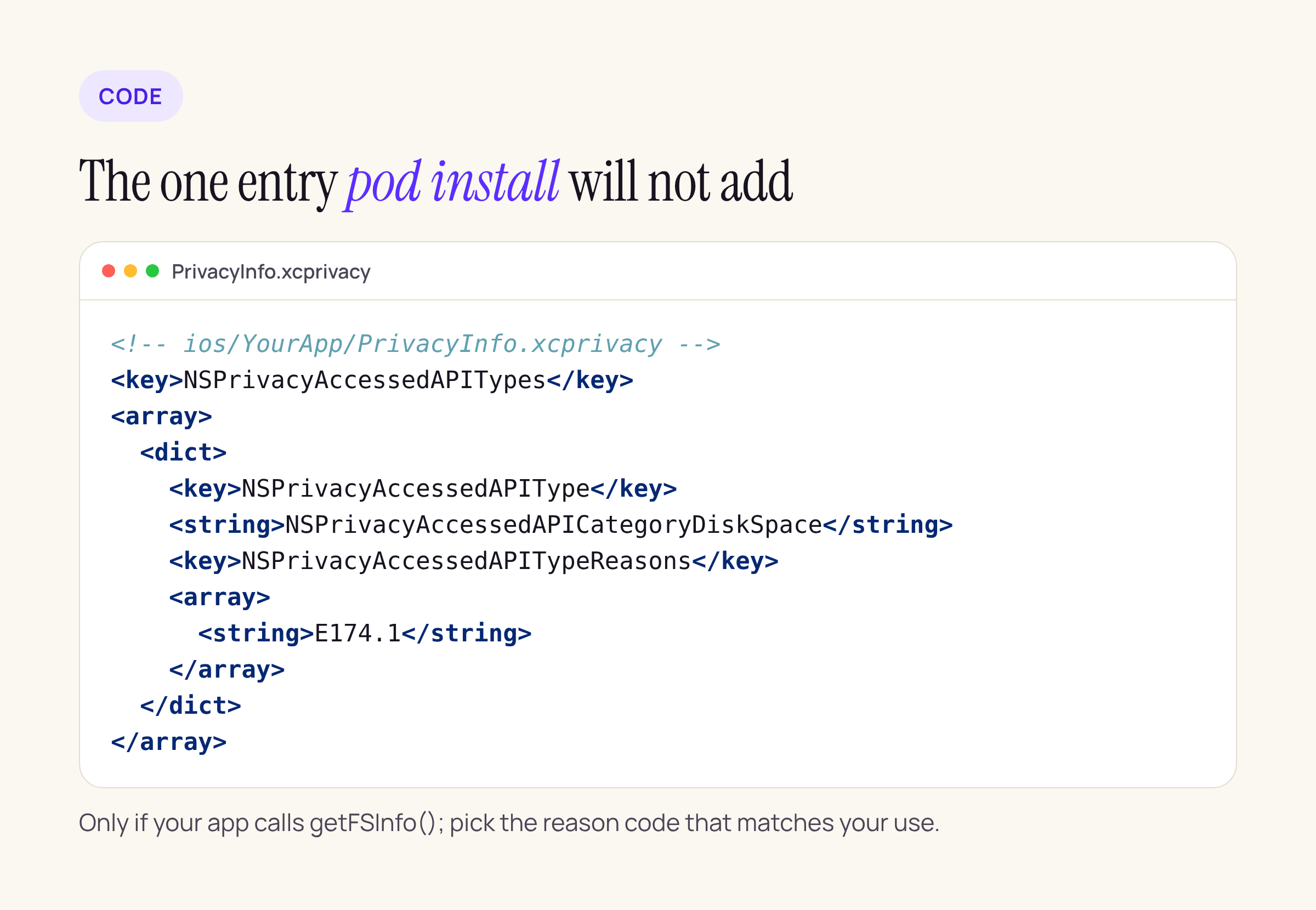
The one entry pod install will not add for you when react-native-fs is the only disk-space caller.
What we did not check
A source audit cannot tell you which of these gaps would actually produce a warning email from App Store Connect; only an upload can. We did not unpack the native SDK pods behind the wrappers (Firebase, SDWebImage, MMKVCore, Sentry Cocoa, lottie-ios). And the grep finds common symbols, not every code path. If you run the same check against a real Podfile.lock, start with the libraries in the “gap” column.






