
If your Mac app shells out with Foundation.Process, a Pipe and readDataToEndOfFile(), most of those calls can move to one try await run(...) from swift-subprocess 1.0.2 (16 Oct 2026), which needs Swift 6.2 and Xcode 26 or later. Run-and-collect calls and calls with a timeout port cleanly and get shorter. Calls that start something and walk away do not: 1.0 removed runDetached(), so keep those on Process. Before you port, know that in 1.0 .string(limit:) returns a non-optional String, going over the limit throws, and a non-zero exit is a normal result, not an error.
Why we did this: Nix and QuitAll both call system tools (mdfind, pkgutil, codesign, lsregister), and Swift 6.4 (15 Sep 2026) lists “Subprocess reaches 1.0” as a headline. We wanted to know how much of a typical Mac utility’s process code would move, before touching ours.
How we checked
- We cloned swift-subprocess at tag 1.0.2 (commit
dbe21bd) and read the public API inAPI.swift,Configuration.swift,IO/Output.swift,Teardown.swiftand the DocC articles. Every signature below comes from that source. - We read the 1.0.0 release notes (4 Aug 2026) and the 1.0.1 and 1.0.2 notes (“bug fix release with no API changes”).
- We cloned six open-source Mac apps on 12 Nov 2026 (Stats, Maccy, Rectangle, Ice, MonitorControl, Sparkle), found every Swift
Process()call site and sorted them by pattern with a small script that looks at the 30 lines after each call. We checked each Stats hit by hand. - We did not compile anything. This workspace has no Swift toolchain or Xcode, so the Swift below is marked “not compiled here”.
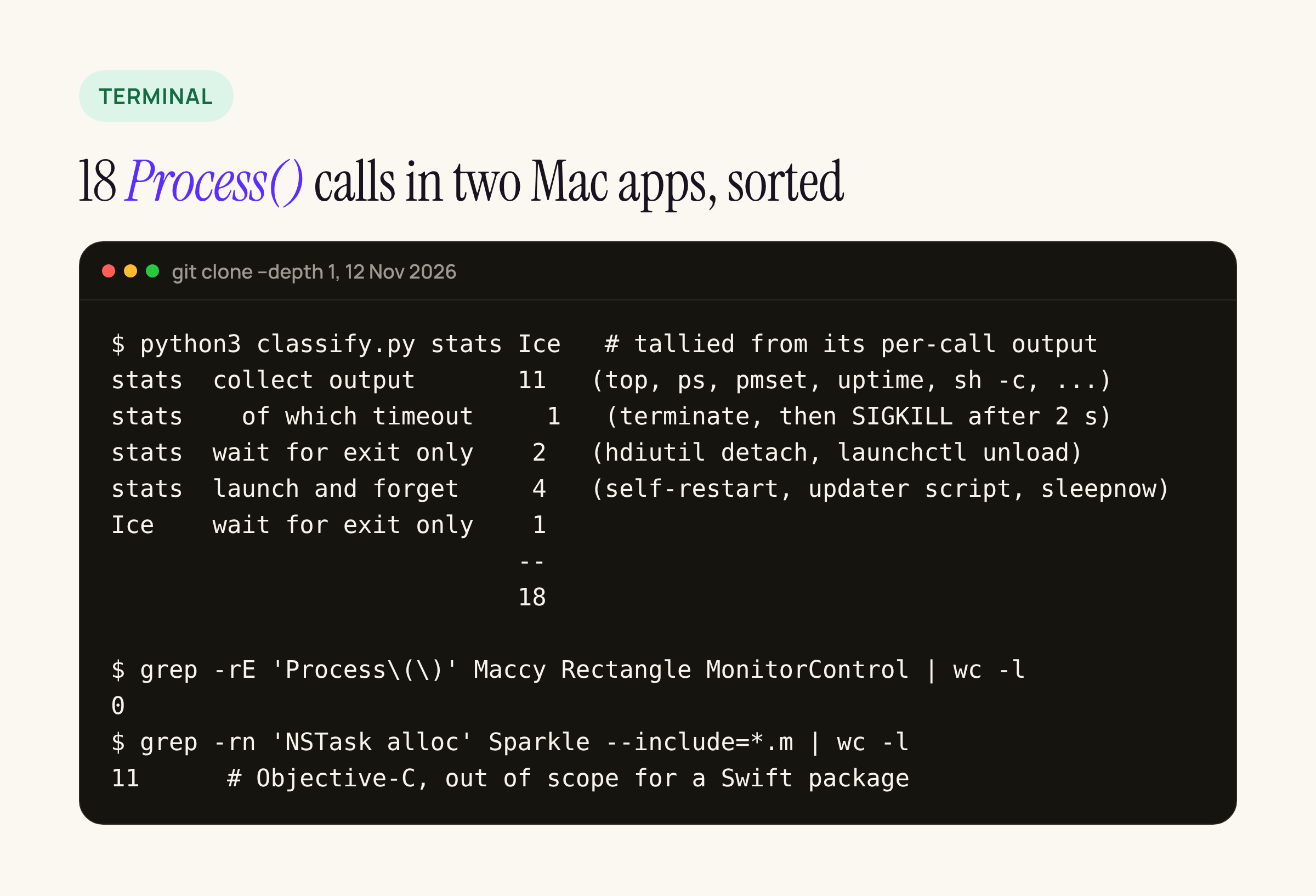
Stats has 17 call sites and Ice has 1. Maccy, Rectangle and MonitorControl have none. Sparkle uses NSTask from Objective-C.
So, in two real Mac utilities, 11 of 18 calls run a tool and collect its output, 3 only wait for the exit, and 4 launch something and leave. One Stats helper wraps run-and-collect in a hand-made timeout: terminate(), wait 2 seconds, then kill(pid, SIGKILL).
The API mapping
| Foundation.Process | Subprocess 1.0.2 | Source |
|---|---|---|
executableURL = URL(fileURLWithPath: "/usr/bin/top") |
run(.path("/usr/bin/top"), ...) |
Configuration.swift |
Look up a tool on PATH yourself |
run(.name("ls"), ...) |
same |
arguments = [...] |
arguments: [...] or Arguments(array) |
same |
environment = [...] (replaces all) |
environment: .custom([...]) |
same |
| Add one variable to the inherited environment | environment: .inherit.updating(["KEY": "value"]) |
same |
currentDirectoryURL |
workingDirectory: FilePath |
API.swift |
Pipe() + readDataToEndOfFile() + String(data:encoding:) |
output: .string(limit: N) then result.standardOutput |
IO/Output.swift |
standardError = FileHandle.nullDevice |
error: .discarded (the default) |
same |
fileHandleForReading.readabilityHandler |
output: .sequence and execution.standardOutput.strings() in the closure form |
StreamingAndInput |
waitUntilExit() / terminationHandler |
try await returns when the process has exited |
API.swift |
terminationStatus == 0 |
result.terminationStatus.isSuccess (.exited(code) or .signaled(code)) |
Configuration.swift |
terminate(), then kill(pid, SIGKILL) |
cancel the task; platformOptions.teardownSequence runs, and always ends with a kill |
Teardown.swift |
qualityOfService |
platformOptions.qualityOfService |
Platforms/Subprocess+Darwin.swift |
Porting steps
- Add the package. The README still shows
.upToNextMinor(from: "0.4.0"), which pins you to 0.4. For 1.0 use.package(url: "https://github.com/swiftlang/swift-subprocess.git", from: "1.0.2"). This needsswift-tools-version: 6.2and Xcode 26 or later. - List your
Process()call sites and sort them into the four patterns above. In our sample a 30-line window was enough to tell them apart, with a manual check after. - Port run-and-collect calls first. Pick a
limitfor each tool that is larger than any output you expect. - Port timeout wrappers to task cancellation plus a
teardownSequence. - Port wait-only calls to
run(..., output: .discarded)and checkterminationStatus. - Leave launch-and-forget calls on
Process. - Make the callers
async. This is usually the largest change: Stats’ helpers are synchronous functions that returnString?.
Run and collect
Before, this is the shape of Stats’ top readers. It reads the pipe before waiting, which is the right order, because a tool that fills the pipe buffer blocks until someone reads it:
let task = Process()
task.executableURL = URL(fileURLWithPath: "/usr/bin/top")
task.arguments = ["-l", "1", "-o", "mem", "-n", "\(n)", "-stats", "pid,command,mem"]
let outputPipe = Pipe()
task.standardOutput = outputPipe
try task.run()
let data = outputPipe.fileHandleForReading.readDataToEndOfFile()
let output = String(data: data, encoding: .utf8)   // String?
After:
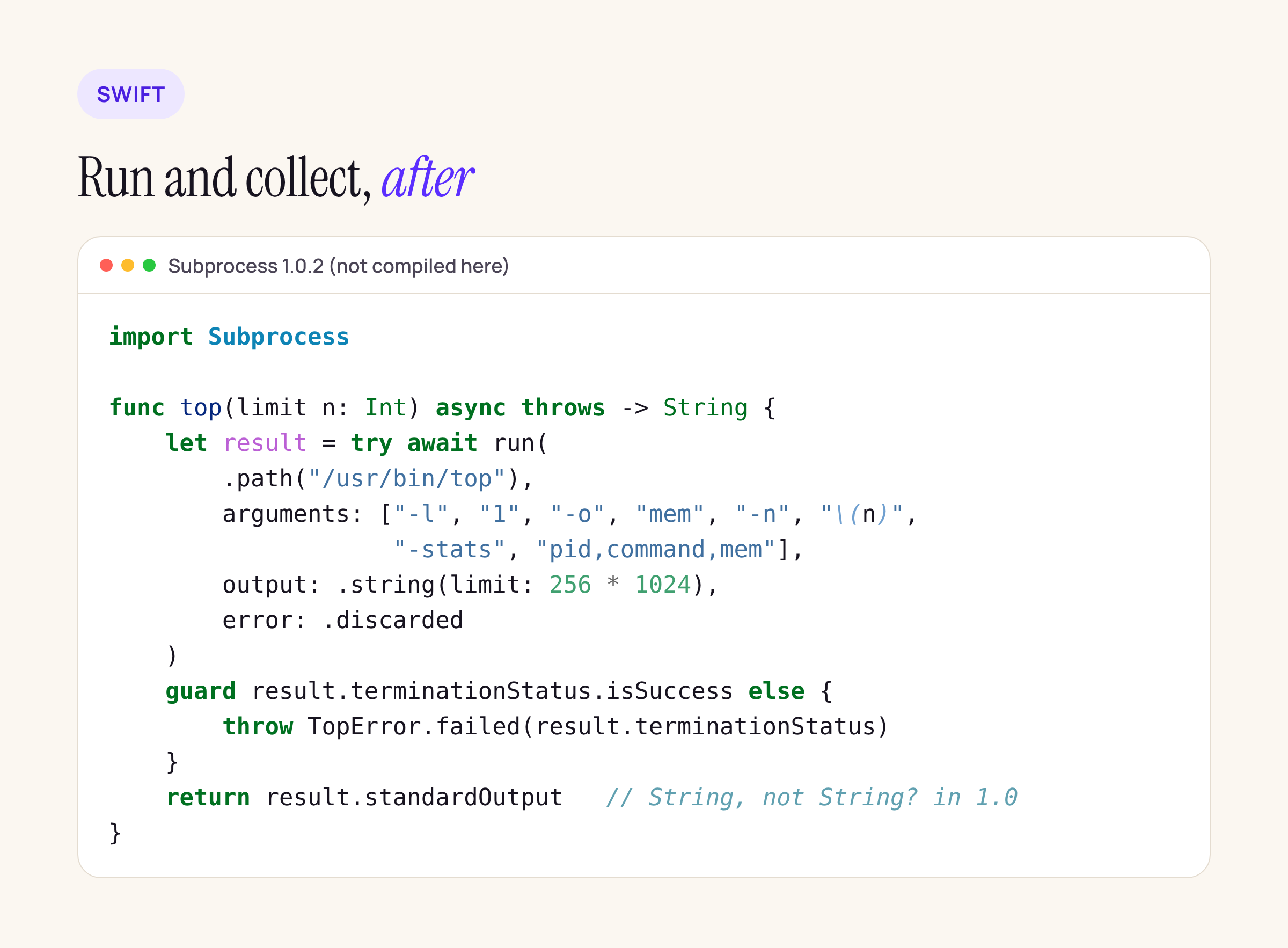
Subprocess reads the output while it waits, so pipe order is no longer your problem. Not compiled here.
Two things change in behaviour. If top prints more than the limit, run throws a SubprocessError instead of handing you a truncated string. And a non-zero exit does not throw: the source says “A non-zero exit code is a normal result, not a thrown error; inspect terminationStatus instead.”
Timeouts and teardown
Stats’ timeout helper uses a DispatchGroup, two reader queues, terminate(), a 2-second wait and SIGKILL, 69 lines. In Subprocess, cancelling the task that runs the process runs the configured teardown, and Execution.teardown “always ends with a .kill signal”. The default teardownSequence is empty, so without configuration a cancel goes straight to kill. To keep a graceful SIGTERM first:
import Subprocess

func output(of path: String, _ args: [String], timeout: Duration) async throws -> String? {
    var options = PlatformOptions()
    options.teardownSequence = [.gracefulShutDown(allowedDurationToNextStep: .seconds(2))]

    return try await withThrowingTaskGroup(of: String?.self) { group in
        group.addTask {
            try await run(.path(FilePath(path)), arguments: Arguments(args),
                          platformOptions: options,
                          output: .string(limit: 1 << 20)).standardOutput
        }
        group.addTask {
            try await Task.sleep(for: timeout)
            return nil            // timed out
        }
        let first = try await group.next() ?? nil
        group.cancelAll()         // cancels the run: SIGTERM, 2 s, then kill
        return first
    }
}
Not compiled here. The gracefulShutDown step sends SIGTERM on Unix. If you also pass toProcessGroup: true, set createSession in PlatformOptions as well. Otherwise, the source warns, “the targeted process group includes the calling process”.
Streaming output
For long-running tools, such as log stream or a mdfind -live query, use the closure form with .sequence:
_ = try await run(.path("/usr/bin/mdfind"), arguments: ["-live", query],
                  input: .none, output: .sequence, error: .discarded) { execution in
    for try await line in execution.standardOutput.strings() {
        handle(line)
    }
}
strings() splits on line breaks, and by default it caps one line at 128 KiB (.maxLineLength(128 * 1024)). The process must exit before run returns, so cancel the surrounding task to stop it.
What stays on Process
Four of Stats’ calls start something and do not wait: a self-restart (/bin/sh -c "sleep N; open ..."), an updater script, pmset sleepnow and a helper uninstall. In 1.0, run waits for the child to exit before it returns, and the 1.0.0 notes list runDetached() as removed. A self-restart has to outlive the app, so leave these on Process. The same goes for Objective-C code like Sparkle’s 11 NSTask call sites: Subprocess is a Swift API.
What broke between 0.x and 1.0
If you tried Subprocess before August, these are the changes from the 1.0.0 notes that break code:
StringOutput.OutputTypeis now a non-optionalString. The README comment still showsOptional("..."). Drop your?? ""..string,.bytesand.datawithout a limit are gone. Use.string(limit:),.string(limit:encoding:),.bytes(limit:)and.data(limit:).CollectedResultis gone. Everything returnsExecutionResult, andclosureOutputis nowclosureResult.- The closure-based
runoverloads need explicitinput:,output:anderror:. runDetached()is removed.TeardownStep.sendSignalis now.send(signal:toProcessGroup:allowedDurationToNextStep:).Configuration(executing:)is nowConfiguration(executable:).- The
.standardOutputand.standardErroroutput aliases are removed; use.currentStandardOutputand.currentStandardError. - Swift 6.2 is required. For Swift 6.1 the notes say to use the 0.4 tag.
Not tested yet
We have not built this in Xcode 27 or run it in a sandboxed Mac app. The next step is SK’s: port Nix’s mdfind and pkgutil --pkgs calls in a branch, then run them in a sandboxed and a non-sandboxed build on macOS 27.2, with a timeout case. We will add the results here.