The short version: on Android 17, for apps that target API 37, ContentCaptureManager.setContentCaptureEnabled(false) no longer turns Content Capture off, and Google’s answer is FLAG_SECURE on the window. We checked the five React Native screenshot-blocking libraries most banking apps reach for, plus React Native 0.88.1’s own Android sources: none of them call setContentCaptureEnabled, and all five already set FLAG_SECURE. So the change only bites if your own native code calls the deprecated method. Search for it before you raise targetSdk to 37. Checked on 11 Nov 2026 by unpacking the npm tarballs; nothing here was run on a device or emulator yet.
Why we did this: the Beacon-type banking apps we build are React Native, and banking screens such as PIN, OTP and statements are exactly where screen capture gets blocked. Raising targetSdk to 37 (see our targetSdk 36 to 37 guide) is when this change starts to apply.
What Android 17 changed
The Android 17 behaviour changes page (updated 31 Oct 2026, section “Deprecation of setContentCaptureEnabled”) says:
- “Starting in Android 17, the ContentCaptureManager.setContentCaptureEnabled(boolean) API method is deprecated.”
- “For apps that target Android 17 (API level 37) or higher, calling setContentCaptureEnabled(false) no longer disables Content Capture.”
- “If your app needs to continue disabling Content Capture or restrict screen contents from being captured by the system, you must transition to using the FLAG_SECURE window layout parameter.”
Note the class: the method lives on ContentCaptureManager (the system service), not on View. Content Capture is the system feature that lets on-device intelligence services read what is on screen. Before Android 17 an app could opt out of it while still allowing screenshots. From API 37 that middle ground is gone: if a screen must not be read by the system, it gets FLAG_SECURE, which also blocks screenshots, screen recording and the preview in recents.
How we checked
For each library we ran npm pack on the current version (and the previous one where it was recent), unpacked it, and ran grep -rE over its android/ folder for three APIs:
setContentCaptureEnabledFLAG_SECUREregisterScreenCaptureCallback, the Android 14 screenshot detection callback
We did the same for react-native@0.88.1‘s ReactAndroid/src/main.
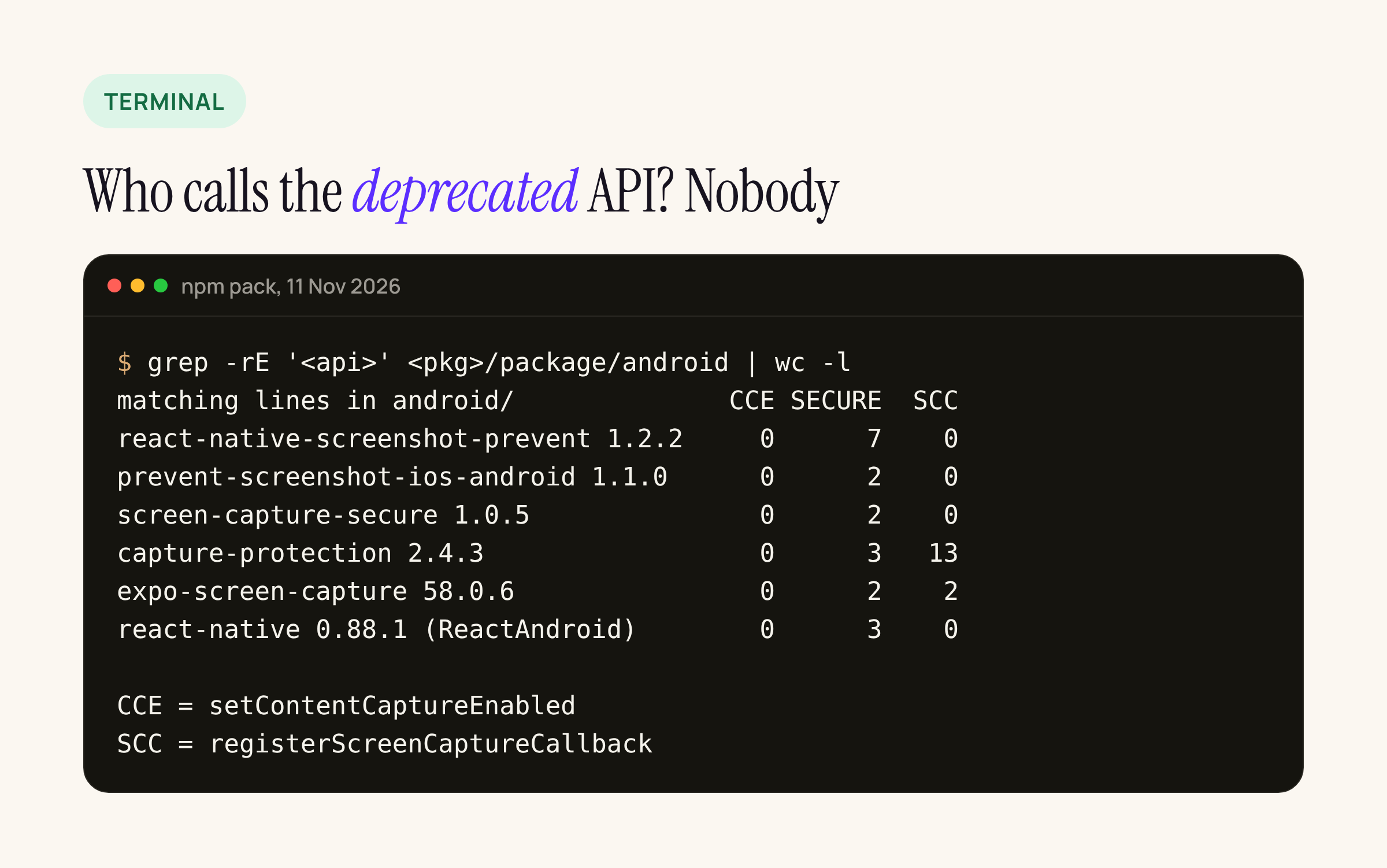
The counts are matching lines. The previous versions we packed (react-native-screenshot-prevent 1.2.1, react-native-capture-protection 2.4.2, expo-screen-capture 58.0.5) gave the same zeros for setContentCaptureEnabled.
Verdict per library
| Library (version checked) | How it blocks capture on Android | Affected by the API 37 change |
|---|---|---|
| react-native-screenshot-prevent 1.2.2 | setFlags(FLAG_SECURE, FLAG_SECURE) on the current Activity window, optional overlay image |
No |
| react-native-prevent-screenshot-ios-android 1.1.0 (npm entry last modified Oct 2023) | addFlags / clearFlags(FLAG_SECURE) on the current Activity |
No |
| react-native-screen-capture-secure 1.0.5 (npm entry last modified May 2022) | FLAG_SECURE on the current Activity |
No |
| react-native-capture-protection 2.4.3 | FLAG_SECURE, plus registerScreenCaptureCallback for detection |
No |
| expo-screen-capture 58.0.6 | addFlags / clearFlags(FLAG_SECURE), plus registerScreenCaptureCallback and the DETECT_SCREEN_CAPTURE permission |
No |
| react-native 0.88.1 | No content capture calls; Modal copies FLAG_SECURE from the Activity (below) |
No |
All five set the flag on currentActivity.window, so the flag covers the whole Activity, which in a React Native app means every screen. The JS side decides when to turn it on and off.
What broke, and the code change
If your app (or an in-house SDK) did this to keep a screen out of Content Capture while still allowing screenshots, it silently stops working once targetSdk is 37:
// before: no effect on Android 17 when targetSdk >= 37
val ccm = context.getSystemService(ContentCaptureManager::class.java)
ccm?.setContentCaptureEnabled(false)
The replacement Google names is the window flag, set while the sensitive screen is visible and cleared when it leaves:
// after: the documented replacement
activity.window.addFlags(WindowManager.LayoutParams.FLAG_SECURE)
// ... and when the screen is gone
activity.window.clearFlags(WindowManager.LayoutParams.FLAG_SECURE)
The behaviour is not identical. FLAG_SECURE also blocks screenshots and blanks the recents preview for as long as it is set. A screen that used to allow screenshots and only opt out of Content Capture now has to choose one or the other.
To find the old call in your project:
grep -rnE 'setContentCaptureEnabled|ContentCaptureManager' android/ node_modules/*/android node_modules/@*/*/android
Per screen, not per app
Because the flag lives on the Activity window and a React Native app usually has one Activity, “per screen” has to be done from JS: turn the flag on when a sensitive screen gains focus, off when it loses focus. The catch is nesting. A PIN sheet opened over a statement screen should not clear the flag when the sheet closes. A counter handles that:
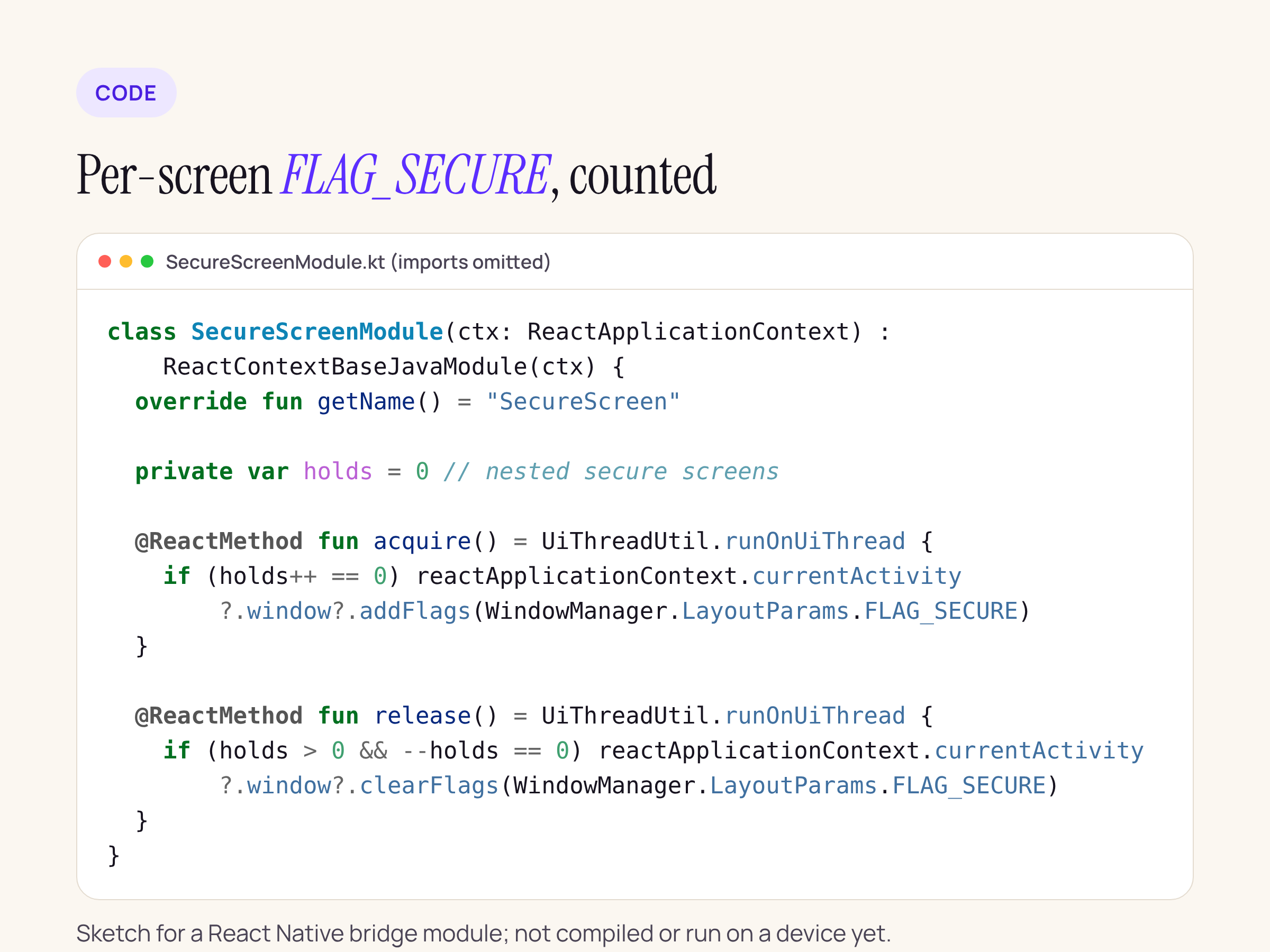
class SecureScreenModule(ctx: ReactApplicationContext) : ReactContextBaseJavaModule(ctx) {
  override fun getName() = "SecureScreen"

  private var holds = 0 // nested secure screens

  @ReactMethod fun acquire() = UiThreadUtil.runOnUiThread {
    if (holds++ == 0) reactApplicationContext.currentActivity
        ?.window?.addFlags(WindowManager.LayoutParams.FLAG_SECURE)
  }

  @ReactMethod fun release() = UiThreadUtil.runOnUiThread {
    if (holds > 0 && --holds == 0) reactApplicationContext.currentActivity
        ?.window?.clearFlags(WindowManager.LayoutParams.FLAG_SECURE)
  }
}
On the JS side, call acquire() in a useFocusEffect and release() in its cleanup. This is a sketch: we have not compiled it or run it on a device yet. If you already use one of the libraries above, you can get the same result by wrapping its enable and disable calls in a counter on the JS side.
The Modal detail
React Native’s Modal on Android is a Dialog with its own window, and FLAG_SECURE on the Activity does not cover other windows by itself. ReactModalHostView.kt in 0.88.1 handles this by checking the Activity’s flags when it creates the dialog and copying FLAG_SECURE across:
// ReactAndroid/.../views/modal/ReactModalHostView.kt, 0.88.1
val flagSecureSet = isFlagSecureSet(currentActivity)
if (flagSecureSet) {
  window.setFlags(
      WindowManager.LayoutParams.FLAG_SECURE,
      WindowManager.LayoutParams.FLAG_SECURE,
  )
}
Reading the code, the copy happens when the dialog is created. So set the flag before you show a sensitive Modal. If you set it after the Modal is already open, the Modal’s window keeps whatever it got at creation. Native bottom sheets and dialogs from other libraries need their own check.
Steps before raising targetSdk to 37
- Run the grep above over
android/andnode_modules. Any hit outside a comment needs the change above. - Pick one screenshot library, or the module above. Do not combine two, because each clears the flag on its own.
- Make sure the flag is set before a sensitive
Modalopens. - Decide, screen by screen, whether “no Content Capture” is worth “no screenshots”. On API 37 they come together.
Not checked yet
We have not run any of this on a device or emulator. Still to check on an Android 17 emulator with the banking app, once it targets API 37:
- whether recents shows a blank card for flagged screens;
- whether
Modalkeeps the flag when it is set after opening; - how the counter behaves across app background and foreground.
Sources: Android 17 behavior changes, WindowManager.LayoutParams.FLAG_SECURE, ContentCaptureManager, and the npm packages named in the table.