
On 9 November 2026 we downloaded the current release of 30 React Native packages that ship iOS code (react-native 0.88.1, react-native-screens 4.30.1, react-native-video 6.19.3, react-native-vision-camera 5.2.4 and 26 more) and counted the code patterns Apple’s Prepare for iPhone Duo page tells you to remove. 15 of the 30 contain at least one. The takeaway: if your app uses react-native-video’s fullscreen player, React Native’s Modal, or an orientation library, test those screens first on the iPhone Duo simulator in Xcode 27.1, because their native code sizes things from the whole screen or from device orientation, not from the window the app is actually given.
Why we did this: our React Native banking and consumer apps have to be built with the iOS 27 SDK from April 2027, and Apple says apps built with that SDK “resize dynamically on iPhone Duo”. Most of the native code in those apps is not ours, it comes from node_modules. We wanted to know which dependencies to watch before we spend simulator time.
This is a source audit, not a runtime test. Nothing here was run on a device or simulator yet; where a hit matters on screen is our reading of the code.
What Apple says to remove
Apple’s page lists these patterns (quoted from developer.apple.com/iphone-duo/prepare, read 9 Nov 2026):
| Pattern | Apple’s replacement |
|---|---|
UIScreen.main.bounds |
view.bounds or window.bounds; GeometryReader or onGeometryChange in SwiftUI |
UIWindow(frame: UIScreen.main.bounds) |
UIWindow(windowScene:) |
Stored UIScreen |
view.window?.windowScene?.screen, read when needed |
UIDevice.current.orientation, statusBarOrientation, interfaceOrientation |
Compare view.bounds (or superview.bounds) for wide vs tall |
userInterfaceIdiom == .phone / .pad |
Size classes or available space |
bounds.height == 844 and lists of known sizes |
Remove them |
| Scale from the screen | traitCollection.displayScale |
It also says that reading the size once at launch “isn’t enough”: size-dependent layout belongs in layoutSubviews or viewDidLayoutSubviews. UIScreen.main itself is marked in Apple’s reference with “Apple discourages the use of this symbol”, and its availability range ends at iOS 26.0.
How we counted
# one folder per package, then a node_modules-shaped tree of symlinks
for p in react-native react-native-screens react-native-video react-native-vision-camera; do  # ...30 in total
  d=$(echo "$p" | tr '/@' '__'); mkdir -p "pkgs/$d"
  (cd "pkgs/$d" && npm pack "$p" && tar xzf ./*.tgz)
  n=$(node -p "require('./pkgs/$d/package/package.json').name")
  mkdir -p "nm/$(dirname "$n")" && ln -sfn "$PWD/pkgs/$d/package" "nm/$n"
done
python3 duo_audit.py nm            # table
python3 duo_audit.py nm --lines    # every hit with file and line
On your own app, skip the packing and point it at node_modules.
The script (full source at the end) walks every package, reads only .m, .mm, .swift and .h files, skips android/, example/, tests and prebuilt frameworks, ignores comment lines, and counts six patterns:
- bounds:
UIScreen.main.bounds,[UIScreen mainScreen].bounds, and React Native’s ownRCTScreenSize(). - other: any other
UIScreen.mainuse (mostly.scale). - win:
UIWindow(frame:)or[[UIWindow alloc] initWithFrame:]. - orient: device orientation,
statusBarOrientation,.interfaceOrientation. - idiom:
userInterfaceIdiom. - fixed size: equality checks against known iPhone heights (812, 844, 852, 874, 896, 926, 932, 956). Zero hits in all 30 packages.
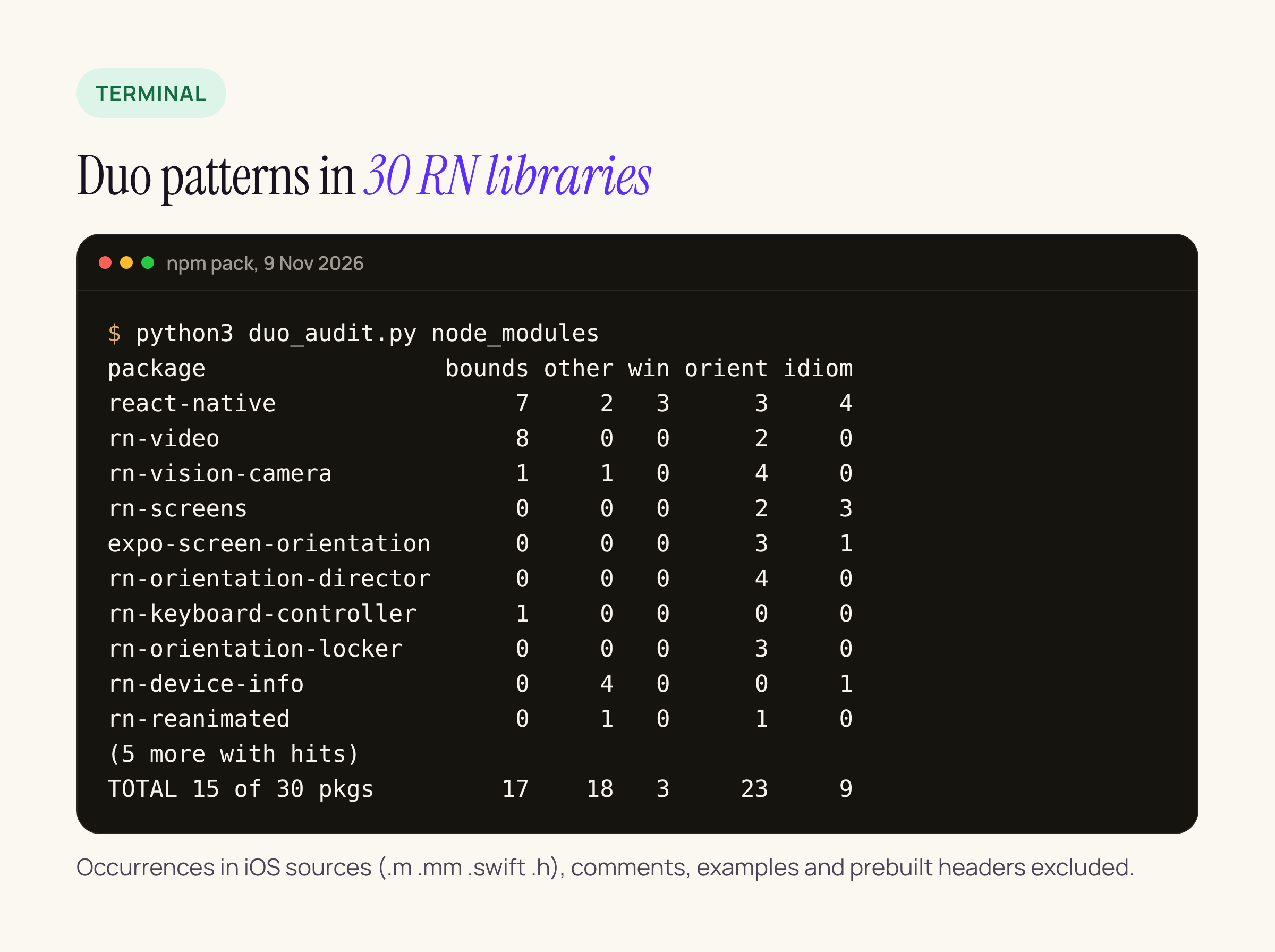
The ten packages with the most layout-relevant hits. Counts are occurrences, not files.
The full table
Packages with zero hits in every column: async-storage 3.1.1, datetimepicker 9.3.0, picker 2.11.4, lottie-react-native 7.5.0, biometrics 3.0.1, blob-util 0.25.1, gesture-handler 3.5.0, image-picker 8.3.0, keychain 11.0.0, mmkv 4.3.2, pager-view 10.0.0, permissions 5.6.3, safe-area-context 5.11.1, splash-screen 3.3.0 and webview 14.0.1. Five more we packed (react-native-modal, toast-message, @gorhom/portal, tab-view, flash-list) ship no iOS sources in their current release, so they were not counted toward the 30.
| Package | bounds | other | win | orient | idiom |
|---|---|---|---|---|---|
| react-native@0.88.1 | 7 | 2 | 3 | 3 | 4 |
| react-native-video@6.19.3 | 8 | 0 | 0 | 2 | 0 |
| react-native-vision-camera@5.2.4 | 1 | 1 | 0 | 4 | 0 |
| react-native-device-info@15.0.2 | 0 | 4 | 0 | 0 | 1 |
| react-native-maps@1.29.11 | 0 | 5 | 0 | 0 | 0 |
| react-native-screens@4.30.1 | 0 | 0 | 0 | 2 | 3 |
| expo-screen-orientation@58.0.4 | 0 | 0 | 0 | 3 | 1 |
| react-native-orientation-director@3.1.0 | 0 | 0 | 0 | 4 | 0 |
| expo-image@58.0.18 | 0 | 3 | 0 | 0 | 0 |
| react-native-orientation-locker@1.7.0 | 0 | 0 | 0 | 3 | 0 |
| react-native-reanimated@4.7.1 | 0 | 1 | 0 | 1 | 0 |
| expo-camera@58.0.14 | 0 | 0 | 0 | 1 | 0 |
| react-native-keyboard-controller@1.23.0 | 1 | 0 | 0 | 0 | 0 |
| react-native-share@12.3.1 | 0 | 1 | 0 | 0 | 0 |
| react-native-svg@15.16.1 | 0 | 1 | 0 | 0 | 0 |
| Total, 15 packages | 17 | 18 | 3 | 23 | 9 |
The hits that matter for layout
Not every hit is a bug. A camera library has to know which way the device is held to rotate the picture, and reading UIScreen.main.scale gives the right number on a single-screen device. These are the ones where the size or orientation feeds layout.
React Native core: RCTScreenSize() and two windows
RCTScreenSize() in React/Base/RCTUtils.mm reads the screen size once into a static std::atomic<CGSize>, stores it as portrait (min, max), and then swaps width and height when UIDeviceOrientationIsLandscape(RCTDeviceOrientation()) is true. That is two of Apple’s patterns in one function: a size read once, and layout by device orientation. It is used by ModalHostViewScreenSize() in ReactCommon/react/renderer/components/modal/ModalHostViewUtils.mm, which is where Fabric gets the size for <Modal>, by RCTInstance.mm, which calls it on the main queue during startup (so the cache is filled at launch), and by a dev-only “image larger than the screen” warning in RCTImageLoader.mm.
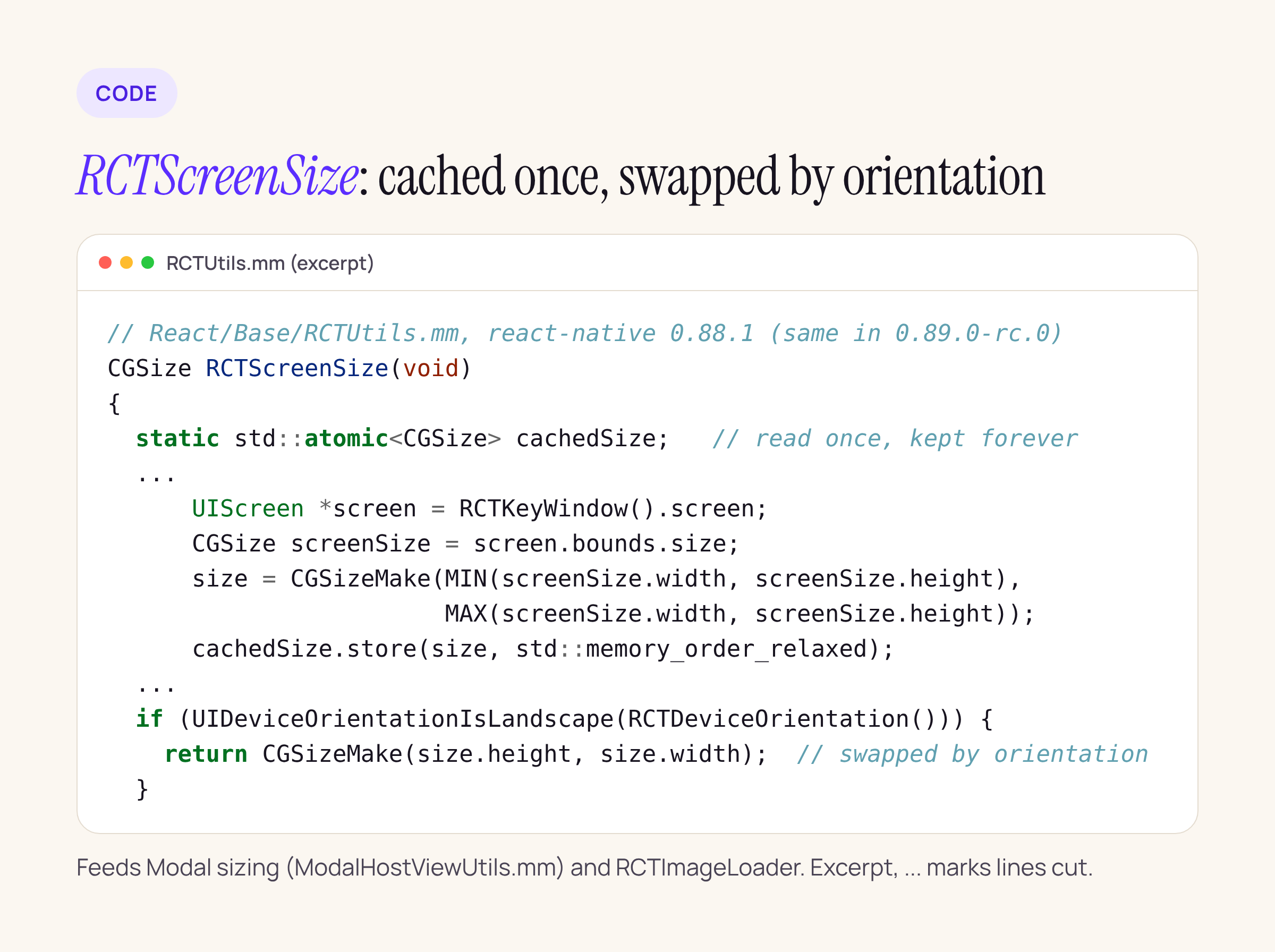
React Native 0.88.1, unchanged in 0.89.0-rc.0. The full function is about 25 lines.
Two places still build a window from the screen: RCTAppDelegate.mm:58 ([[UIWindow alloc] initWithFrame:[UIScreen mainScreen].bounds]) and RCTAlertController.mm:28, the window used for Alert.alert. RCTAppDelegate is marked deprecated in 0.88.1, and the header says: “For UIScene apps implement your own SceneDelegate with RCTReactNativeFactory”. The 0.88.1 template already does this, so an app on the new template does not go through line 58. An app still on RCTAppDelegate does.
We ran the same audit on react-native@0.89.0-rc.0. The only change is that the profiler’s debug window (RCTProfile.m, a fixed 20,80 frame, not screen-sized) is gone. RCTScreenSize, the alert window and RCTAppDelegate are unchanged.
What we will do in our own apps: move to a SceneDelegate with RCTReactNativeFactory (we already planned this for the iOS 27.1 hop), use useWindowDimensions() in JS rather than Dimensions.get('screen') (RCTDeviceInfo.mm reports window from the key window’s bounds, and screen from the screen), and put full-screen Modal screens on the simulator test list.
react-native-video 6.19.3: the fullscreen player
ios/Video/RCTVideo.swift sets the fullscreen player’s frame from the screen in eight places, for example:
playerViewController.view.frame = UIScreen.main.bounds          // line 328
playerViewController.contentOverlayView?.frame = UIScreen.main.bounds
_playerViewController.preferredContentSize = CGSize(
    width: UIScreen.main.bounds.width, height: UIScreen.main.bounds.height)  // line 1421
and RCTVideoPlayerViewController.swift:42 falls back to UIApplication.shared.statusBarOrientation. On a device where the app’s window is not the full screen, a frame from UIScreen.main.bounds can be larger than the window. The 7.0.0-beta.12 package (6 Oct 2026) has a rewritten ios/ folder, and our grep found no UIScreen.main.bounds or statusBarOrientation in it. If you play video, the 7.0 line is worth tracking.
react-native-vision-camera 5.2.4 and keyboard-controller 1.23.0
HybridCameraPreviewOutput.swift:41 reads UIScreen.main.bounds.size for the preview’s size in dp. KeyboardExtenderManager.mm:186 takes its width from UIScreen.mainScreen.bounds.size.width. Both are one-line changes to the window’s or the view’s bounds.
Orientation and idiom checks
react-native-screens 4.30.1 checks userInterfaceIdiom == UIUserInterfaceIdiomPad in RNSScreen.mm:1989 and in its scroll-to-top guard, and derives interface orientation from [[UIDevice currentDevice] orientation] in RNSScreenWindowTraits.mm:108. React Native core does the same idiom check for ActionSheetIOS (RCTActionSheetManager.mm:65), the dev menu, and Modal (RCTModalHostViewComponentView.mm:53): when a Modal has no supportedOrientations, it allows all orientations on iPad and portrait only on anything else, so an iPhone Duo gets the phone rule. Apple says an iPad-style decision on iPhone Duo should come from size classes. The orientation libraries (orientation-locker 1.7.0, orientation-director 3.1.0, expo-screen-orientation 58.0.4) read device orientation by design; what to check there is whether your app locks orientation at all on a device that changes shape. react-native-orientation-locker 1.7.0 also still reads statusBarOrientation (Orientation.m:77).
Scale only
expo-image 58.0.18, react-native-maps 1.29.11, react-native-svg 15.16.1, react-native-share 12.3.1 and react-native-device-info 15.0.2 use UIScreen.main for scale (device-info also for brightness and traitCollection). expo-image already prefers window?.screen.scale and only falls back to UIScreen.main.scale. We do not expect these to move layout; they are on the list because Apple asks for traitCollection.displayScale.
What we have not checked yet
- How any of this looks on iPhone Duo. That needs the iPhone Duo simulator in Xcode 27.1 and is the next step for the banking app: open a full-screen
Modal, anAlert, and the video player fullscreen, folded and unfolded. - Hits in JavaScript. The audit reads native sources only;
Dimensions.get('screen')in your own JS is a separate grep. - Packages beyond these 30. Run the script on your own
node_modules.
The script
Read-only, Python 3.8 or later, no dependencies. Run it from the project root: python3 duo_audit.py node_modules --lines.
#!/usr/bin/env python3
"""Count iPhone Duo risk patterns (Apple's "Prepare for iPhone Duo" list) in the iOS sources
of every package under a node_modules folder. Read-only.  Usage: python3 duo_audit.py node_modules [--lines]"""
import json, os, re, sys
PATTERNS = {
    "screen bounds": r"UIScreen\.main\.bounds|mainScreen\]\.bounds|mainScreen\.bounds|RCTScreenSize\(\)",
    "screen other":  r"UIScreen\.main\.(?!bounds)\w+|\[UIScreen mainScreen\](?!\.bounds)|UIScreen\.mainScreen\.(?!bounds)\w+",
    "window(frame:)": r"UIWindow\(frame:|\[UIWindow alloc\] initWithFrame:",
    "orientation":   r"UIDevice\.current\.orientation|currentDevice\]\.orientation|currentDevice\] orientation\]|UIDevice\.currentDevice\.orientation|statusBarOrientation|\.interfaceOrientation\b",
    "idiom":         r"userInterfaceIdiom",
    "fixed size":    r"(height|width)\b[^=\n]{0,30}==\s*(812|844|852|874|896|926|932|956)\b",
}
SKIP = {"node_modules", "example", "Example", "android", "ReactAndroid", "apps", "__tests__", "prebuilds"}
EXT = (".m", ".mm", ".swift", ".h")
root = sys.argv[1]; show = "--lines" in sys.argv
pkgs = []
for base, dirs, files in os.walk(root, followlinks=True):
    if "package.json" in files and base != root:
        pkgs.append(base); dirs[:] = []
    elif base != root and not os.path.basename(base).startswith("@"):
        dirs[:] = []
print(f"{'package':42}" + "".join(f"{k:>15}" for k in PATTERNS))
tot = {k: 0 for k in PATTERNS}; withhits = 0; scanned = 0
for p in sorted(pkgs):
    meta = json.load(open(os.path.join(p, "package.json")))
    counts = {k: 0 for k in PATTERNS}; hits = []; nfiles = 0
    for base, dirs, files in os.walk(p, followlinks=True):
        dirs[:] = [d for d in dirs if d not in SKIP]
        for f in files:
            if not f.endswith(EXT): continue
            nfiles += 1
            path = os.path.join(base, f)
            for i, line in enumerate(open(path, errors="replace"), 1):
                s = line.strip()
                if s.startswith(("//", "*", "/*")): continue   # comments don't count
                for k, rx in PATTERNS.items():
                    n = len(re.findall(rx, line))
                    if n:
                        counts[k] += n; hits.append(f"  {os.path.relpath(path, root)}:{i}: {s[:150]}")
    if not nfiles: continue
    scanned += 1; withhits += any(counts.values())
    for k in PATTERNS: tot[k] += counts[k]
    print(f"{meta['name'] + '@' + meta['version']:42}" + "".join(f"{counts[k]:>15}" for k in PATTERNS))
    if show: print("\n".join(hits))
print(f"{'TOTAL (' + str(withhits) + ' of ' + str(scanned) + ' packages hit)':42}" + "".join(f"{tot[k]:>15}" for k in PATTERNS))
Related: iPhone Duo: what changes in a UIKit or RN app on the iOS 27.1 SDK covers the new APIs; iOS 26 SDK to iOS 27.1 covers the whole SDK hop.