Hermes bytecode is not a hiding place. We built a React Native 0.88.1 release bundle with three dummy secrets in a config module, compiled it with the Hermes compiler that ships with 0.88.1, and a 30-line Python scan found all three in the .hbc file, plus a debug log line whenever console.log was not stripped. If a key, service account or long-lived token sits anywhere in your JavaScript, assume anyone with the APK can read it, and move it behind your own backend.
The trigger is CERT-In advisory CIVN-2026-0537 of 4 Nov 2026 about two car-maker apps. Nothing in the advisory says how those apps were built; we are not auditing them. We took its four findings as a checklist, because each one is a mistake a React Native banking app can make, and wrote a check for each.
Why we did this: our Beacon-type banking apps are React Native on Android and iOS, and a release build gets these four checks before it goes to a store. Tested on Ubuntu 24.04 with Node 22.23.5, Python 3.13, react-native 0.88.1 and hermes-compiler 260318099.0.5.
The four findings, as a checklist
CERT-In rated the advisory High and listed four issues, each with its own CVE:
- CVE-2026-121144: “hardcoded service account credentials, API Keys and authorization tokens within the application package”. Our check: scan the bundle and the
.hbc. - CVE-2026-121145: “insufficient validation of URLs and origins loaded within the WebView component”. Our check: review the WebView props.
- CVE-2026-121146: “recording of authentication tokens in application logs used for development and debugging”. Our check: strip
console.*and scan for log strings. - CVE-2026-121147: “improper implementation of SSL certificate pinning in the network security configuration”. Our check: lint
network_security_config.xml.
Strix lists CVE-2026-121144 at CVSS 4.0 8.8 (CWE-798). The fixed app versions, per CERT-In, are iRA 2.0 26.8.2 and iRA.ev 26.9.1.
Check 1: what a release bundle really contains
The test app is one screen and one config module. All values are dummies (the AWS one is the example key from AWS’s own documentation):
// src/config.js
export const AWS_ACCESS_KEY_ID = 'AKIAIOSFODNN7EXAMPLE';
export const MAPS_API_KEY = 'AIzaSyDUMMY-dummy-dummy-dummy-dummy0000';
export const SUPPORT_BEARER =
  'Bearer eyJhbGciOiJIUzI1NiJ9.eyJzdWIiOiJkZW1vIn0.c2lnbmF0dXJl';
export const API_BASE = 'https://api.example.com/v1';
We bundled it the way a release build does, then compiled it to Hermes bytecode:
npx react-native bundle --platform android --dev false --minify true \
  --entry-file index.js --bundle-output out/strip.bundle
node_modules/hermes-compiler/hermesc/linux64-bin/hermesc \
  -emit-binary -O -out out/strip.hbc out/strip.bundle
The minified bundle is 866 KB of JavaScript, the .hbc 1.23 MB of bytecode. Minification renames variables; it does not touch string literals. Hermes stores every string literal in a string table inside the .hbc file. That is exactly what lands in assets/index.android.bundle of a Hermes release APK.
The scanner reads a bundle, an .hbc file, or an .apk/.aab (it opens the zip and reads everything under assets/ and res/raw/):
#!/usr/bin/env python3
"""Look for key-shaped strings in a React Native bundle, .hbc or APK."""
import re, sys, zipfile

RULES = {
    "aws-key-id": rb"AKIA[0-9A-Z]{16}",
    "google-api-key": rb"AIza[0-9A-Za-z_\-]{35}",
    "bearer-jwt": rb"Bearer eyJ[\w-]{4,}\.eyJ[\w-]{2,}\.[\w-]{8,}",
    "private-key": rb"-----BEGIN [A-Z ]*PRIVATE KEY-----",
    "debug-log": rb"login token|access_token=",
}

def blobs(path):
    if path.endswith((".apk", ".aab")):
        z = zipfile.ZipFile(path)
        for n in z.namelist():
            if n.startswith(("assets/", "res/raw/", "base/assets/")):
                yield n, z.read(n)
    else:
        yield path, open(path, "rb").read()

hits = 0
for name, data in blobs(sys.argv[1]):
    for rule, rx in RULES.items():
        for m in sorted(set(re.findall(rx, data))):
            hits += 1
            s = m.decode(errors="replace")
            print(f"{rule:15} {name.split('/')[-1]:14} {s[:14]}...")
print(f"{hits} hit(s)")
sys.exit(1 if hits else 0)
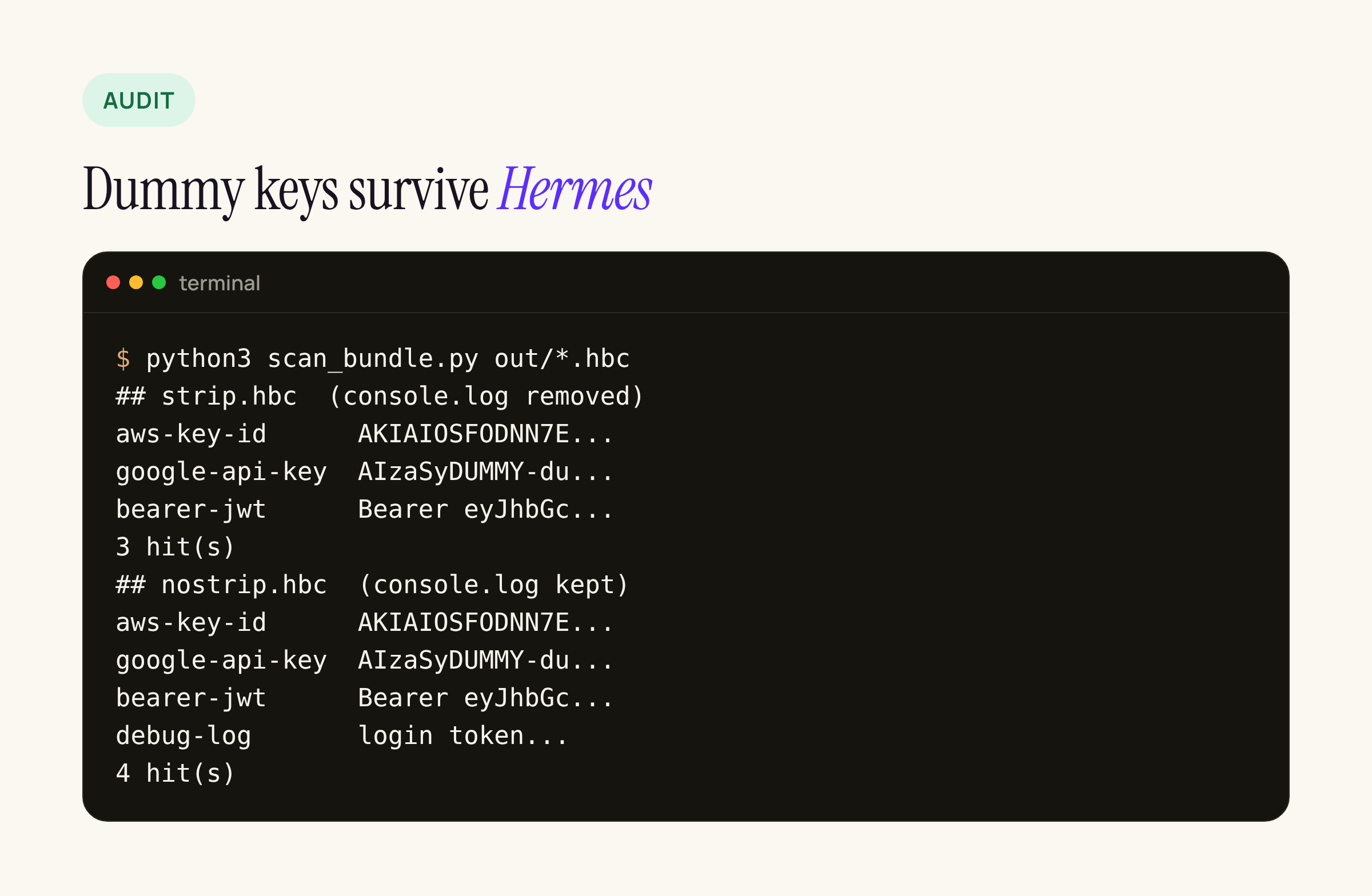
Real output from our test server. The scan found the AWS key ID, the Maps-style key and the bearer token in the plain bundle, in both .hbc files and in a test .apk with the .hbc placed at assets/index.android.bundle. It exits non-zero on any hit, so it can fail a CI job.
One thing bit us while writing it. Our first AWS rule ended with a “no more capital letters” lookahead, and it found the key in the JavaScript bundle but not in the .hbc. The Hermes string table packs strings next to each other without separators, so the key was followed directly by the first letters of the next string. Patterns for bytecode need fixed lengths or explicit structure, not word boundaries.
What to do instead
React Native’s own security page says it plainly: “Never store sensitive API keys in your app code”, and warns that react-native-config and react-native-dotenv values are not server-side secrets. They are inlined into the bundle like any other string.
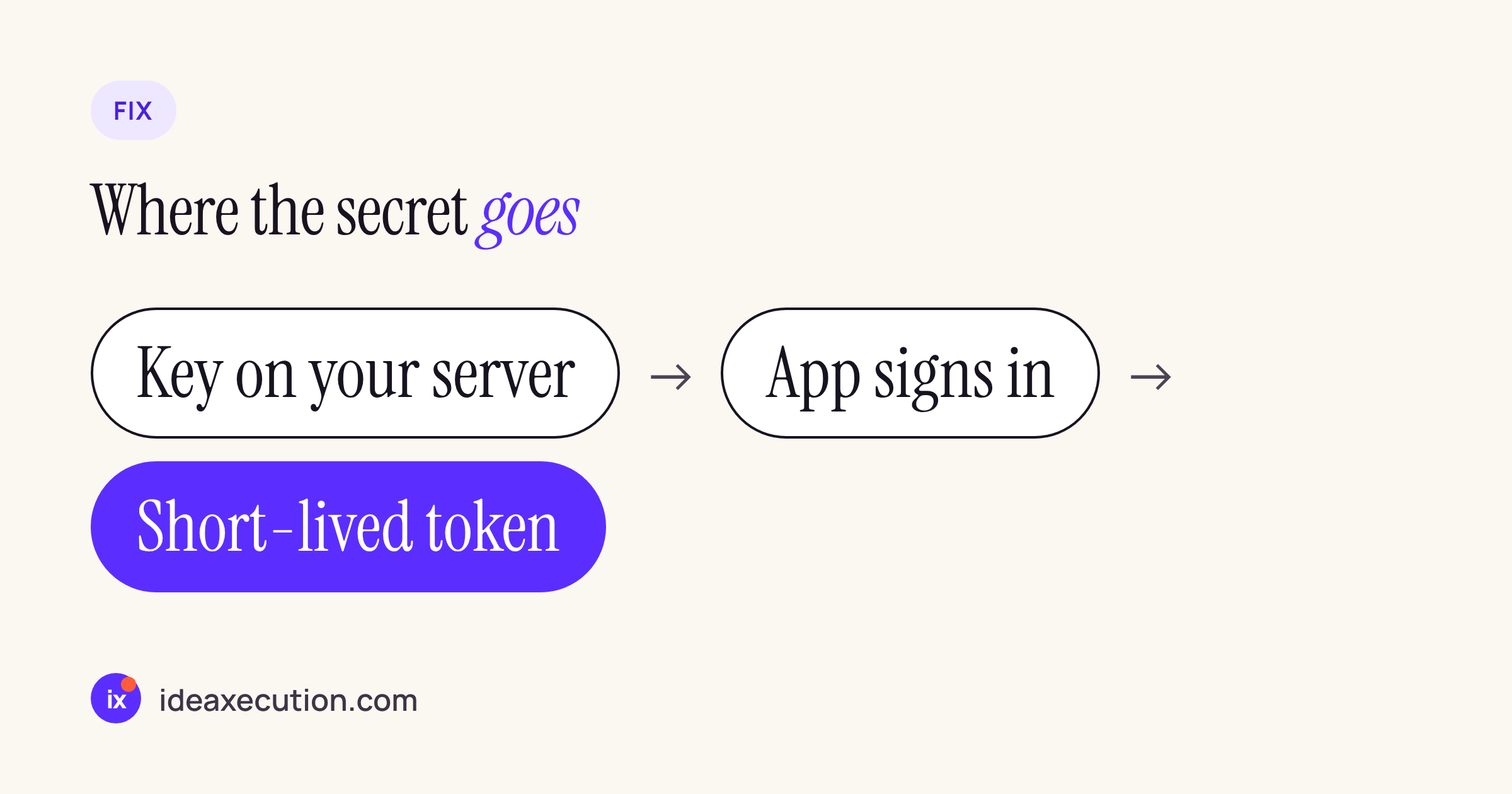
The pattern we use: anything that grants access (cloud credentials, a service account, a partner API key) stays on our server. The app authenticates the user, gets a short-lived token scoped to that user, and the server makes the privileged call. Keys that must ship in the app, such as a Maps key, get restricted in their console to the app’s package name and signing certificate, so a copied key is not useful elsewhere.
Check 2: tokens in logs
In the test app, login() logs the token. We built the bundle twice: once with babel-plugin-transform-remove-console active for the production Babel environment, once without.
// babel.config.js
module.exports = {
  presets: ['module:@react-native/babel-preset'],
  env: {production: {plugins: ['transform-remove-console']}},
};
With the plugin, the string login token is gone from the .hbc (strip.hbc, 3 hits). Without it, it is there (nostrip.hbc, 4 hits), and on Android a console.log left in a release build can end up in logcat. Two limits worth knowing: the plugin removes console.* calls only, not a logging library writing to a file or a remote service, and it only runs when BABEL_ENV or NODE_ENV is production during bundling. Keep the debug-log rule in the scanner with the strings your own code uses, so a regression shows up in CI rather than in a device log.
Check 3: pinning in the network security config
On Android, pinning for a React Native app usually lives in res/xml/network_security_config.xml. The Android documentation has three details that are easy to get wrong:
- A pin set can have an
expiration; after that date “pinning is not performed”. An expired pin set does not fail closed, it switches pinning off. - “you should always include a backup key”, so a key rotation does not cut every installed app off from the API.
- Debug-only CAs are trusted “only when android:debuggable is true”, by using
debug-overrides. A user CA added tobase-configis trusted in release builds too.
The linter checks those, plus cleartext traffic, against a date you pass in:
#!/usr/bin/env python3
"""Lint res/xml/network_security_config.xml for pinning mistakes."""
import datetime as dt, sys, xml.etree.ElementTree as ET

today = dt.date.fromisoformat(sys.argv[2]) if len(sys.argv) > 2 else dt.date.today()
root = ET.parse(sys.argv[1]).getroot()
problems = []
for dc in root.iter("domain-config"):
    names = ",".join(d.text.strip() for d in dc.findall("domain"))
    if dc.get("cleartextTrafficPermitted") == "true":
        problems.append(f"{names}: cleartext allowed")
    ps = dc.find("pin-set")
    if ps is None:
        problems.append(f"{names}: no pin-set")
        continue
    if len(ps.findall("pin")) < 2:
        problems.append(f"{names}: only one pin, no backup")
    exp = ps.get("expiration")
    if exp and dt.date.fromisoformat(exp) < today:
        problems.append(f"{names}: pins expired {exp}, pinning is OFF")
    for ta in dc.iter("certificates"):
        if ta.get("src") == "user":
            problems.append(f"{names}: trusts user-added CAs")
for ta in root.findall("./base-config/trust-anchors/certificates"):
    if ta.get("src") == "user":
        problems.append("base-config: trusts user-added CAs")
for p in problems:
    print("FAIL", p)
print(f"{len(problems)} problem(s)")
sys.exit(1 if problems else 0)
We ran it on two configs for a dummy api.example.com: a “before” with every mistake above, and an “after” with two pins, a future expiration, no cleartext, and the user CA moved into debug-overrides.
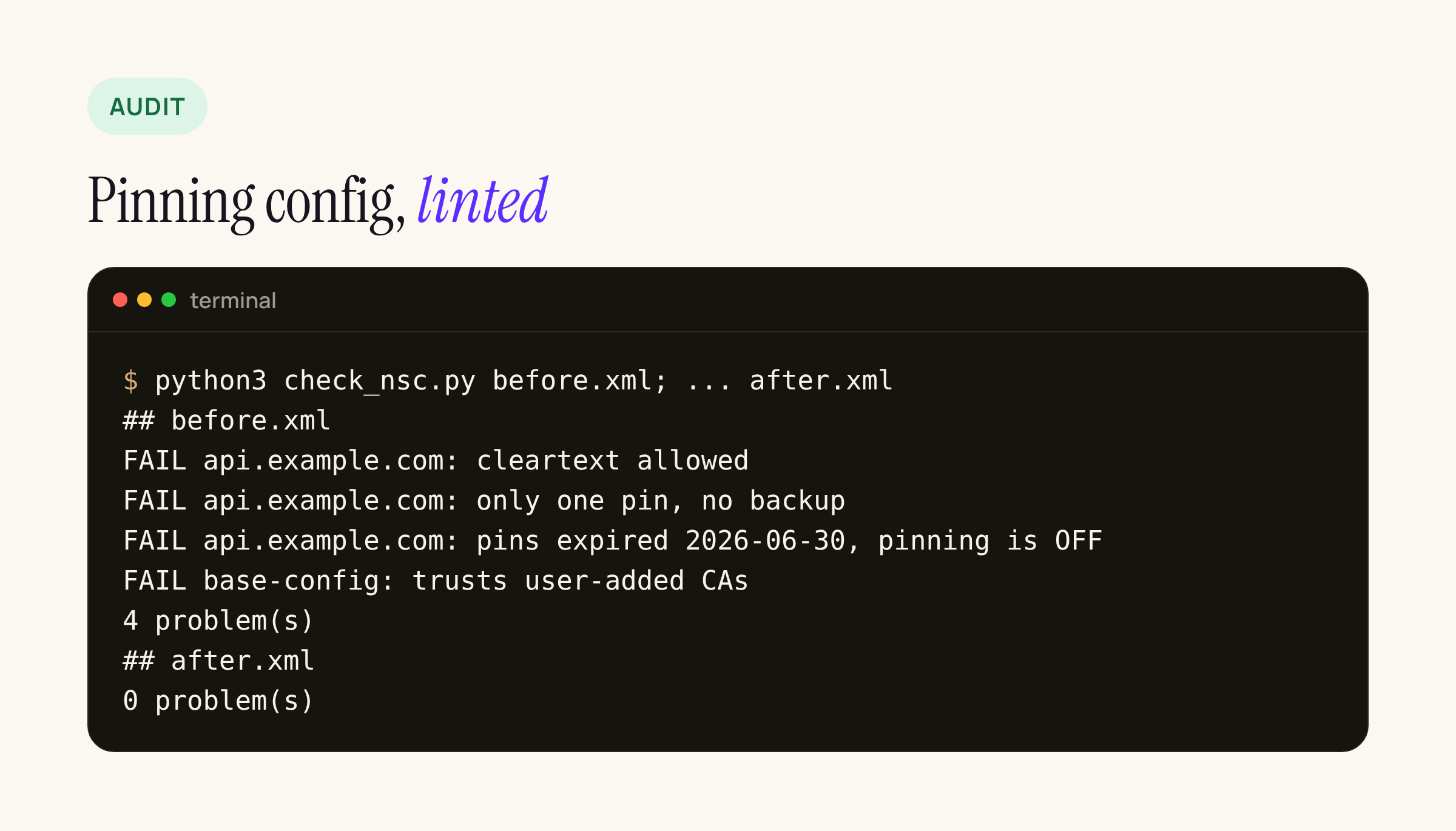
Real output from our test server, run with 19 Nov 2026 as the date. The linter reads the source XML in your repo; inside a built APK the file is compiled to binary XML, so run it in CI on android/app/src/main/res/xml/. It does not prove pinning works at runtime: for that, route a release build on a test device through an intercepting HTTPS tool with its own CA and confirm the API calls fail.
Check 4: WebView origins
This one is a review rather than a script, because the risk depends on what each screen loads. For every react-native-webview screen, check:
originWhitelistlists only the origins that screen needs. The library’s reference notes that static HTML needs["*"]; that is a reason to keep static HTML and remote pages in separate WebViews, not to use*everywhere.onShouldStartLoadWithRequestchecks the full URL (scheme and host) and returnsfalsefor anything else. On Android it is not called for the first load, so validate the initialsource.uribefore rendering.- No auth token is passed into the page in a query string or injected JavaScript unless the origin check above has already passed.
javaScriptEnabledand file access (allowFileAccess,allowUniversalAccessFromFileURLs) are off on screens that do not need them.
Wiring it into a release
Both scripts exit non-zero on findings, so they fit a CI step after bundleRelease:
python3 scan_bundle.py android/app/build/outputs/apk/release/app-release.apk
python3 check_nsc.py android/app/src/main/res/xml/network_security_config.xml
The patterns above cover the key types we use; add the prefixes of your own providers (payment gateways, SMS vendors, analytics write keys) and the log strings your app prints. A scan with zero hits is a floor, not proof: a secret split across two strings or encoded at build time will not match, which is one more reason to keep real secrets off the device entirely.