Short answer: you can move a localized table from .strings and .stringsdict to a String Catalog (.xcstrings) with a converter of under 200 lines of Python, keep every translator comment, and mark copied-but-untranslated strings for review instead of calling them done. We ran ours on three open-source iOS apps on GitHub (wikipedia-ios at commit 0aea1dc, home-assistant/iOS at ac2896d, mastodon-ios at 2c165fc, all from November 2026): 203,493 strings across 117, 34 and 51 languages went in, and every one of them came back out of the catalog with the same value. Xcode 26.2’s own catalog compiler accepted the Home Assistant and Mastodon catalogs and rejected Wikipedia’s, for a reason worth checking in your app before you migrate: plural strings in which no form mentions the number.
Why we did this: our Beacon-type banking apps ship Hindi and English, the translators work from spreadsheets, and every new localization feature in Xcode (plural and device variations, review states, the String Catalog editor) only works on .xcstrings. Xcode’s own migration is one click, but we wanted control over comments and states, and a script we can rerun when translations arrive in the old format.
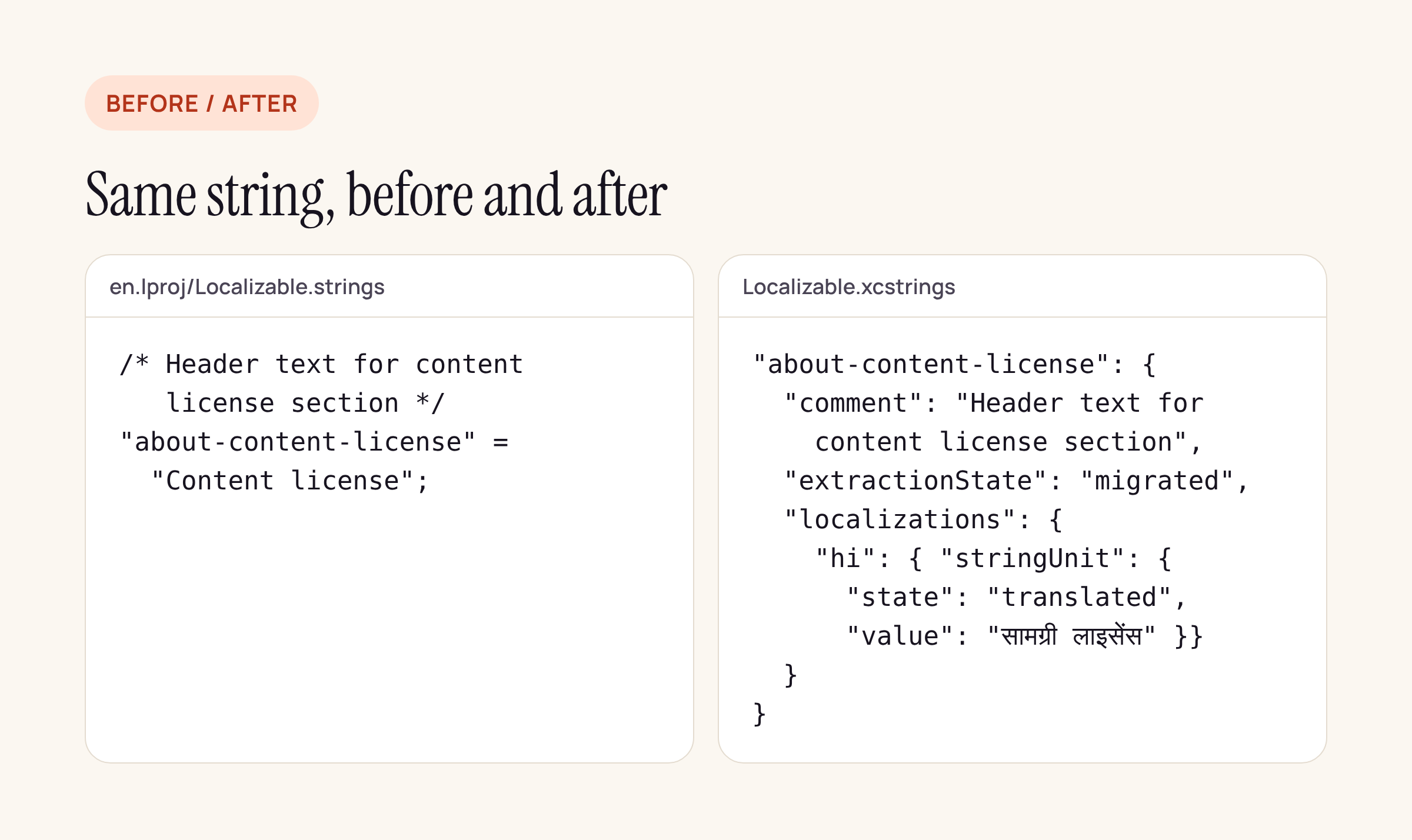
Wikipedia’s string and its comment, before and after the converter.
What a String Catalog stores
A .xcstrings file is JSON. We built this table from Apple’s String Catalog documentation and from a catalog Xcode itself produced: Mastodon already migrated its main Localizable.strings with Xcode, so MastodonSDK/Sources/MastodonLocalization/Resources/Localizable.xcstrings shows exactly what Xcode writes.
| Field | What it holds | What Xcode wrote in Mastodon’s catalog |
|---|---|---|
sourceLanguage |
the development language | en |
version |
file format version | 1.1 |
strings |
one entry per key | 827 keys |
extractionState |
where the key came from | migrated (678), manual (149) |
comment |
the note for translators | from the old /* */ comment |
localizations.<lang>.stringUnit |
state and value |
translated (28,046), new (11,682) |
variations.plural |
one stringUnit per plural category |
used for single-number plurals |
substitutions |
named plural pieces inside a longer sentence, with argNum and formatSpecifier; the number is written as %arg |
51 entries |
Two details are worth copying from Xcode’s own output. A plural that is the whole string (%#@count@) becomes a plain variations.plural block. A plural inside a sentence (%2$#@v2@ a year) becomes a substitutions entry, and inside it the number is spelled %arg, not %2$d.
The converter
The script reads one table (for example Localizable) from every *.lproj folder, merges the .strings and .stringsdict files, and writes one catalog. The parts that matter:
# 1. .strings: keep the comment above each pair, decode \" \n \U escapes,
#    and read UTF-16 files too (Wikipedia's are UTF-16 with a BOM)
def parse_strings(path): ...

# 2. a value that equals the source text in a non-source language
#    is a copy, not a translation
state = 'needs_review' if (lang != src and val == src_val) else 'translated'

# 3. .stringsdict: whole-string plural -> variations,
#    plural inside a sentence -> substitutions with %arg
if SPEC_RE.fullmatch(fmt):
    return {'variations': {'plural': plural(spec)}}
loc['substitutions'][name] = {'argNum': arg, 'formatSpecifier': fs,
                              'variations': {'plural': pl}}
Each entry is written with extractionState: migrated, the same value Xcode uses for migrated strings, so Xcode does not treat the keys as stale when it cannot find them in code. We marked untranslated copies needs_review where Xcode’s migrator writes new: in a catalog that came from a translation vendor, a copied English string usually means “the vendor did not translate this”, and needs_review keeps it in the translators’ queue without hiding the fact that a value exists.
Five pytest cases cover comments and escapes, the review state, a whole-string plural, a plural inside a sentence and the numberless-plural warning described below; all five pass on Python 3.
Three apps, zero lost strings
We picked open-source apps that still ship .strings tables, ran the converter, then checked the result the other way round: for every key in every original file, the catalog must hold the same value in the same language, or a plural block for it.
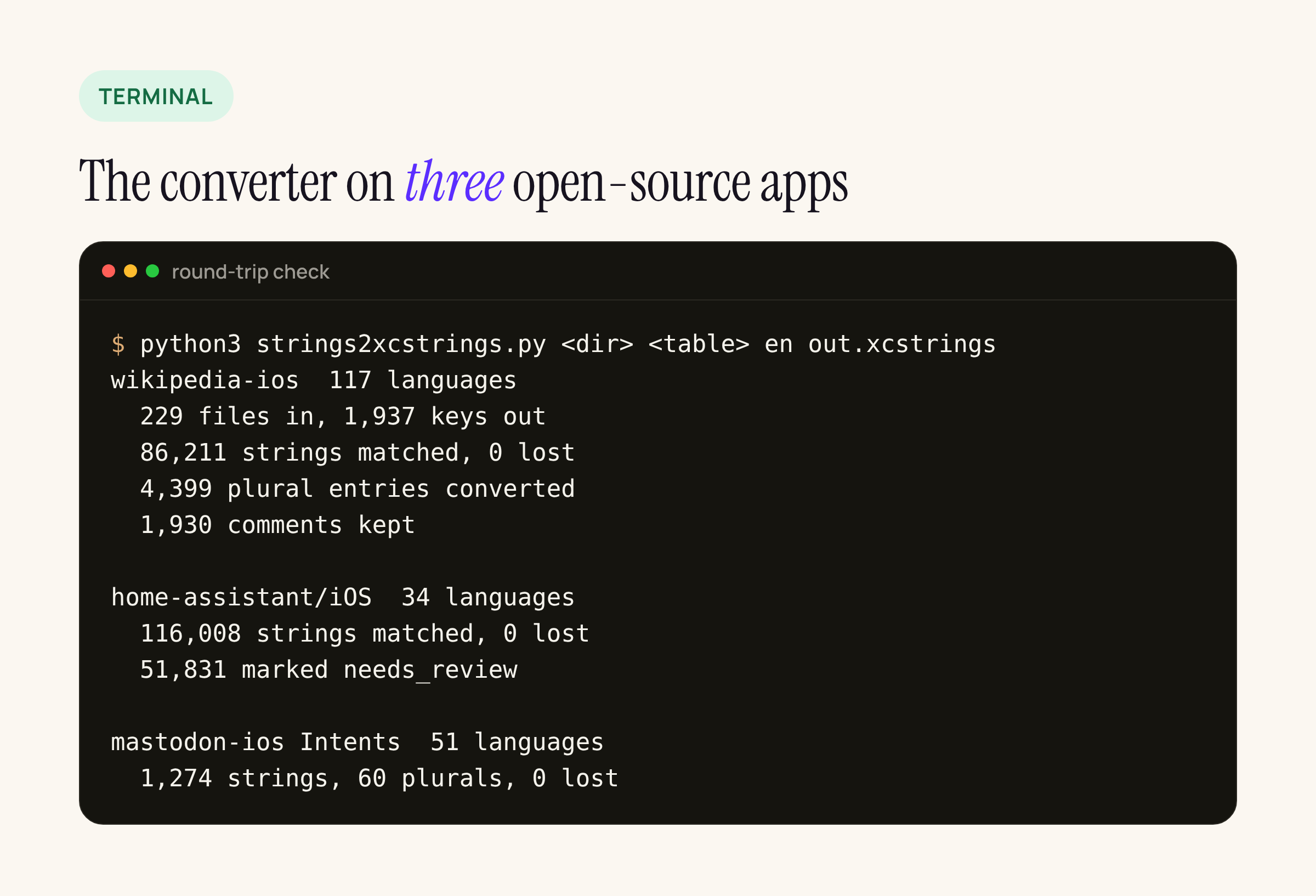
Round-trip check: every original string is in the catalog with the same value.
| App and table | Languages | Input | Output catalog | Result |
|---|---|---|---|---|
wikipedia-ios, WMFNativeLocalizations/Localizable |
117 | 229 files (UTF-16 .strings + .stringsdict) |
1,937 keys, 17.7 MB | 86,211 strings matched, 4,399 plural entries converted, 1,930 comments kept |
home-assistant/iOS, Sources/App/Resources/Localizable |
34 | 34 .strings files |
3,412 keys, 19.9 MB | 116,008 strings matched; 51,831 copies of English marked needs_review |
mastodon-ios, MastodonIntent/Intents |
51 | 80 files | 28 keys, 0.3 MB | 1,274 strings and 60 plural entries matched |
What each app taught us:
- Wikipedia keeps its
.stringsin UTF-16. A converter that assumes UTF-8 reads nothing useful; check the byte order mark first. It is also the only one of the three with real comments, and all 1,930 came across. - Home Assistant fills every language with the English text where no translation exists, so 51,831 of its 116,008 values are copies of English. A converter that marks everything
translatedwould tell Xcode the app is fully localized in 34 languages. Withneeds_review, Xcode’s catalog editor shows the real progress per language. - Mastodon uses
Base.lprojfor its Siri Intents table next toen.lproj. We usedenas the source language and carriedBaseover as its own localization, which you may want to drop.
What Xcode’s catalog compiler said
A catalog that loads as JSON is not yet a catalog Xcode will build. When a target contains a .xcstrings file, Xcode compiles it into per-language .strings and .stringsdict files with xcstringstool. We ran that step on all three catalogs on our M1 lab Mac with Xcode 26.2 (xcrun xcstringstool compile <catalog> -o <dir>).
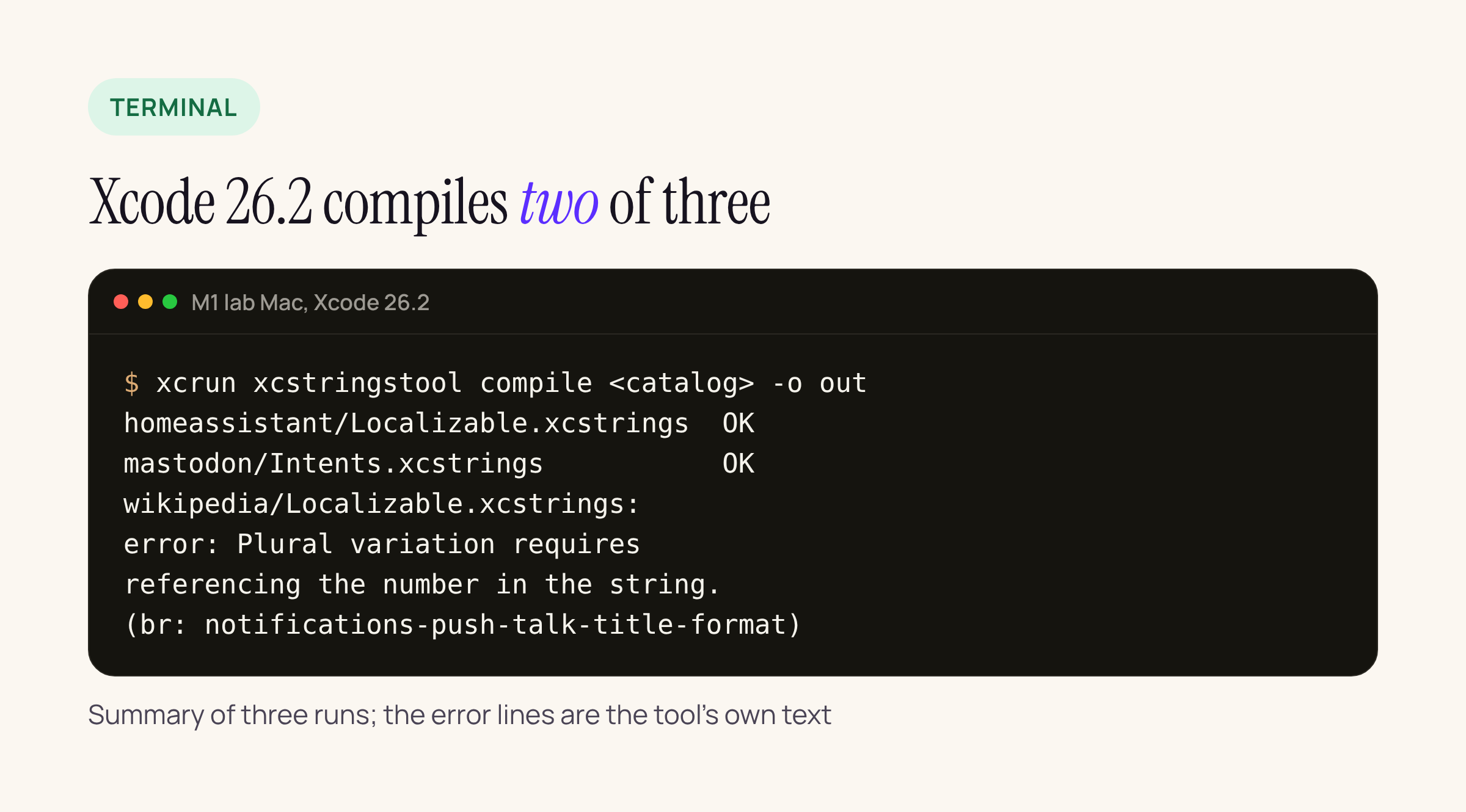
Home Assistant and Mastodon compiled; Wikipedia stopped at its first plural error.
The Home Assistant catalog (19.9 MB) compiled in about 4 seconds into 34 language folders, Mastodon’s in under a second. Wikipedia’s failed with “Plural variation requires referencing the number in the string”, first for Breton and, in the second run, for Welsh, both on notifications-push-talk-title-format. In the old .stringsdict, that key is a plural whose forms are just “New message” and “New messages”: the number never appears. Foundation has accepted that for years. The catalog compiler does not.
The tool stops at the first error, so we added a check to the converter. It now prints a warning for every plural block in which no form contains a format specifier, and the Wikipedia table has two kinds:
| Kind | Wikipedia language entries | Example |
|---|---|---|
| Whole-string plural, no number in any form | 118 in 13 keys (1 in English) | “New message” / “New messages” |
| Plural used only for a word ending, number printed outside it | 535 in 47 keys | French “Ajouter %1$d article%1$#@v1@”, with the plural forms “” and “s” |
Home Assistant and Mastodon have none of either kind, which matches what the compiler did with them.
The first kind is what the compiler rejected. For those, Xcode’s error message gives the fix: use two keys, one for a single item and one for several, and choose between them in code. The second kind is a legitimate translator trick, and may not survive the compiler either; rewriting it so each plural form carries the number (%arg article / %arg articles) keeps the grammar and gives the compiler what it wants. Because xcstringstool stops at the first error, we cannot tell from that compile whether it also rejects the second kind; fixing both before migrating is the safe order. In both cases the change belongs with the translators, not in a script that guesses.
Things a converter cannot decide for you
- Which table to migrate first. One catalog per table; start with the smallest one (an Intents or InfoPlist table) and let it go through a full build and a TestFlight round before moving
Localizable. - Keys that are English sentences. Old projects often use the English text as the key. That still works in a catalog, but the catalog cannot tell a key from a value then; keep
extractionState: migratedso Xcode does not rewrite them from code. - The size of the diff. A 17 to 20 MB JSON file is a big pull request. Land the catalog and the removal of the old files in the same commit so the reviewer sees a move, not an addition.
What to check on your own app
- Run the converter on one table, read its warnings, and fix every plural that never mentions the number.
- Compile the catalog once with
xcrun xcstringstool compile <catalog> -o /tmp/outbefore you add it to the target; it fails fast and names the language and key. - Open the catalog in Xcode and check the per-language percentages: copied English shows up as “Needs Review”, not as done.
- Build and look at one plural string per language on a device or Simulator.
- Remove the old
.stringsand.stringsdictfor that table in the same commit.
Sources
- Apple: Localizing and varying text with a string catalog
- wikipedia-ios, home-assistant/iOS, mastodon-ios on GitHub, checked 21 Nov 2026