The takeaway first: on 2 December 2026 CocoaPods trunk stops accepting new pods and new pod versions. Your pod install keeps working with the versions you have, but no library you depend on can ship you a fix through CocoaPods after that day. Every one of the 25 most common pods we checked already has a Package.swift, so for most native apps the move is three steps: read Podfile.lock, run pod deintegrate, add the packages in Xcode. The work is in the details: product names that differ from pod names, locked versions older than a library’s first Swift package, local :path pods, and the occasional pod with no package at all.
Why we did this: our Mac and iPhone apps, Nix, QuitAll and Cardigami, already use Swift packages, but client iOS projects we maintain still carry Podfiles, and the deadline is twelve days away. We wrote this guide from the CocoaPods and Swift.org announcements, Apple’s Xcode documentation, the Package.swift of 25 libraries read on 20 November 2026, and a check script run against a real open-source app’s Podfile.lock. For the React Native side of the same deadline, see our CocoaPods read-only audit for React Native.
What changes on 2 December, and what does not
The CocoaPods team announced the plan in CocoaPods Trunk Read-only Plan (30 November 2024, updated May 2025). The key lines:
- “On December 2nd 2026 I will switch trunk to not accept new Podspecs permanently.”
- “Making the switch will not break builds for people using CocoaPods in 2026 onwards, but at that point, you’re not getting any more updates to dependencies which come though CocoaPods trunk.”
- “Infrastructure like the Specs repo and the CDN would still operate as long as GitHub and jsDelivr continue to exist.”
- It “shouldn’t affect people who use CocoaPods with their own specs repos, or have all of their dependencies vendored.”
The Swift.org November 2026 update (11 November 2026) repeats the date and adds the advice: “if you haven’t switched to SwiftPM yet, now is the time”, pointing to the Swift Package Index to check which libraries support it.
So after 2 December: existing pods and versions stay installable, read-only. What stops is new versions, including security fixes, for anything published through trunk. The risk grows with every month you stay.
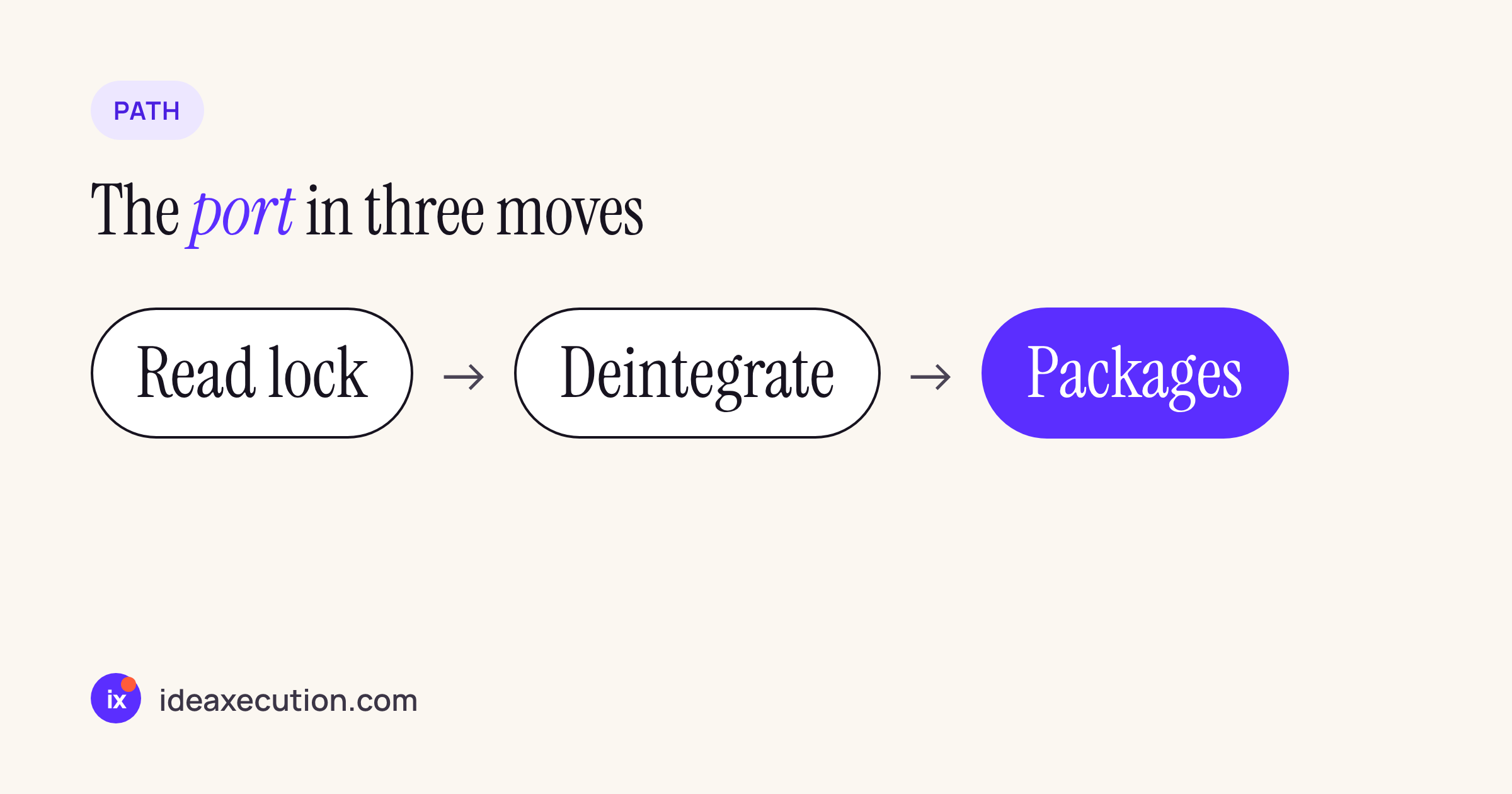
The port in three moves.
Step 1: read Podfile.lock, not the Podfile
The Podfile says what you asked for; Podfile.lock says what you actually ship, including transitive pods and subspecs. Each locked version matters, because a library may have added its Package.swift years after the version you are on. We wrote a short script that reads the lock file, separates local :path pods from trunk pods, and asks GitHub whether a Package.swift exists at the locked tag (with or without a v prefix) or only on the default branch:
#!/usr/bin/env python3
"""Read a Podfile.lock and say, per pod, whether a Swift package exists at the locked version."""
import re, sys, urllib.request
REPOS = {"Alamofire": "Alamofire/Alamofire", "AppAuth": "openid/AppAuth-iOS",
  "GoogleAPIClientForREST": "google/google-api-objectivec-client-for-rest",
  "GoogleSignIn": "google/GoogleSignIn-iOS", "GTMAppAuth": "google/GTMAppAuth",
  "GTMSessionFetcher": "google/gtm-session-fetcher", "SDWebImage": "SDWebImage/SDWebImage",
  "SMCalloutView": "nfarina/calloutview", "SQLite.swift": "stephencelis/SQLite.swift",
  "SwiftyDropbox": "dropbox/SwiftyDropbox"}
def has_package(repo, ref):
    url = f"https://raw.githubusercontent.com/{repo}/{ref}/Package.swift"
    try: return urllib.request.urlopen(url, timeout=20).status == 200
    except Exception: return False
lock = open(sys.argv[1]).read()
pods = dict(re.findall(r"^  - ([\w.+-]+)(?:/[\w-]+)? \(([\d.]+)\)", lock, re.M))
trunk = re.search(r"trunk:\n((?:    - .+\n)+)", lock).group(1).split()[1::2]
local = re.findall(r"^  ([\w.+-]+):\n    :path:", lock, re.M)
for pod in local: print(f"{pod:24} local path: move into a local package")
for pod in trunk:
    v, repo = pods[pod], REPOS.get(pod)
    if not repo: print(f"{pod:24} {v:8} no repo mapped"); continue
    at_tag = has_package(repo, v) or has_package(repo, "v" + v)
    at_head = at_tag or has_package(repo, "HEAD")
    state = "at locked version" if at_tag else ("only in newer versions" if at_head else "none")
    print(f"{pod:24} {v:8} Package.swift: {state}")
We ran it on the Podfile.lock of Delta, an open-source iOS app that still uses CocoaPods 1.16.2:
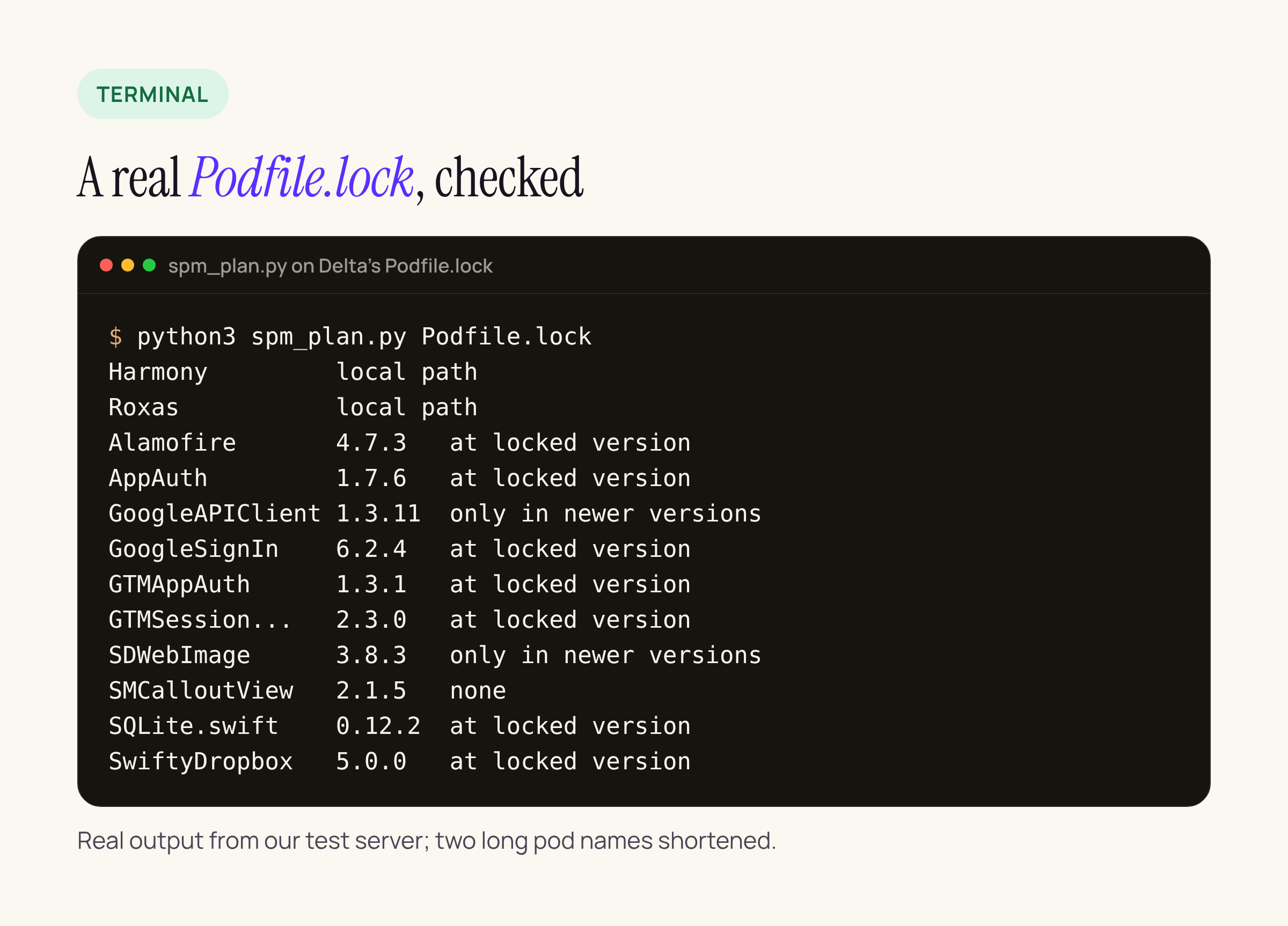
Our check script on Delta’s Podfile.lock: which pods have a Swift package at the locked version.
Reading the result:
- At locked version (8 pods): add the package at the same version first, so the port changes the package manager and nothing else. Upgrade afterwards, in a separate commit.
- Only in newer versions (2 pods): SDWebImage 3.8.3 and GoogleAPIClientForREST 1.3.11 predate their Swift packages. The port includes a major upgrade for these, with its API changes. Budget for that, or keep those two on CocoaPods for one more release.
- None (1 pod): SMCalloutView has no
Package.swiftat any version. See “Pods with no package” below. - Local path (2 pods): Harmony and Roxas live in the repo. They become local packages.
The script’s REPOS table is the part you edit: map each pod in your lock file to its GitHub repository. Pods hosted elsewhere need their own check.
Step 2: map each pod to a package and a product
A Swift package can contain several libraries, called products, and you add products to targets. The product name is often not the pod name. Here are the 25 pods we checked, each linked to the Package.swift we read on 20 November 2026:
| Pod | Swift package | Product to add, note |
|---|---|---|
Alamofire |
Alamofire/ |
Alamofire |
Kingfisher |
onevcat/ |
Kingfisher |
SnapKit |
SnapKit/ |
SnapKit |
lottie- |
airbnb/ |
Lottie; product name differs |
Firebase/* |
firebase/ |
FirebaseAnalytics, FirebaseAuth, …; one product per subspec; binary targets |
SDWebImage |
SDWebImage/ |
SDWebImage |
RxSwift, RxCocoa |
ReactiveX/ |
RxSwift, RxCocoa, RxRelay; one package, several products |
Moya |
Moya/ |
Moya; no privacy manifest in the package |
SwiftyJSON |
SwiftyJSON/ |
SwiftyJSON |
IQKeyboardManagerSwift |
hackiftekhar/ |
IQKeyboardManagerSwift |
RealmSwift |
realm/ |
RealmSwift (and Realm) |
GoogleSignIn |
google/ |
GoogleSignIn, GoogleSignInSwift |
FBSDKCoreKit, FBSDKLoginKit |
facebook/ |
FacebookCore, FacebookLogin; product names differ; binary targets |
DGCharts |
ChartsOrg/ |
DGCharts |
KeychainAccess |
kishikawakatsumi/ |
KeychainAccess; no privacy manifest in the package |
Sentry |
getsentry/ |
Sentry; binary targets |
GoogleMaps |
googlemaps/ |
GoogleMaps; binary; GoogleMaps.bundle copied as a resource |
MBProgressHUD |
jdg/ |
MBProgressHUD |
Nuke |
kean/ |
Nuke, NukeUI |
CocoaLumberjack/ |
CocoaLumberjack/ |
CocoaLumberjack, CocoaLumberjackSwift |
OneSignalXCFramework |
OneSignal/ |
OneSignalFramework (+ extension); binary targets; product name differs |
Google- |
googleads/ |
GoogleMobileAds; separate package repo; binary |
SwiftLint |
realm/ |
SwiftLintBuildToolPlugin; a build tool plugin, not a library |
PromiseKit |
mxcl/ |
PromiseKit; no privacy manifest in the package |
AFNetworking |
AFNetworking/ |
AFNetworking; deprecated since 17 Jan 2023 |
Patterns worth knowing before you click through Xcode:
- Product names differ.
lottie-iosbecomes theLottieproduct,FBSDKLoginKitbecomesFacebookLogin,OneSignalXCFrameworkbecomesOneSignalFramework. Google Mobile Ads lives in its own repository,swift-package-manager-google-mobile-ads. - One package, many products. RxSwift, Firebase, Nuke and CocoaLumberjack each expose several. Add only the ones your targets import;
RxCocoaneedsRxRelaytoo. - Static and dynamic variants. Alamofire, SnapKit, Lottie, RxSwift, Sentry and DGCharts publish a separate
-DynamicorDynamicproduct. Pick the plain one unless you need a dynamic framework, for example to share one copy between an app and its extensions. - Binary targets. Firebase, Sentry, Facebook, OneSignal, Google Maps and Google Mobile Ads ship some or all of their code as prebuilt
.xcframeworkfiles throughbinaryTarget. Xcode downloads them on package resolution, so CI needs network access to those URLs, or a cache. - Minimum iOS versions move. The packages declare their own floors: Google Maps’ manifest says iOS 17, Nuke iOS 16, Alamofire, Kingfisher and Lottie iOS 15. If your app targets lower, you are pinned to older package versions.
- Tools versions move too. The current manifests of Alamofire and CocoaLumberjack declare
swift-tools-version: 6.4. Xcode only resolves package versions whose tools version its Swift toolchain supports, so on an older Xcode pin to a version that still resolves.
Step 3: deintegrate and add the packages
- Commit everything. Keep the old
PodfileandPodfile.lockin history; you may want them for a pod you keep. - Run
pod deintegratein the project folder. It removes the[CP]build phases (Check Pods Manifest.lock, Embed Pods Frameworks, Copy Pods Resources), thePodsframework links and the xcconfig references from your.xcodeproj. Delete the.xcworkspaceCocoaPods generated (unless it also holds other projects) and thePods/folder. - Open the
.xcodeproj. In Apple’s words from Adding package dependencies to your app, “select File > Add Package Dependency and enter its source control repository URL”, choose a version rule (“Selecting the version requirement is the recommended way”), then “Select the package’s products that you need, and add them to targets in your project.” - Build. Fix imports and resources (next section) until the build is clean, then run your tests.
- Commit
Package.resolved(inside the.xcodeprojunderproject.xcworkspace/xcshareddata/swiftpm/) so CI resolves the same versions you did.
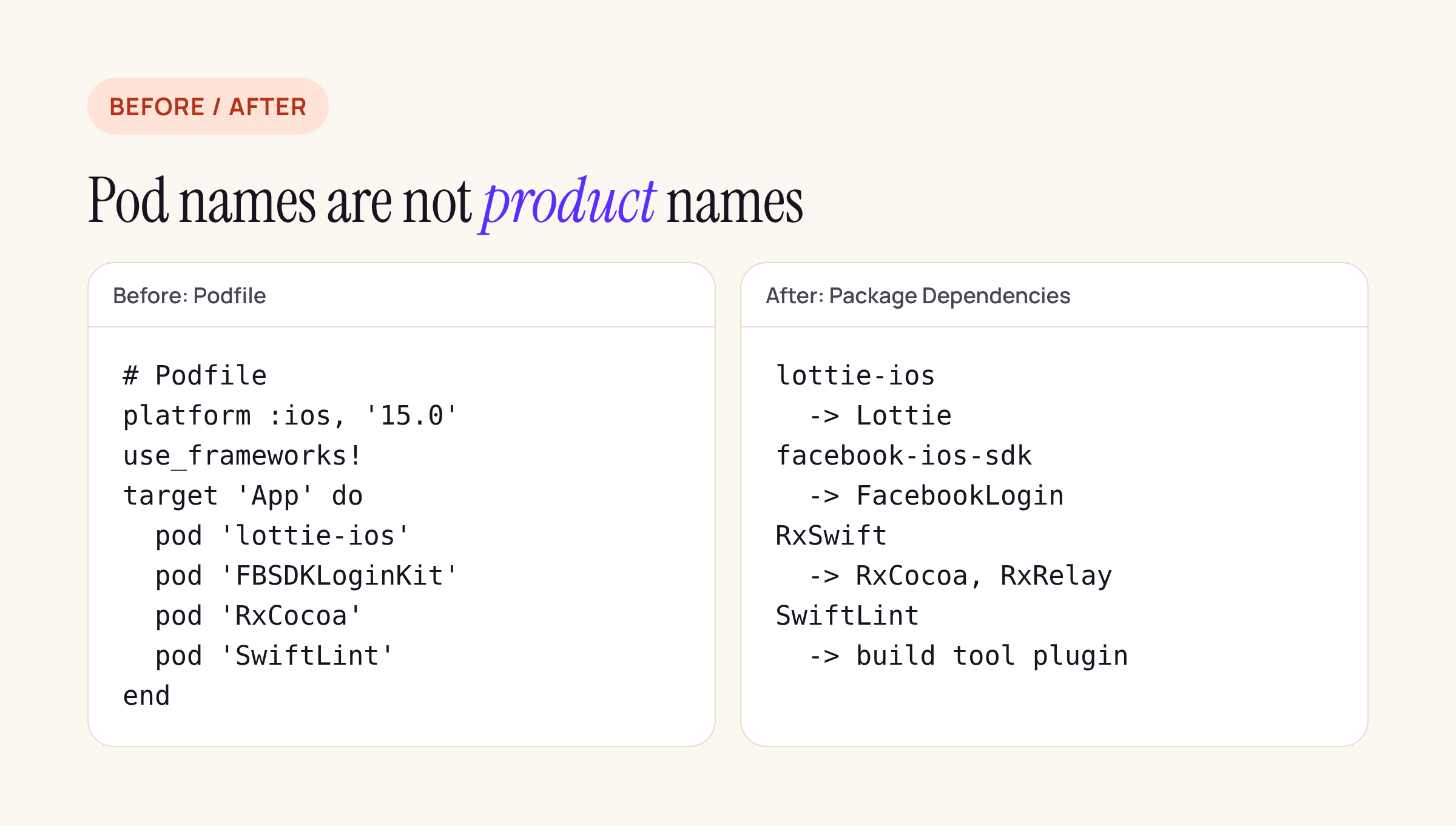
Four pods from a Podfile and the product names they become in Xcode.
What breaks on the way
Imports. Most modules keep their names, but check the ones whose product name changed, and Objective-C pods imported through a bridging header: with packages you import the module (@import SDWebImage; or import SDWebImage), not a header path such as <SDWebImage/SDWebImage.h> through the Pods header search paths that deintegrate removed.
Resource bundles. CocoaPods copies a pod’s resources into a bundle it names in the podspec, and code (yours or the pod’s) finds it with Bundle(for:) plus a bundle name. A Swift package gets its own resource bundle and its code uses Bundle.module. Libraries that support SwiftPM handle their own lookup; any code of yours that reached into a pod’s bundle by name has to change. Google Maps is the one in our list that copies a whole GoogleMaps.bundle as a package resource.
use_frameworks! assumptions. If your Podfile had use_frameworks!, every pod was a dynamic framework. Xcode usually links a package product statically when the product does not ask for a type, so code that loaded a framework at runtime, or a test target that relied on a framework being embedded once for the app, needs a second look. This is where the -Dynamic products help.
Build phases and tools. A Run Script phase that called a tool from Pods/ (SwiftLint, R.swift, SwiftGen) breaks once Pods/ is gone. SwiftLint now ships SwiftLintBuildToolPlugin: add the package, then enable the plugin in the target’s Build Phases instead of the script.
Privacy manifests. 21 of the 25 packages either declare a PrivacyInfo.xcprivacy resource in Package.swift or ship binaries. Moya, KeychainAccess, PromiseKit and AFNetworking declare none in the package. If your privacy report relied on a manifest the pod added, check it again after the port; we covered what a missing manifest means in privacy manifests in 32 React Native libraries.
Deprecated libraries. AFNetworking’s README says “As of Jan. 17, 2023, AFNetworking is deprecated and there will be no further releases.” It has a Package.swift, but moving it is the moment to replace it.
Local pods and pods with no package
Local :path pods (Harmony and Roxas in Delta) become local packages: add a Package.swift next to the code, move the podspec’s source_files and resources into a target, and drag the folder into the Xcode project, or add it through Add Package Dependency, Add Local. Treat this as a sketch to adapt:
// swift-tools-version: 5.9
import PackageDescription

let package = Package(
  name: "Roxas",
  platforms: [.iOS(.v17)],
  products: [.library(name: "Roxas", targets: ["Roxas"])],
  targets: [
    .target(name: "Roxas",
            path: "Roxas",
            resources: [.process("Resources")])
  ]
)
Pods with no package (SMCalloutView in Delta) leave three honest options: vendor the source into a local package as above (check the license), replace the library, or keep CocoaPods for that one pod. CocoaPods can still install it after 2 December from the read-only trunk, and the two tools can live side by side, but you then keep an Xcode workspace and pod install in your build for a library that will not get updates.
Checklist for your own app
- Run the script on your
Podfile.lockwith your pods inREPOS. - List every product you will add, and which target it goes to.
- Upgrade any pod that is “only in newer versions” in a separate change before or after the port, not in the same commit.
- Search the code for
Bundle(for:with a bundle name, header-path imports and scripts that call intoPods/. - After the port, build Release once, archive, and compare the app’s privacy report with the last CocoaPods build.
The steps above come from the CocoaPods and Apple documentation and the packages’ own manifests; clean build times and app sizes before and after depend on your project and are not part of this guide.