
react-native-screens 5.0.0-beta.1 (published to npm on 3 Nov 2026) reorganises its whole native tree. We diffed it against 4.30.1 (28 Oct 2026) on 10 Nov 2026. The takeaway: if your app only uses React Navigation, your JS imports keep working, because the 4.x API is re-exported from a new legacy folder. What can break is native code that imports screens classes on Android (they moved from com.swmansion.rnscreens to com.swmansion.rnscreens.legacy), and tab bars that use the templateSource or xcasset icon types, which 5.0 removes.
Why we did this: every one of our React Native apps, the banking apps and the TV apps included, uses react-native-screens through React Navigation, and the banking app’s tab bar uses image icons. We want to know the cost of 5.0 before it leaves beta.
How we checked
npm pack react-native-screens@4.30.1 react-native-screens@5.0.0-beta.1
mkdir a b
tar xzf react-native-screens-4.30.1.tgz -C a
tar xzf react-native-screens-5.0.0-beta.1.tgz -C b
diff -rq a/package/ios b/package/ios
Plain diff -rq is not much use here, because most files moved folders. It reports 56 iOS paths as gone and 4 new top-level folders. So we wrote a short Python script that matches files by name across the two trees and hashes them. That tells you which files only moved and which actually changed. For Android we also stripped package and import lines before comparing, to separate renames from real code changes.
Everything here is a source read in a Linux workspace. We have not built the beta in Xcode or Gradle, or run the example app on a device or simulator.
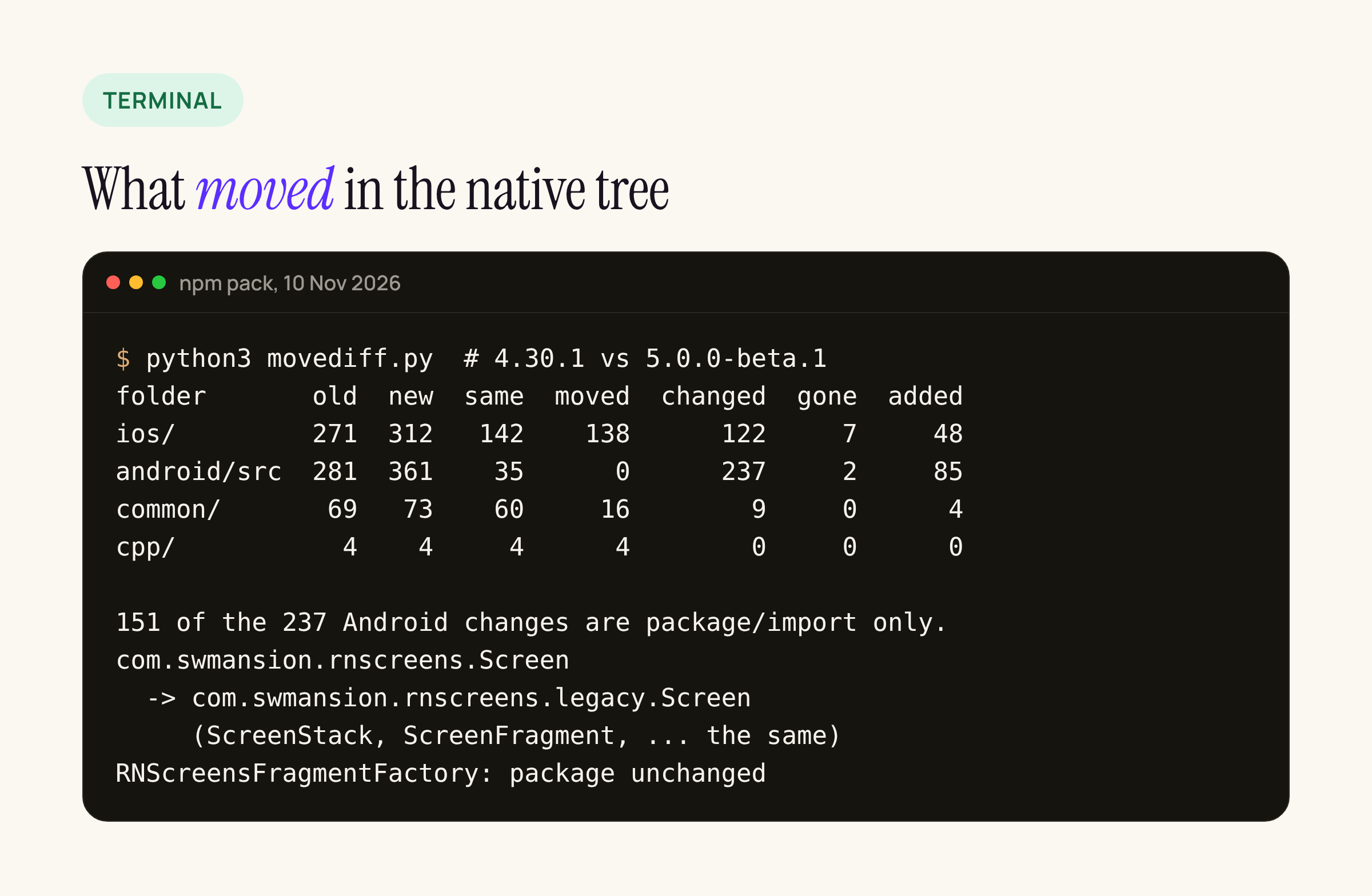
The file-matching script’s output for the four native folders.
What moved
iOS: one flat folder becomes four
In 4.30.1 most Objective-C++ sources sat directly in ios/. 5.0.0-beta.1 has four top-level folders:
ios/legacy/holds the 4.x components React Navigation uses today (RNSScreen,RNSScreenStack,RNSScreenStackHeaderConfigand so on).ios/react/holds the Fabric component views and conversions for the new components.ios/core/holds UIKit-side code that does not depend on React.ios/stack/holds the new stack’s header coordinator.
Of 271 iOS files in 4.30.1, 142 are byte-identical in 5.0, and 138 of those changed folder. 122 changed content, 7 are gone and 48 are new. The 48 new ones are mostly the contained modal (ios/react/modals/contained-modal/), form sheet conversions, and appearance mappers for the stack header and tab bar.
The podspec drops the “gamma” switch. In 4.30.1, RNS_GAMMA_ENABLED=1 turned on DEFINES_MODULE and the Swift sources. In 5.0 DEFINES_MODULE = 'YES' is always set and nothing is excluded:
# 5.0.0-beta.1, RNScreens.podspec
rnscreens_config['DEFINES_MODULE'] = 'YES'
The package also ships a Package.swift for the first time (swift-tools-version 6.0, platforms: [.iOS("15.1")]). That is for React Native’s Swift Package Manager path. The minimum iOS version in the podspec stays at 15.1.
Android: the old classes move to .legacy
The Android tree has a bigger change for anyone who touches native code. The 4.x classes moved Kotlin package:
| Class | 4.30.1 | 5.0.0-beta.1 |
|---|---|---|
Screen |
com.swmansion.rnscreens |
com.swmansion.rnscreens.legacy |
ScreenStack |
com.swmansion.rnscreens |
com.swmansion.rnscreens.legacy |
ScreenStackFragment |
com.swmansion.rnscreens |
com.swmansion.rnscreens.legacy |
ScreenStackHeaderConfig |
com.swmansion.rnscreens |
com.swmansion.rnscreens.legacy |
ScreenFragment, ScreenContainer |
com.swmansion.rnscreens |
com.swmansion.rnscreens.legacy |
RNScreensFragmentFactory |
com.swmansion.rnscreens.fragment.restoration |
unchanged |
RNScreensPackage |
com.swmansion.rnscreens |
unchanged |
Of 281 Android source files, 237 changed. 151 of those differ only in their package and import lines. The other 86 have body changes. 85 files are new, mostly under react/ and core/ for the form sheet (core/modals/formsheet/...) and stack animations (react/containers/stack/animation/StackAnimationMapper.kt). Two old files are gone: TabsScreenDelegate.kt and CustomBottomNavigationView.kt.
The good news for most apps: the line the README tells you to put in MainActivity does not change.
import com.swmansion.rnscreens.fragment.restoration.RNScreensFragmentFactory

override fun onCreate(savedInstanceState: Bundle?) {
    supportFragmentManager.fragmentFactory = RNScreensFragmentFactory()
    super.onCreate(savedInstanceState)
}
What breaks is any of your own Kotlin or Java that imports com.swmansion.rnscreens.Screen or its siblings, for example a custom native module that finds the current screen fragment. Those imports need .legacy added.
We checked whether other libraries reach into these classes. In the 28 React Native packages we had unpacked for today’s Android 17 orientation audit, no Kotlin or Java file imports com.swmansion.rnscreens. Reanimated 4.7.1 refers to screens on iOS by component name ("RNSScreen", "RNSScreenStack") and by a selector check, not by import. The class names did not change, so that path should still match. We have not built Reanimated against the beta to confirm it.
What changed in the JS surface
src/index.tsx in 5.0 starts with export * from './legacy'. The legacy folder exports the same components as 4.30.1’s index (ScreenContainer, ScreenStack, ScreenStackItem, SearchBar, FullWindowOverlay, ScreenFooter, ScreenContentWrapper, useTransitionProgress). Then it adds the new components:
export * from './legacy';
export * from './components/tabs';
export * from './components/stack';
export * from './components/split';
export * from './components/scroll-view-marker';
export * from './components/modals/form-sheet';
export * from './components/modals/contained-modal';
The new stack, form sheet and contained modal are opt-in. React Navigation’s native stack keeps using the legacy components until it is updated.
The tab icon break
The native bottom tabs (TabsScreen) lost two iOS icon types. In 4.30.1, TabsScreen.ios.tsx accepted sfSymbol, imageSource, templateSource and xcasset. In 5.0.0-beta.1 it accepts sfSymbol and imageSource only, and any other type throws:
[RNScreens] Incorrect icon format for iOS. You must provide `sfSymbol` or `imageSource`.
imageSource gains a renderingMode of default, template or original, named after UIImage.RenderingMode. A templateSource icon becomes an imageSource with renderingMode: 'template'. An xcasset icon needs a new source: an SF Symbol, or the image bundled through require().
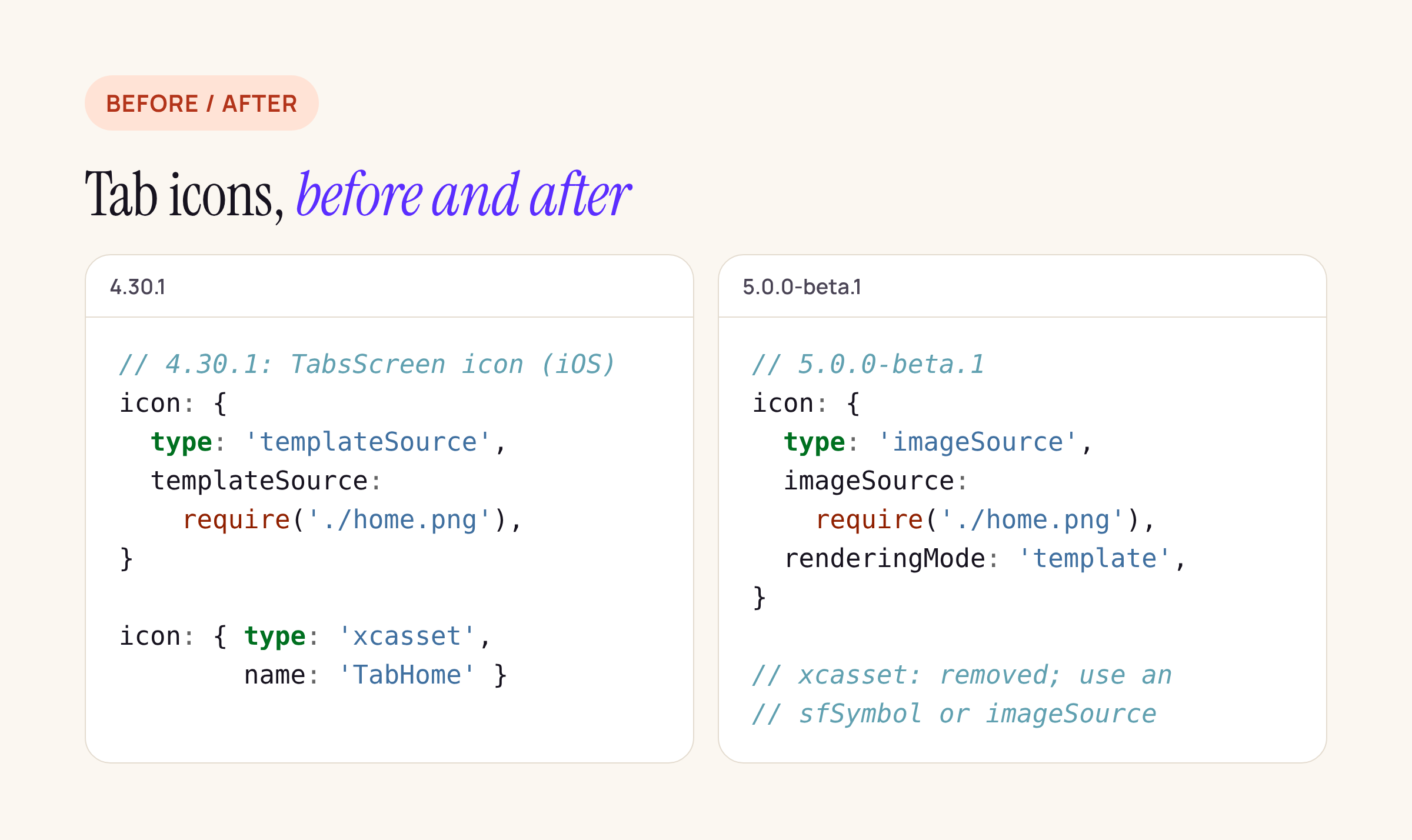
The two removed icon types and the 5.0 replacement.
iOS 27 APIs in the new code
The new native code wraps iOS 27 UIKit APIs behind @available(iOS 27.0, *) checks. On older iOS versions it logs a warning instead:
| Prop | UIKit API it sets | File (5.0.0-beta.1) |
|---|---|---|
minimizationBehavior |
UIBarMinimizationBehavior (automatic, never, onScrollDown, onScrollUp) |
ios/react/containers/stack/conversion/RNSConversions-Stack.mm |
restorationBehavior |
UIBarMinimizationRestorationBehavior (automatic, atScrollEdge) |
same |
safeAreaAdjustment |
UIBarMinimizationSafeAreaAdjustment (automatic, enabled, disabled) |
same |
tabBarSidebarPreferredPlacement |
UITabBarController.sidebar.preferredPlacement |
ios/react/containers/tabs/host/RNSTabsHostComponentView.mm |
prominentScreenKey |
prominent tab on the tab bar controller | same |
The three bar minimisation props are not new to 5.0. 4.30.1 already had them in RNSScreenStackHeaderConfig.mm, which is now ios/legacy/. 5.0 adds them to the new stack header too. The guards use RNS_IPHONE_OS_VERSION_AVAILABLE(27_0), so the code only compiles against the iOS 27 SDK. Building with Xcode 26 skips it.
What to change, step by step
- Wait for React Navigation if you only use it through
@react-navigation/native-stackandbottom-tabs. Check that its peer range accepts 5.x before you bump. - Grep your native code for
com.swmansion.rnscreens.and add.legacyto every class import exceptRNScreensFragmentFactoryandRNScreensPackage. - Grep your JS for
templateSourceand'xcasset'in tab options. Move them toimageSourcewith arenderingMode, or tosfSymbol. - Run
pod installand look for errors from code that relied on the old flatios/header layout.DEFINES_MODULEis now always on. - Build Android and fix any
Unresolved referenceerrors against the old package. - Test on a device, which we have not done: tab bar icons in light and dark mode, the stack header on iOS 27, and back navigation on Android.
Not run yet
This post covers what the source diff shows. We have not built 5.0.0-beta.1 into an app, run its example app, or checked the release notes’ claims about Liquid Glass form sheets and Android transition presets at runtime. When the banking app moves, we will add the build errors we hit and how long the move took.