Once your app targets Android 17 (API 37), a portrait lock stops working on any display with a smallest width of 600dp or more: tablets, unfolded foldables and desktop windows. The Android 16 opt-out is gone. What to do first: search your own AndroidManifest.xml and your JS for orientation locks, then make the screens that matter lay out by window size. We checked where locks come from in a React Native app by reading the android/ sources of 29 npm packages and two project templates on 10 Nov 2026. Library manifests set no locks at all. Five libraries set requestedOrientation at runtime, and the Expo default template writes portrait into your manifest for you.
Why we did this: Peepal, Shopkeeper and our banking apps are portrait-locked phone apps today, and all of them move to targetSdk 37 next. Our targetSdk 36 to 37 post covered this in one row; this post goes deeper.
What Android 17 ignores
From Android’s restrictions ignored on large screens page (updated 28 Oct 2026) and the Android 17 behavior changes page (updated 31 Oct 2026):
| What | On sw600dp+ when targeting API 37 | Source |
|---|---|---|
android:screenOrientation |
Ignored for portrait, reversePortrait, sensorPortrait, userPortrait, landscape, reverseLandscape, sensorLandscape, userLandscape | ff-restrictions-ignored |
setRequestedOrientation() / getRequestedOrientation() |
Same values ignored | ff-restrictions-ignored |
android:resizeableActivity="false" |
No effect | ff-restrictions-ignored |
android:minAspectRatio, android:maxAspectRatio |
No effect; the app fills the window, no pillarboxing | ff-restrictions-ignored |
| Android 16 developer opt-out | Not available for apps targeting API 37 | behavior-changes-17 |
| Exceptions | Games (by android:appCategory), users who pick the app default in the device’s aspect ratio settings, screens under sw600dp |
ff-restrictions-ignored |
| How to test | App compatibility framework with the UNIVERSAL_RESIZABLE_BY_DEFAULT compat flag |
ff-restrictions-ignored |
Phones are not affected. A Pixel-sized phone keeps your portrait lock. The change hits the same APK when it runs on a tablet or an open foldable.
Where orientation locks come from in an RN app
There are three places a lock can live:
- Your app manifest.
android:screenOrientationonMainActivity, often added years ago. - Library manifests, merged into yours at build time.
- Runtime calls from JS through a native module that sets
activity.requestedOrientation.
We packed the current release of each package with npm pack, unpacked it, and grepped its android/ folder for screenOrientation, resizeableActivity, minAspectRatio, maxAspectRatio and requestedOrientation. The list covers the libraries most likely to touch orientation (orientation lockers, video, camera, scanners, pickers, splash, modal, webview, PDF) plus the ones every app has (screens, safe-area, gesture-handler, reanimated).
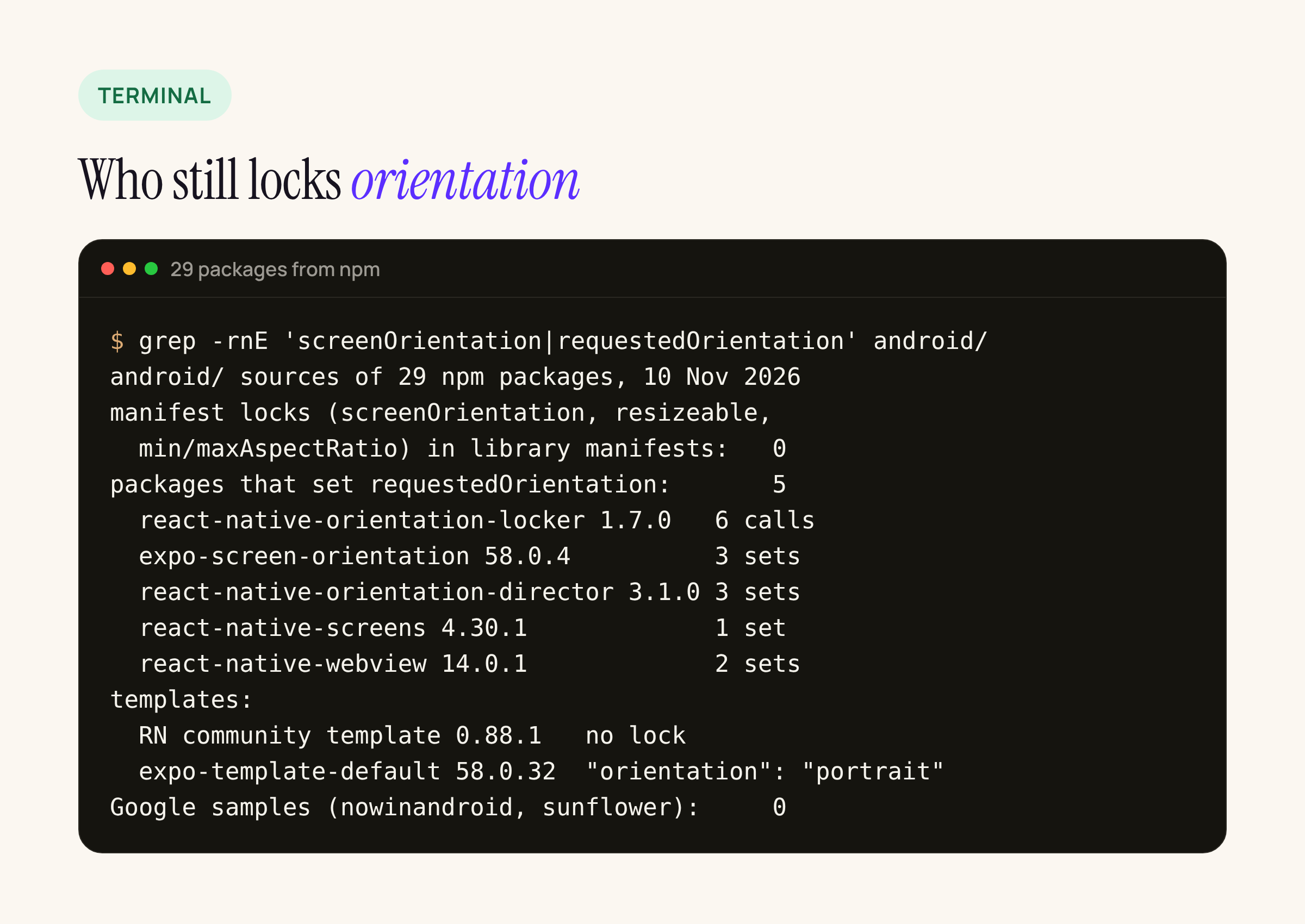
The grep summary from the cloud workspace, 10 Nov 2026.
Result 1: no library manifest sets a lock
Only three of the library manifests declare activities at all (expo-image-picker 58.0.10 and react-native-image-crop-picker 0.52.0, plus an example app inside react-native-orientation-locker). None of them sets screenOrientation, resizeableActivity or an aspect ratio. So the manifest merger is not where your lock comes from. If your merged manifest has one, it is yours.
Result 2: five libraries lock at runtime
| Package (version) | File | What it does |
|---|---|---|
| react-native-orientation-locker 1.7.0 | OrientationModule.java lines 176-312 |
lockToPortrait(), lockToLandscape() and friends call setRequestedOrientation (6 calls) |
| expo-screen-orientation 58.0.4 | ScreenOrientationModule.kt lines 38, 45, 79 |
lockAsync and lockPlatformAsync set requestedOrientation |
| react-native-orientation-director 3.1.0 | OrientationDirectorModuleImpl.kt lines 102, 125, 132 |
lock and unlock set requestedOrientation |
| react-native-screens 4.30.1 | ScreenWindowTraits.kt line 79 |
the per-screen screenOrientation option maps to SENSOR_PORTRAIT, SENSOR_LANDSCAPE and so on |
| react-native-webview 14.0.1 | RNCWebViewManagerImpl.kt |
sets UNSPECIFIED for HTML5 fullscreen video, then restores the old value |
On a phone these all behave as before. On a large screen under API 37, the portrait and landscape values they pass are ignored, per the table above. The webview case is harmless: it sets UNSPECIFIED, which is not in the ignored list. The react-native-screens case matters if you use screenOrientation: 'portrait' on a stack screen to keep, say, a PIN pad upright. On a tablet that screen will rotate.
The screens mapping, from Screen.kt in 4.30.1:
"portrait" -> ActivityInfo.SCREEN_ORIENTATION_SENSOR_PORTRAIT
"landscape" -> ActivityInfo.SCREEN_ORIENTATION_SENSOR_LANDSCAPE
"landscape_left" -> ActivityInfo.SCREEN_ORIENTATION_REVERSE_LANDSCAPE
else -> ActivityInfo.SCREEN_ORIENTATION_UNSPECIFIED
Result 3: the Expo template locks for you
The React Native community template 0.88.1 has no lock. Its MainActivity declares configChanges that already include orientation|screenLayout|screenSize|smallestScreenSize.
The Expo default template 58.0.32 ships "orientation": "portrait" in app.json. At prebuild, @expo/config-plugins 58.0.12 (build/android/Orientation.js) writes it into the main activity:
mainActivity.$[SCREEN_ORIENTATION_ATTRIBUTE] = orientation !== 'default' ? orientation : 'unspecified';
So every app started from that template carries android:screenOrientation="portrait", and on API 37 that line does nothing on a tablet.
Google’s own samples
We also cloned two of Google’s sample apps and ran the same grep: nowinandroid (commit 2982e63, 20 Oct 2026, 26 manifests) and sunflower (last commit Aug 2024, 2 manifests). Zero hits in either. Google’s reference apps never lock orientation and lay out from window size classes instead.
What to change, step by step
- Find the locks. Grep your manifest and
app.jsonforscreenOrientationandorientation. In JS, look forlockToPortrait,lockAsync,lockToandscreenOrientation:in navigator options. - Keep the lock for phones if you want it. The lock still works under sw600dp, so you do not have to remove it to keep phone behaviour. Removing it only tidies the manifest.
- Make large-screen layouts use the window, not the rotation. Read
useWindowDimensions()in JS, or window size classes in Compose, and switch to a two-pane or centred layout above 600dp. - Save state across re-creation. Rotation on a tablet now re-creates the activity where it did not before, unless
configChangescovers it. The RN template covers it; native Kotlin screens may not. - Check the camera preview. The Android page warns that previews can come out stretched, rotated or cropped. Our banking apps scan cheques and QR codes, so this is the one we expect to bite.
- Test with the compat flag before you raise targetSdk (below).
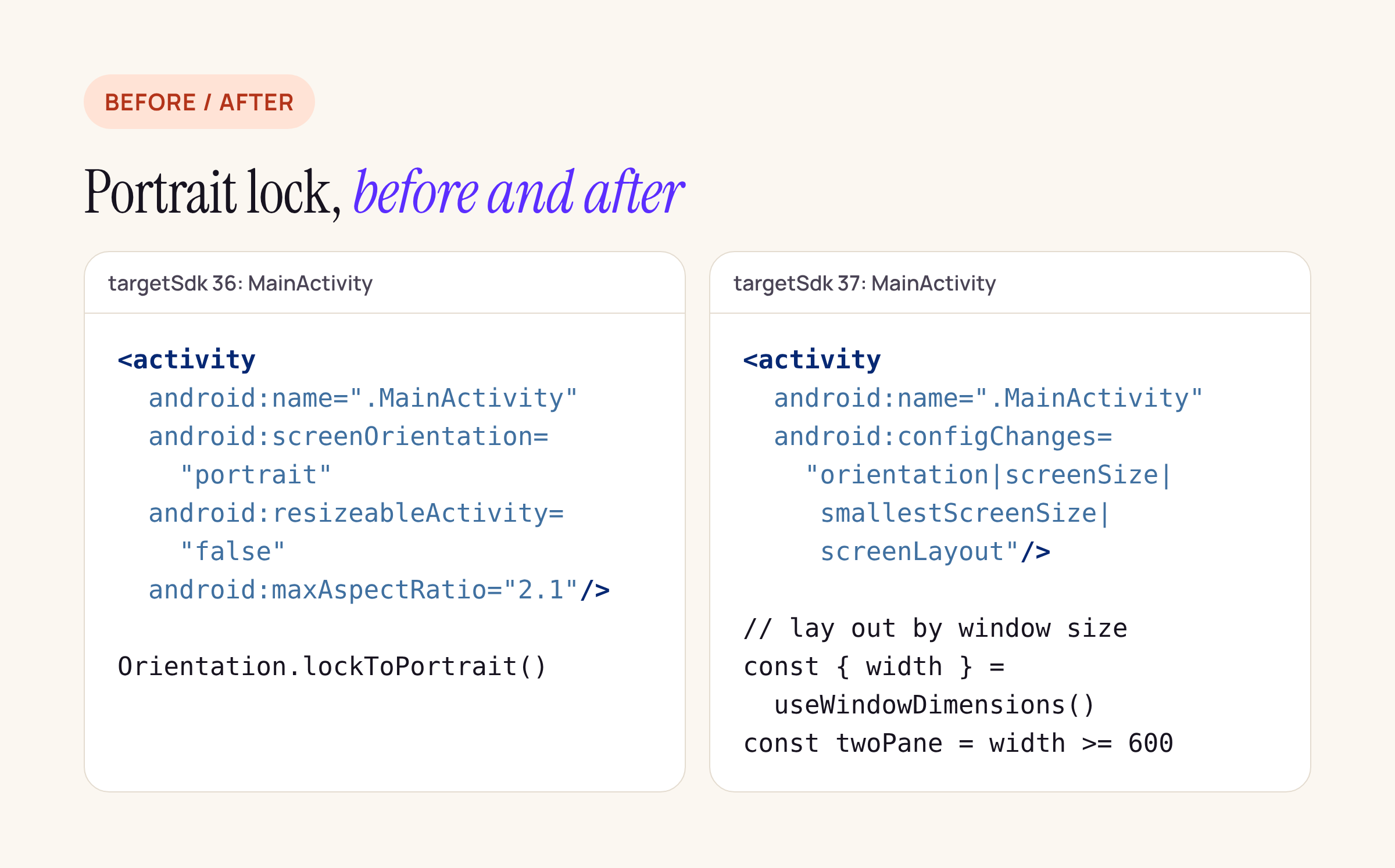
Left: a typical portrait-locked activity. Right: what we plan to ship on targetSdk 37.
What we have not run yet
None of this was run on a tablet, a foldable or an emulator. This workspace has no Android SDK. The audit is a source read of npm packages and two GitHub repos. The next step for our apps is an emulator run on a tablet AVD with UNIVERSAL_RESIZABLE_BY_DEFAULT turned on for Peepal, Shopkeeper and the banking app, checking the PIN pad, the camera screens and any modal that assumes a tall phone.
Checklist for our apps
MainActivity:screenOrientationcan stay for phones, but nothing may depend on it above 600dp.- Stack screens with
screenOrientationin react-native-screens: list them and design their tablet layout. - Camera and scanner screens: check preview aspect on a tablet AVD.
- Forms: make sure state survives a rotation (
onSaveInstanceStatein native screens, persisted state in JS). - Modals sized with fixed heights: switch to percentage or max-width.