

If you add the usual one-liner location ~* /wp-content/uploads/.*\.php$ { deny all; } to an nginx vhost by pasting it at the bottom of the server block, it does nothing: a .php file in uploads still runs. nginx checks regex locations in the order they appear and stops at the first match, so the existing location ~ \.php$ wins. We tested four variants on nginx 1.24.0 and PHP-FPM 8.3.6 in a Linux container on 5 Nov 2026. The one that held is a ^~ prefix block for /wp-content/uploads/ with a nested deny for every PHP-like extension, placed above the PHP location.
Why we did this: the Paperkite rebuild runs on our own CloudPanel VPS behind nginx, and CloudPanel’s WordPress vhost does not deny script execution in uploads by default. The Bricksforge exploitation in October is the latest reminder of why that matters.
Why uploads is the folder to lock down
CVE-2026-85097 in the Bricksforge plugin (CVSS 10.0, versions up to 3.1.8.9, fixed in 3.1.8.10) has been exploited in the wild since 7 October, according to Patchstack’s numbers reported by The Hacker News: automated attempts from 63 IPs that push a file through the plugin’s form endpoint, get it past the image check, and end up with a .php file inside wp-content/uploads. The plugin bug is specific, but the last step is the same in most WordPress upload RCEs: a file lands in uploads and the web server hands it to PHP.
Patching the plugin closes this hole. A server rule that refuses to run anything from uploads closes the whole class, including the next plugin that gets it wrong. WordPress itself never needs to execute PHP from that folder.
The test setup
We built a minimal WordPress-shaped document root with a CloudPanel-style PHP location (try_files $uri =404, PHP-FPM over a Unix socket) and put harmless probe files in wp-content/uploads/2026/11/. Each probe contains one line, <?php echo "PHP-EXECUTED";, so a response body tells us whether PHP ran or nginx served the file as text. No real payloads, no image polyglots: a text file named like an image is enough to test the server rules.
P=/wp-content/uploads/2026/11
for f in probe.php probe.PHP probe.php5 probe.phtml probe.phar photo.gif readme.txt "readme.txt/x.php"; do
  code=$(curl -s -o /tmp/b -w "%{http_code}" "http://localhost:8080$P/$f")
  grep -q '^PHP-EXECUTED' /tmp/b && ran=EXECUTED || ran=no
  printf "%-18s %s  %s\n" "$f" "$code" "$ran"
done
The four configs:
- A: no rule, only the CloudPanel-style
location ~ \.php$. - B: the common one-liner appended after the PHP location.
- D: the same one-liner placed before the PHP location.
- C: a
^~ /wp-content/uploads/prefix block with a nested deny, placed before the PHP location.
What happened
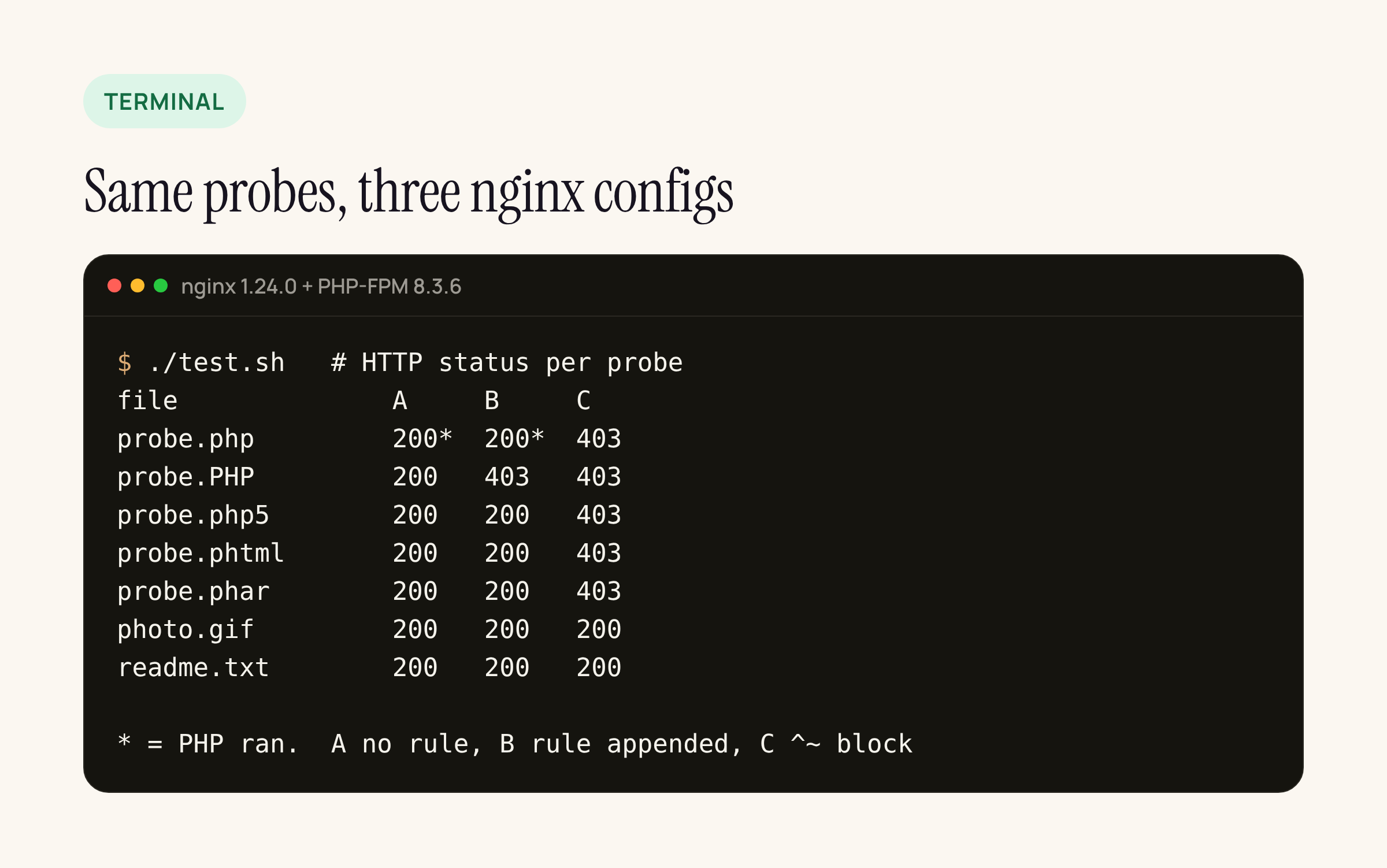
Real output from the container; an asterisk means the PHP in the probe executed.
A (no rule): probe.php executed. Everything else came back 200 as plain text, because the default PHP location is case-sensitive and only matches .php. That is not code execution, but it does mean anyone can download the source of a .phtml or .PHP file someone dropped there.
B (rule appended): probe.php still executed. The appended rule only caught probe.PHP, because the case-insensitive ~* matches .PHP and the case-sensitive PHP location does not. This is the trap: a quick curl -I on an uppercase file returns 403 and looks like proof the rule works.
D (rule moved above the PHP block): probe.php and probe.PHP returned 403, and so did readme.txt/x.php. That is the fix most guides intend, and it works for .php. .php5, .phtml and .phar were still served as text with a 200.
C (^~ block): every PHP-like extension returned 403, and probe.php/x (a path-info style request) returned 403 as well. Images and text files were still served with 200, so media keeps working.
The rule that held
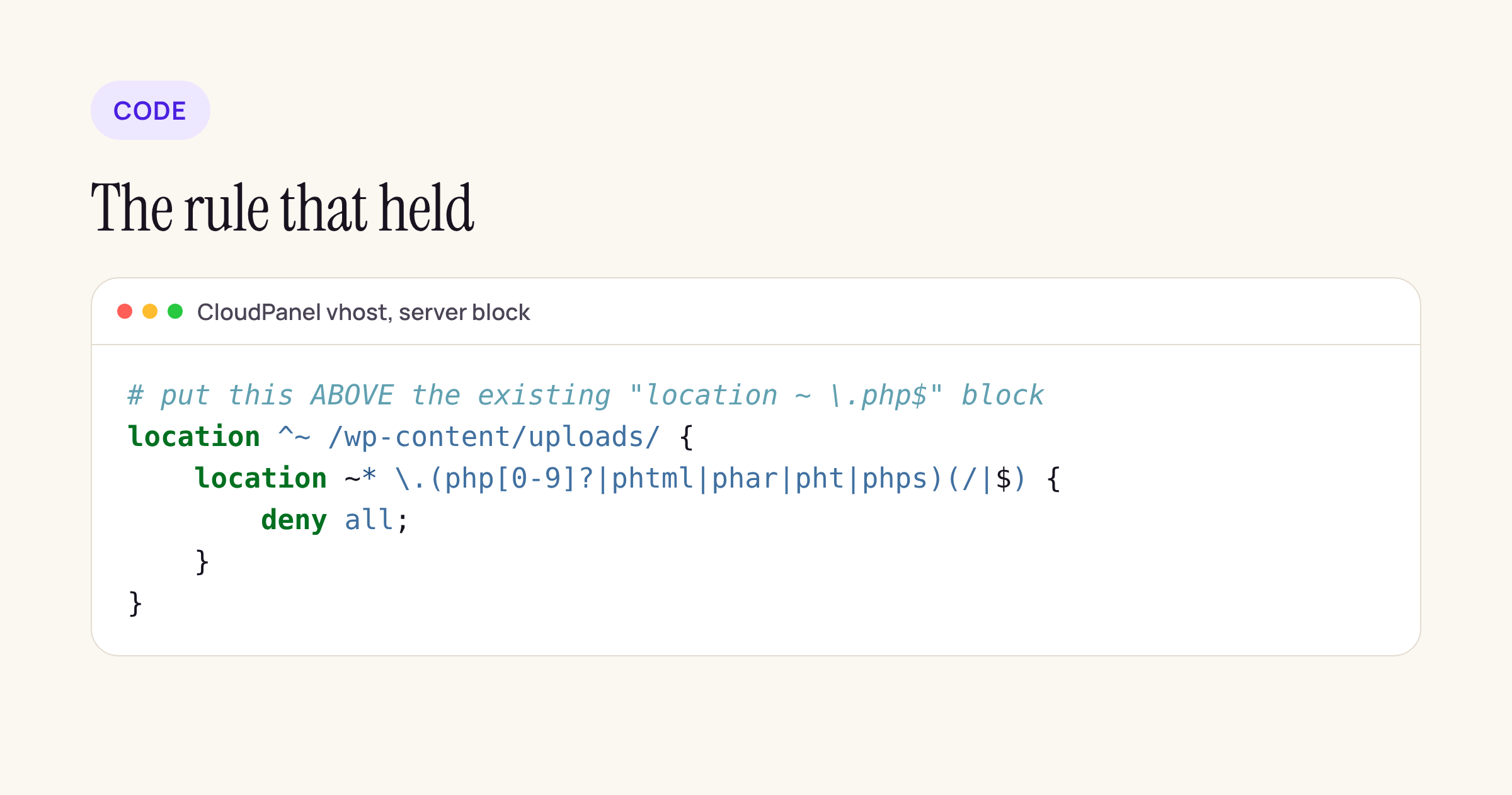
Paste it above the existing location ~ \.php$ block in the site’s vhost (in CloudPanel: Sites, the site, Vhost).
location ^~ /wp-content/uploads/ {
    location ~* \.(php[0-9]?|phtml|phar|pht|phps)(/|$) {
        deny all;
    }
}
Why it works regardless of where the other regex locations sit: ^~ tells nginx that when this prefix is the longest match, it must not go on to check the server-level regex locations at all. Requests under uploads are handled only by this block and its nested regex. Anything that matches the nested regex is denied; everything else falls through to static file serving.
Two side effects to know about:
- Some plugins drop an
index.phpcontaining// Silence is golden.into uploads subfolders to stop directory listings. With this rule those return 403 instead of an empty page, which does the same job. - If a plugin you rely on genuinely serves PHP from uploads (rare, and a design smell), this rule will break it. Test the plugin’s front-end feature after reloading nginx.
After editing, check and reload, then confirm with a probe of your own:
nginx -t && systemctl reload nginx
echo '<?php echo "PHP-EXECUTED";' | sudo -u www-data tee /path/to/wp-content/uploads/probe.php >/dev/null
curl -s -o /dev/null -w "%{http_code}\n" https://example.com/wp-content/uploads/probe.php   # expect 403
rm /path/to/wp-content/uploads/probe.php
Finding PHP that is already in uploads
A deny rule stops new files from running, but it does not tell you whether something landed before you added it. This read-only scanner lists every file under uploads that contains a PHP open tag, separates the “Silence is golden” stubs from everything else, and exits 1 if anything suspect turns up, so it can run from cron.
#!/bin/bash
# uploads-scan.sh: list files under wp-content/uploads that contain PHP open tags. Read-only.
dir="${1:?usage: uploads-scan.sh /path/to/wp-content/uploads}"
found=0
while IFS= read -r -d '' f; do
  if grep -qiE '<\?(php|=)' "$f"; then
    if grep -qi 'silence is golden' "$f" && [ "$(wc -c <"$f")" -lt 200 ]; then
      kind="stub"
    else
      kind="SUSPECT"; found=$((found+1))
    fi
    printf '%-8s %-12s %s\n' "$kind" "$(file -b --mime-type "$f")" "${f#$dir/}"
  fi
done < <(find "$dir" -type f -size -5M -print0)
echo "suspect files: $found"
[ "$found" -eq 0 ]
On the test tree (one stub, seven probe files including two text files named .gif) it flagged all seven and passed the stub, in 0.07 seconds:
stub     text/x-php   index.php
SUSPECT  text/x-php   2026/11/probe.PHP
SUSPECT  text/x-php   2026/11/probe.phar
SUSPECT  text/plain   2026/11/photo.gif
SUSPECT  text/x-php   2026/11/probe.phtml
SUSPECT  text/x-php   2026/11/probe.php5
SUSPECT  text/plain   2026/11/photo.php.gif
SUSPECT  text/x-php   2026/11/probe.php
suspect files: 7
Note the photo.gif lines: file calls them text/plain, so a scanner that only checks MIME types against the extension would miss a PHP payload hidden behind a fake image header. Searching for the open tag catches both.
What we did not test
These results come from a container with stock Ubuntu nginx 1.24.0 and PHP-FPM 8.3.6 and a vhost modelled on CloudPanel’s WordPress template, not from our production box on PHP 8.5. The location-matching behaviour is nginx’s, not PHP’s, so the version of PHP should not change the outcome, but run the probe above on your own server before you trust it.
Sources: The Hacker News on Bricksforge exploitation (12 Oct 2026), SecurityWeek, nginx location documentation.