When wordpress.org closes a plugin, every site that already has it keeps running it, and the dashboard shows no warning. The fix is a weekly check: feed your plugin list to the directory’s own JSON endpoint and fail the job when anything comes back closed. Below is the 40-line PHP script we wrote for that, tested on 4 Nov 2026 with PHP 8.3.6 on Ubuntu 24.04 against wordpress.org’s live plugin endpoint, and run against our own site.
Why we did this: we look after WordPress sites for clients and run our own on the Paperkite plugin. CryptoPayment Gateway was closed on 28 Aug 2026 for a security issue (CVE-2026-81648, CVSS 10, missing authorization in its AJAX router, no fixed version named), and nothing in WordPress would have told an owner who still had it installed.
What the directory tells you
The plugin directory has a public JSON endpoint, https://wordpress.org/plugins/wp-json/plugins/v1/plugin/<slug>. For a live plugin it returns the version, last_updated, tested and more. For a closed one it returns a short record:
curl -s https://wordpress.org/plugins/wp-json/plugins/v1/plugin/cryptopayment-gateway
{"error":"closed","name":"CryptoPayment Gateway","slug":"cryptopayment-gateway",
 "description":"This plugin has been closed as of August 28, 2026 and is not available for download. Reason: Security Issue.",
 "closed":true,"closed_date":"2026-08-28","reason":"security-issue","reason_text":"Security Issue"}
A slug that was never in the directory (a premium plugin, your own code) returns HTTP 400 with rest_invalid_param. That gives three useful states: closed, not listed, and listed with a last-updated date.
The script
It reads JSON on stdin, either wp plugin list --format=json (WP-CLI gives name) or the response of GET /wp-json/wp/v2/plugins (REST gives plugin as dir/file), and prints one line per plugin. Exit code 2 means at least one closed plugin, 1 means stale only, 0 means clean, so cron or CI can act on it.
<?php
// closed-plugins.php: flag installed plugins that wordpress.org has closed,
// never listed, or not updated in 2 years. Exit: 0 fine, 1 stale, 2 closed.
$rows = json_decode(stream_get_contents(STDIN), true) ?: [];
$staleDays = 730;
$worst = 0;
printf("%-28s %-9s %-12s %s\n", 'SLUG', 'STATUS', 'FLAG', 'DETAIL');
foreach ($rows as $r) {
    $slug = isset($r['plugin']) ? dirname($r['plugin']) : $r['name'];
    if ($slug === '.' || $slug === '') { $slug = basename($r['plugin'] ?? $r['name'], '.php'); }
    $ch = curl_init('https://wordpress.org/plugins/wp-json/plugins/v1/plugin/' . rawurlencode($slug));
    curl_setopt_array($ch, [CURLOPT_RETURNTRANSFER => true, CURLOPT_TIMEOUT => 20,
        CURLOPT_USERAGENT => 'closed-plugins-check/1.0']);
    $body = curl_exec($ch);
    $code = curl_getinfo($ch, CURLINFO_RESPONSE_CODE);
    curl_close($ch);
    $info = json_decode((string) $body, true) ?: [];
    if (!empty($info['closed'])) {
        $flag = 'CLOSED';
        $detail = sprintf('since %s, reason: %s', $info['closed_date'] ?? '?',
            $info['reason_text'] ?? $info['reason'] ?? '?');
        $worst = 2;
    } elseif ($code === 400 || $code === 404) {
        $flag = 'NOT-LISTED';
        $detail = 'not in the directory (custom, premium or renamed): check with the vendor';
    } elseif ($code === 200 && !empty($info['last_updated'])) {
        $updated = strtotime(preg_replace('/(\d)(am|pm)/', '$1 $2', $info['last_updated']));
        $age = $updated ? (int) floor((time() - $updated) / 86400) : null;
        if ($age !== null && $age > $staleDays) { $flag = 'STALE'; $worst = max($worst, 1); }
        else { $flag = 'OK'; }
        $detail = sprintf('v%s upstream, updated %d days ago, tested up to %s',
            $info['version'] ?? '?', $age ?? -1, ($info['tested'] ?? '') ?: '?');
    } else {
        $flag = 'ERROR';
        $detail = "HTTP $code from the directory";
    }
    printf("%-28s %-9s %-12s %s\n", $slug, $r['status'] ?? '-', $flag, $detail);
}
exit($worst);
Two details. The last_updated field looks like 2026-08-18 11:42pm GMT; PHP 8.3 parsed it the same with and without a space before pm in our test, so the preg_replace is only a guard for other parsers. And some old plugins have an empty tested field, which our first run printed as a blank; the ?: turns it into a ?.
Test 1: a sample list with known answers
We built a WP-CLI style list of eight slugs whose state we had checked by hand against the directory: three current plugins, two closed ones, two that have not been updated in years and one premium plugin that was never listed.
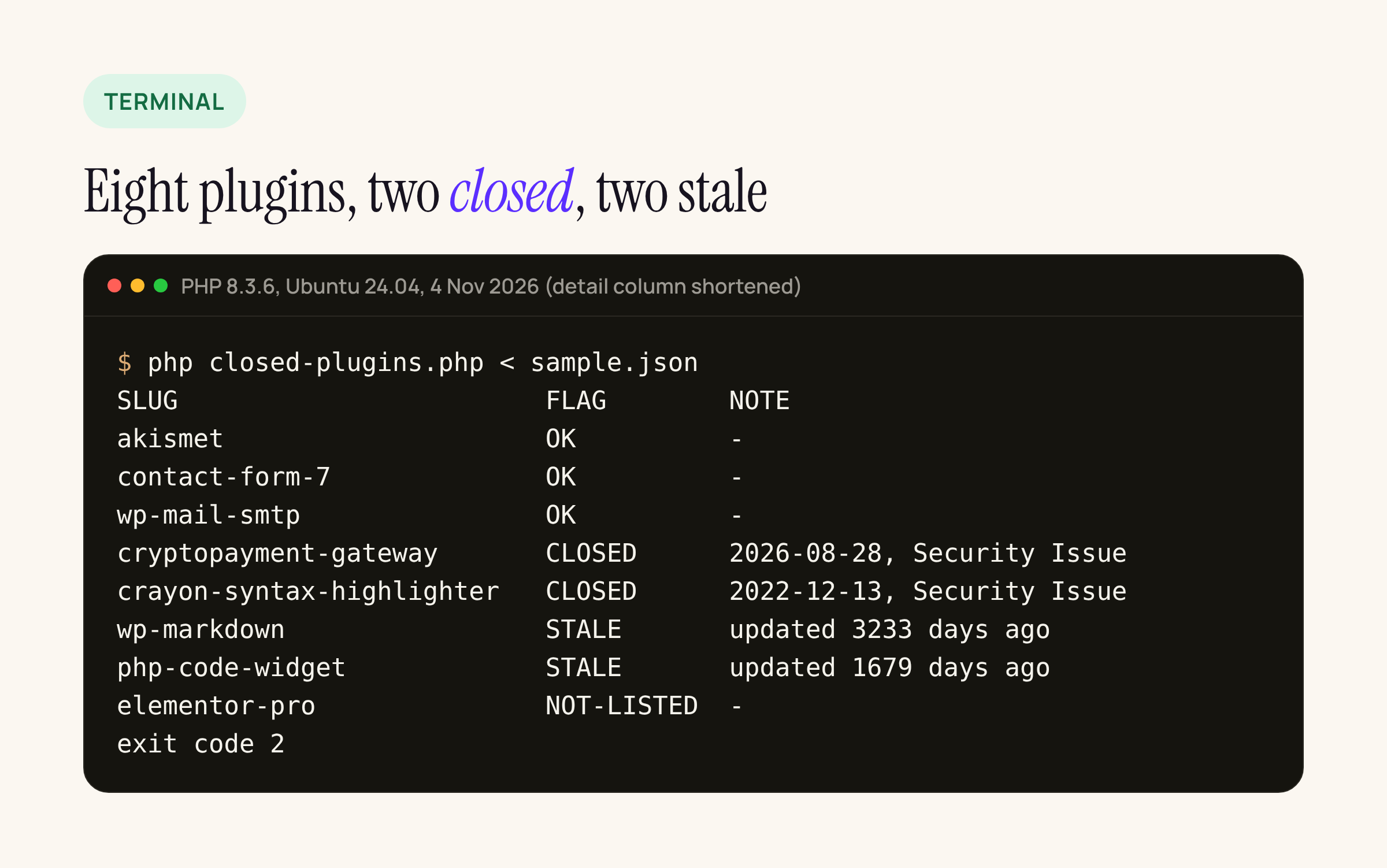
The script flagged both closed plugins, both stale ones and the premium one, and exited with code 2. Eight lookups took 2.2 seconds.
The full lines carry more than the image shows. For example, crayon-syntax-highlighter was closed on 2022-12-13 for a security issue, and wp-markdown was last updated 3,233 days ago with no “tested up to” value at all. A closed plugin that is still active is the urgent case. Inactive is not a pass either: the files stay on disk, so delete it rather than leave it switched off.
Test 2: our own site
Our site runs two plugins, because the Paperkite rebuild replaced about twenty. We read the list over the REST API with an application password and piped it in:
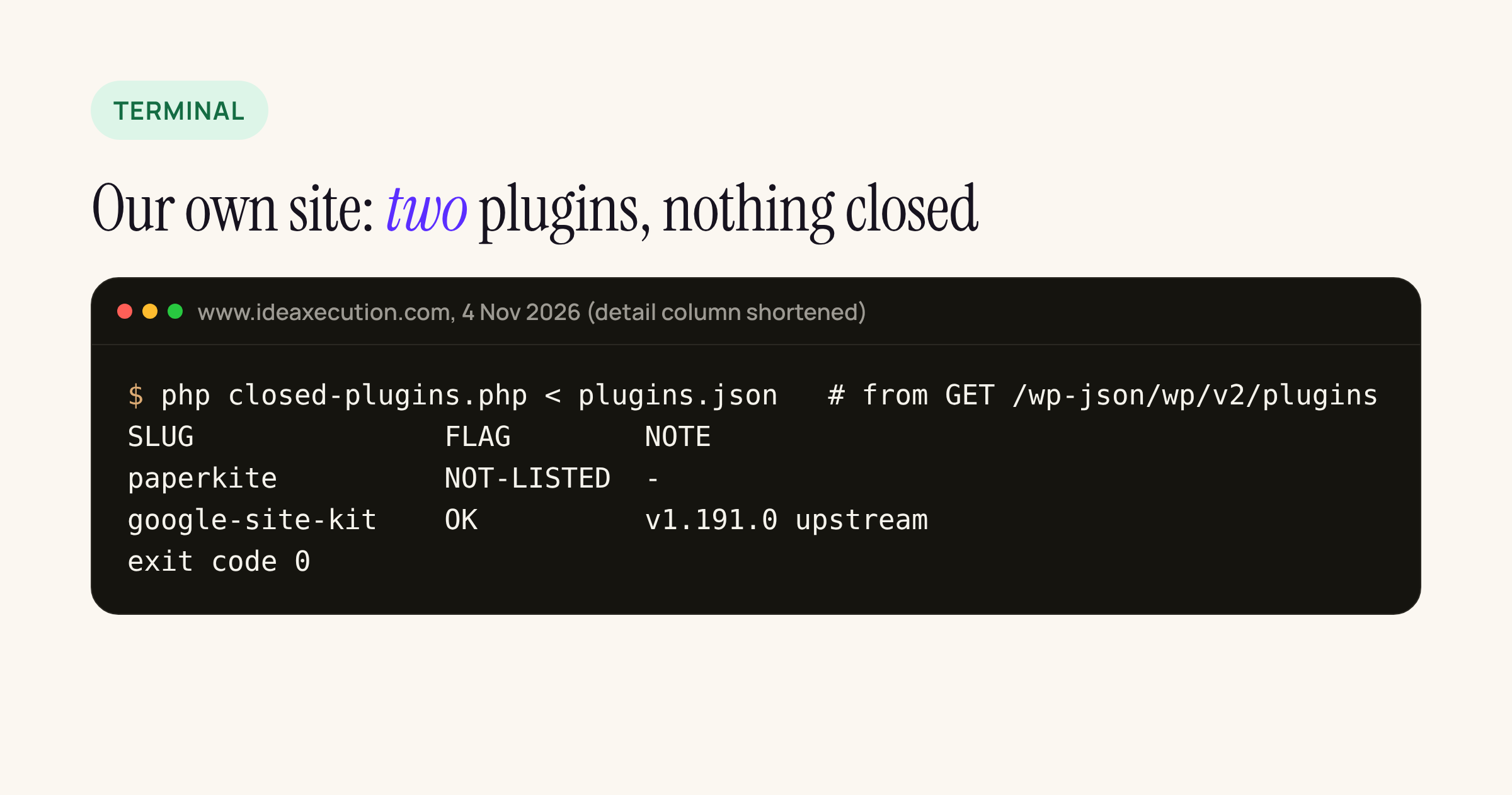
paperkite is ours, so NOT-LISTED is expected. google-site-kit is current upstream at 1.191.0, released a day earlier; the site had 1.190.0, so the check doubles as a cheap “updates waiting” hint. Exit code 0.
Running it weekly
On a server with WP-CLI, one line per site in the crontab of the site user:
# Mondays 07:15: fail loudly if any plugin on this site is closed or stale
15 7 * * 1 cd /home/site/htdocs && wp plugin list --format=json | php /home/site/bin/closed-plugins.php || echo "closed-plugins: exit $? on $(hostname)" | mail -s "Plugin check" ops@example.com
Without shell access, read the list through GET /wp-json/wp/v2/plugins with an application password from a user who can manage plugins, as we did for our own site, and pipe that JSON in instead.
What the check does not do
It only knows what wordpress.org knows. Premium plugins come back NOT-LISTED and need the vendor’s changelog or a feed such as Patchstack or Wordfence. A plugin can be open, recently updated and still vulnerable, so this sits next to a vulnerability scanner, not in place of one. And “stale” at two years is our threshold; set $staleDays to whatever your clients will accept.
If the check finds a closed plugin with a security reason, deactivate and delete it, then look for what it may have left behind: unknown admin users, new files in wp-content/uploads with a .php extension, and scheduled events you do not recognise.