WordPress 7.1.4 (28 Oct 2026) fixes a race condition in the core upgrader that could lead to remote code execution, and it is being probed in the wild. If you run WordPress behind nginx, the takeaway is one line, and the exact form matters: location ^~ /wp-content/upgrade/ { deny all; }. The ^~ is not decoration. We tested the rule with and without it on nginx 1.24.0 and PHP-FPM 8.3.6 in a Linux container on 31 Oct 2026: a plain location /wp-content/upgrade/ prefix returns 403 for the folder itself but still hands a staged setup-config.php to PHP, because the \.php$ regex location wins. With ^~ both return 403.
We also diffed the 7.1.3 and 7.1.4 release zips to see what core actually changed, and the change is small enough to read in one sitting: 73 lines across two files.
Why we did this: the Paperkite rebuild runs on our own CloudPanel VPS behind nginx, the same box we patched for PHP2Shell. CloudPanel’s default WordPress vhost has a \.php$ location and no rule for the upgrade folder, so the first version of the deny rule we tried would have passed a casual curl -I check and still left the hole open.
What the race is
During a core update WordPress downloads the new package, unpacks the full copy into wp-content/upgrade/<package-name>/, and then copies files over the live install. That folder is inside the web root and nginx serves it like any other path. Before 7.1.4 the folder name was predictable (it came from the package file name, so wordpress-7.1.4 or similar), the cleanup step deleted the index.php that stops directory listing, and for the few seconds the copy sat there, wp-content/upgrade/<name>/wp-admin/setup-config.php was a reachable, unconfigured WordPress installer.
A PHP-level firewall or an mu-plugin cannot see that request. The staged copy bootstraps its own WordPress from its own wp-includes, with no wp-config.php and no mu-plugins, so nothing of yours runs. The block has to happen in the web server, before PHP.
The fix was reported by Umut Bayram and credited on the 7.1.4 release page as “a race condition during core updates that could lead to remote code execution”. No CVE has been assigned as of 31 Oct. Wordfence reported its firewall rule’s first hit nine minutes after the release shipped and more than 18,500 requests for staged setup-config.php paths in the first 21 hours, with no confirmed compromise. Fixed versions were backported as far as 4.7.39.
What 7.1.4 changed, from the diff
We downloaded wordpress-7.1.3.zip and wordpress-7.1.4.zip from downloads.wordpress.org and ran diff -u on the two files the release page names: wp-admin/includes/class-wp-upgrader.php (60 lines of diff) and wp-admin/includes/update-core.php (13 lines).
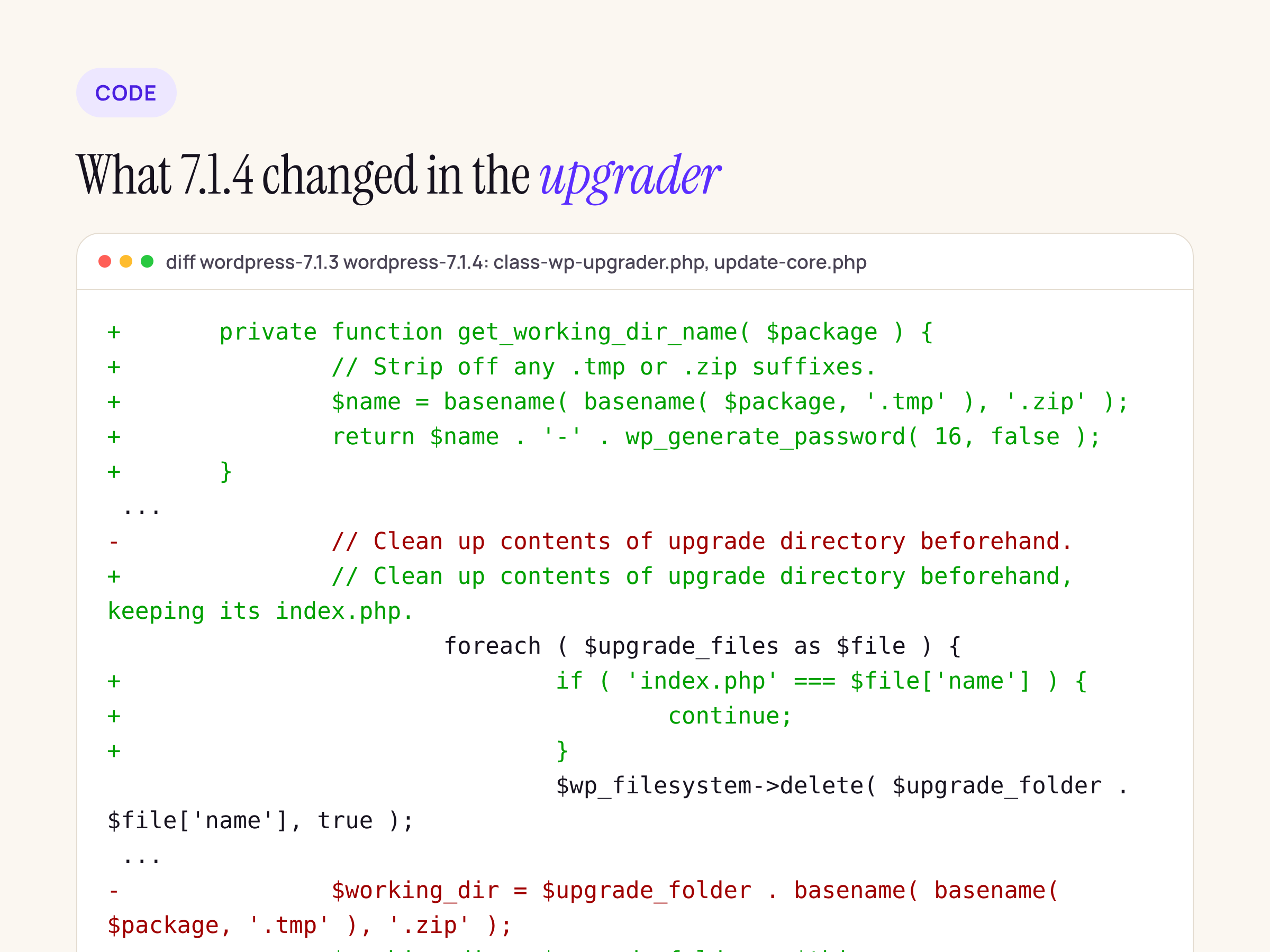
The three changes in the upgrader, trimmed from the real diff. Three defences for one race.
Three things changed:
- The working directory name is now random. A new private method
get_working_dir_name()strips.tmpand.zipfrom the package name and appendswp_generate_password( 16, false ), so the staged copy lands in something likewordpress-7.1.4-aB3kX9qLm2ZpR7wT. Sixteen alphanumeric characters are not guessable in a window of seconds. index.phpinwp-content/upgrade/survives the cleanup and is recreated if missing. The old loop deleted everything in the folder; the new one skipsindex.php, then writes a “Silence is golden” file if there is none. The code comment says why: the folder is web-served and a directory index would have revealed the random name.update-core.phpnever copies awp-config.phpout of the working directory.wp-config.phpjoinswp-contentandwp-includes/version.phpin the skip list, with the comment “could have been written to the working directory”. That closes the second half of the attack, where a config planted in the staged copy gets copied over the real one.
private function get_working_dir_name( $package ) {
    // Strip off any .tmp or .zip suffixes.
    $name = basename( basename( $package, '.tmp' ), '.zip' );

    return $name . '-' . wp_generate_password( 16, false );
}
The randomised name shrinks the attack from “poll a known URL” to “guess 16 characters”, and the kept index.php stops the listing that would have leaked the name. The web server rule is still worth adding, because it also covers the window during the update that moves you to 7.1.4, and any site stuck on an older branch.
Three nginx rules, tested against PHP-FPM
We stood up nginx 1.24.0 with PHP-FPM 8.3.6 (Ubuntu 24.04 packages), unpacked WordPress 7.1.4 as the docroot, and simulated an update in progress by creating wp-content/upgrade/wordpress-7.1.4/wp-admin/setup-config.php as a plain PHP file that prints a line. Nothing in it is an installer; it only proves whether PHP executes at that path. Then we ran three copies of the vhost on three ports: no rule, a plain prefix location, and a ^~ prefix location. Each vhost has the usual WordPress block:
location / { try_files $uri $uri/ /index.php?$args; }

location ~ \.php$ {
    include fastcgi_params;
    fastcgi_param SCRIPT_FILENAME $document_root$fastcgi_script_name;
    fastcgi_pass unix:/run/php/php8.3-fpm.sock;
}
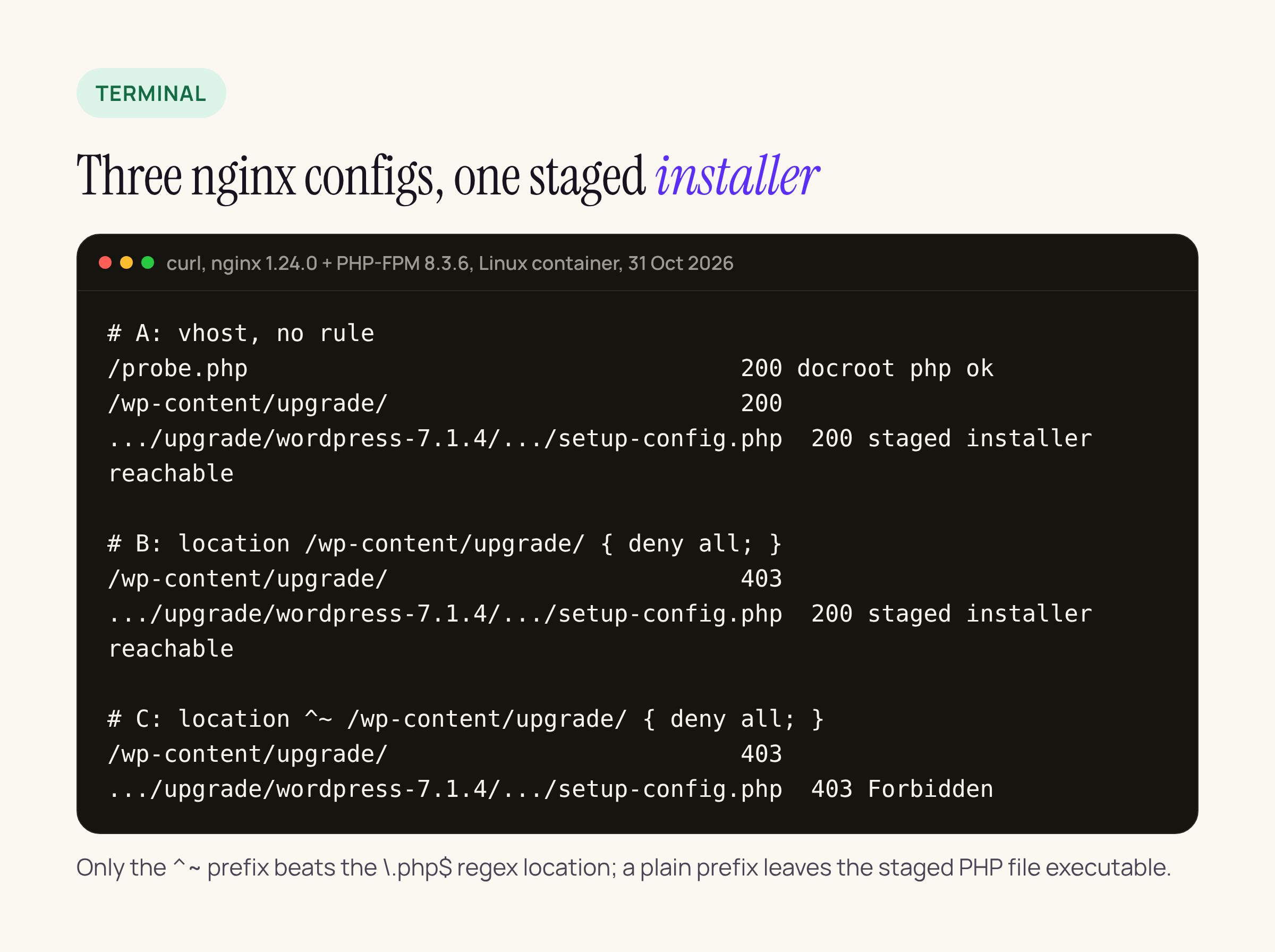
The same three requests against each vhost. Only configuration C blocks the staged PHP file.
The result that matters is B. nginx matches location blocks in a fixed order: it finds the longest matching prefix, then checks regex locations in order, and a regex match overrides the prefix unless the prefix was declared with ^~. The plain location /wp-content/upgrade/ does deny the directory URL (403), so a quick check of the folder looks fine, but the request for setup-config.php ends in .php, the regex location takes it, and PHP-FPM runs the file: 200. With ^~ nginx stops at the prefix and the regex is never consulted: 403 for both.
So the rule to put in the CloudPanel vhost, above the PHP location, is:
location ^~ /wp-content/upgrade/ { deny all; }
Reload with nginx -t && systemctl reload nginx, then check from outside:
curl -s -o /dev/null -w '%{http_code}\n' https://example.com/wp-content/upgrade/
curl -s -o /dev/null -w '%{http_code}\n' https://example.com/wp-content/upgrade/x/wp-admin/setup-config.php
Both should print 403. The second line is the one to keep; it is the check that caught our first attempt.
Two notes for CloudPanel specifically. The vhost editor applies the config to the site’s nginx server block, so the rule goes there, not in a .htaccess (nginx ignores those) and not in a file inside wp-content/upgrade/, which the pre-7.1.4 upgrader empties before it unpacks. And deny all does not interfere with the update itself: WordPress writes to the folder through the filesystem, not over HTTP, so updates keep working with the rule in place.
Post-update checks
After moving to 7.1.4, the checks worth running on the server are short. With WP-CLI:
wp core version
wp core verify-checksums
wp option get auto_core_update_failed
wp option get core_updater.lock
ls -la wp-content/upgrade/
The version should read 7.1.4, checksums should verify, the two options should be empty, and the upgrade folder should hold only index.php. A value in core_updater.lock means an update is stuck or still running. Then confirm wp-config.php was not touched during the window: stat -c '%y %n' wp-config.php should show a date well before the update, and the DB_HOST, DB_NAME and DB_USER constants should be yours. Finally, grep the access log since 28 Oct for /wp-content/upgrade/ requests ending in setup-config.php or install.php. Zero is a useful number too.
The other change: root certificates
7.1.4 also ships a refreshed wp-includes/certificates/ca-bundle.crt “due to the eMudhra revocation”. We diffed the two bundles. 7.1.3 carried Mozilla’s data as of 16 Jul 2026 with 119 certificates; 7.1.4 carries data as of 20 Oct 2026 with 118. Removed: emSign Root CA – C1, emSign ECC Root CA – C3 and emSign ECC Root CA – G3 (all eMudhra), plus ePKI Root Certification Authority and Atos TrustedRoot 2011. Added: SECOM TLS RSA and ECC Root CA 2024, and Telia RSA and EC TLS Root CA v3. One eMudhra root, emSign Root CA – G1, is still present in 7.1.4.
This bundle is what WordPress uses for its own outbound HTTPS (updates, plugin API, oEmbed, anything through wp_remote_get()), not what PHP or curl on the server use. To check it on your install:
grep -c "BEGIN CERTIFICATE" wp-includes/certificates/ca-bundle.crt   # 118 on 7.1.4
grep "^emSign" wp-includes/certificates/ca-bundle.crt                # only "emSign Root CA - G1"
We covered the server-side trust stores (PHP, Node, Go, composer on Ubuntu) in the eMudhra post earlier this week; this bundle is the one piece that only a WordPress update refreshes.
What we did not test
All of the above ran in a Linux container, not on the production CloudPanel box, and we did not time the real update window on a live site. The rule and the diff are the parts that transfer directly; the log grep and the WP-CLI checks are the parts to run on your own server.